Get Ma Cj-d 301 S 2007
How it works
-

Open form follow the instructions
-

Easily sign the form with your finger
-

Send filled & signed form or save
How to fill out the MA CJ-D 301 S online
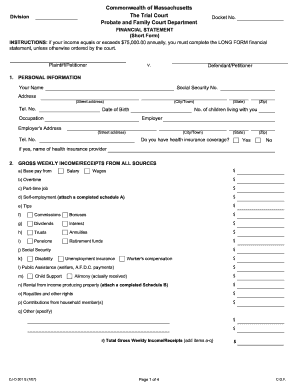
This guide provides clear, step-by-step instructions for completing the MA CJ-D 301 S financial statement online. Designed for individuals with varying levels of legal experience, this document aims to simplify the process and enhance your understanding of each section.
Follow the steps to easily complete the financial statement online.
- Press the ‘Get Form’ button to access the MA CJ-D 301 S financial statement, which you will open in the online editor.
- Begin filling out the personal information section, including your full name, Social Security number, address, telephone number, date of birth, occupation, number of children living with you, and employer information.
- Provide details on your gross weekly income. Report your earnings from various sources such as salary, wages, overtime, and any self-employment income. Make sure to include all relevant figures.
- List your itemized deductions from gross income. This includes federal and state taxes, F.I.C.A. and Medicare deductions, medical insurance, and union dues.
- Calculate your adjusted net weekly income by subtracting the total deductions from your gross income.
- Detail any other deductions from your salary or wages, such as contributions to a credit union, retirement plans, or other specified deductions.
- Determine your net weekly income by subtracting total deductions from your adjusted net weekly income.
- Report your gross yearly income from the prior year, ensuring to attach copies of W-2 and 1099 forms.
- Fill out your weekly expenses by listing all expenses, such as rent or mortgage, utilities, food, transportation, childcare, and any other relevant expenses.
- Provide information about your assets and liabilities. This includes the fair market value of real estate, vehicles, savings accounts, and any outstanding debts.
- Finally, review all provided information for accuracy, sign the certification, and ensure that all necessary attached documents are included.
- Once completed, save your changes, and proceed to download, print, or share the finished financial statement as needed.
Complete your MA CJ-D 301 S financial statement online today!
Get form
Related links form
You can look up probate records in Massachusetts online through the state's trial court website or by visiting the probate court in the relevant county. These records include filed documents related to estates, wills, and Letters of testamentary. For a smoother experience, especially with the MA CJ-D 301 S process, consider using tools from platforms like USLegalForms, which offer guidance on navigating probate records and obtaining necessary forms.