Get Instruction Sheet Form For Ca 114
How it works
-

Open form follow the instructions
-

Easily sign the form with your finger
-

Send filled & signed form or save
How to fill out the Instruction Sheet Form for CA 114 online
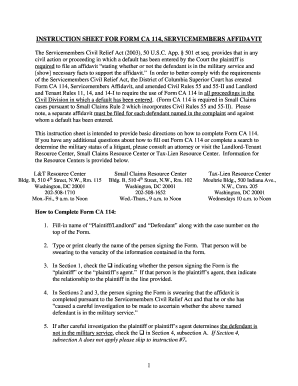
Filling out the Instruction Sheet Form for CA 114 is an essential step in complying with the Servicemembers Civil Relief Act requirements. This guide will provide detailed instructions to ensure that users can effectively complete this form online, regardless of their legal experience.
Follow the steps to successfully complete the Instruction Sheet Form for CA 114.
- Press the ‘Get Form’ button to acquire the Instruction Sheet Form for CA 114 and open it in your preferred editing tool.
- Populate the top section of the form with the names of the 'Plaintiff/Landlord' and 'Defendant,' along with the associated case number.
- Type or clearly print the name of the individual who is signing the form. This person is attesting to the accuracy of the information provided.
- In Section 1, check the box to indicate whether you are the 'plaintiff' or the 'plaintiff’s agent.' If acting as an agent, specify your relationship to the plaintiff.
- In Sections 2 and 3, affirm that the affidavit is completed according to the Servicemembers Civil Relief Act, and that a thorough investigation has been conducted to determine the defendant's military service status.
- If the investigation concludes the defendant is not in military service, select the checkbox in Section 4, subsection A. If this subsection does not apply, proceed directly to step 8.
- After confirming the defendant is not in military service in Section 4, subsection A, check one or more boxes that indicate your basis for this conclusion. Options include conducting a search through the Department of Defense Manpower Data Center or making inquiries from military branches.
- If you cannot ascertain the defendant’s military status, mark the checkbox in Section 4, subsection B and provide details of your efforts to contact and verify the defendant's status.
- Should it be determined that the defendant is indeed in military service, check the box in Section 4, subsection C, and include supporting facts that substantiate this determination.
- In Section 4, subsection D, you may indicate if the defendant has provided a signed written waiver of their rights under the Servicemembers Civil Relief Act.
- Finally, declare the truthfulness of the information in Section 5. This declaration must be made under penalty of perjury, which does not require notarization.
- Once you have filled out all necessary sections, save changes to the document. You can then choose to download, print, or share the completed form as needed.
Complete your Instruction Sheet Form for CA 114 online today!
Related links form
To fill out a military affidavit, begin by listing your personal details, such as your name and military service information. Clearly state the purpose of the affidavit, which may pertain to legal documents or rights. Ensure that you follow all relevant regulations and include a signature where required. The Instruction Sheet Form for CA 114 is a valuable resource that can assist you in accurately completing this type of affidavit.