Loading
Get Form 40 Ucpr 35.1
How it works
-

Open form follow the instructions
-

Easily sign the form with your finger
-

Send filled & signed form or save
How to fill out the Form 40 UCPR 35.1 online
This guide provides a clear and supportive walkthrough for filling out Form 40 UCPR 35.1 online. Whether you are familiar with legal documents or a first-time user, you will find the instructions easy to follow.
Follow the steps to complete the Form 40 UCPR 35.1 online effectively.
- Click ‘Get Form’ button to obtain the form and open it in the editor.
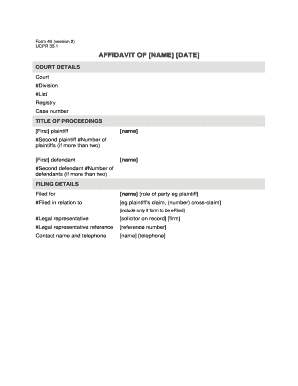
- Begin with the court details section. Enter the specific court name, division, and list associated with your case. Be sure to include the registry and the case number accurately.
- In the title of proceedings section, list the first and second plaintiffs by their names, and include the total number of plaintiffs if there are more than two.
- Next, list the first and second defendants in the same way, and indicate the total number of defendants if applicable.
- In the filing details section, fill in the name and role of the party associated with this document (e.g., plaintiff). Specify the nature of the filing, such as ‘plaintiff's claim’ or ‘cross-claim’.
- Provide details about the legal representative, including their name, reference number, and contact information.
- Proceed to the affidavit section. List your name, address, occupation, and the date. Then, affirm your role as the deponent.
- Clearly state the information you wish to include in the affidavit as numbered paragraphs. Ensure clarity and detail in your statements.
- Continue by indicating the witness details, including their name, address, and capacity (e.g., solicitor, barrister). Both the deponent and witness must sign each page of the affidavit.
- Once you complete all sections, save your changes. You may then download, print, or share the completed form as needed.
Start filling out your Form 40 UCPR 35.1 online today.
Related links form
Writing an affidavit example starts with providing a clear heading and stating the affiant's credentials. Follow this by listing facts in a logical order, as outlined in Form 40 UCPR 35.1. You can look for templates online to help structure your affidavit, which will provide a useful reference as you draft your own.