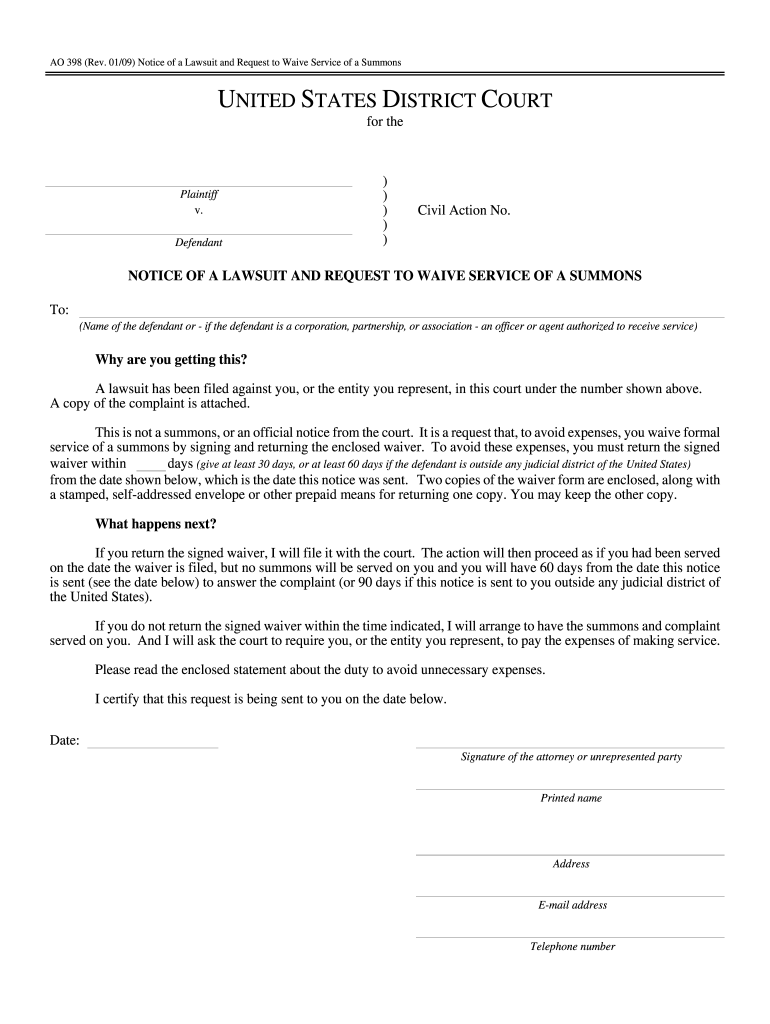
AO 398 Rev. 01/09 Notice of a Lawsuit and Request to Waive Service of a Summons UNITED STATES DISTRICT COURT for the District of Plaintiff v. Defendant Civil Action No. NOTICE OF A LAWSUIT AND REQUEST TO WAIVE SERVICE OF A SUMMONS To Name of the defendant or - if the defendant is a corporation partnership or association - an officer or agent authorized to receive service Why are you getting this A lawsuit has been filed against you or the entity you represent in this court under the number shown.
Loading

Open form follow the instructions

Easily sign the form with your finger

Send filled & signed form or save
How to fill out the AO 398 online
The AO 398 form is a notice of a lawsuit and a request to waive service of a summons. This guide provides a step-by-step approach to accurately complete the AO 398 online, ensuring a smooth process for users.
Follow the steps to complete the AO 398 online
- Click the ‘Get Form’ button to access the AO 398 form and open it in your preferred online editor.
- Identify the plaintiff and defendant sections. Enter the names of the individuals or entities involved in the lawsuit accurately.
- Fill in the civil action number in the designated field. This number is crucial for identifying the specific case.
- Complete the notice section by entering the name of the person or authorized agent to whom the notice is addressed.
- Review the instructions provided for the defendant. Ensure you mention the required timeline for returning the signed waiver, which ranges from 30 to 60 days.
- Include the date the notice is sent, as this is important for calculating deadlines.
- Complete the signature section with the name of the attorney or unrepresented party and their contact details, including address, email, and telephone number.
- After filling out all sections, review the form for accuracy and completeness.
- Save your changes, download, print, or share the form as needed.
Start filling out your AO 398 online today for a seamless process.
Experience a faster way to fill out and sign forms on the web. Access the most extensive library of templates available.
Related content
Jan 1, 2009 — Notice of a Lawsuit and Request to Waive Service of a Summons. Download...
The International Atomic Energy Agency published in 1987 an International. Code of...
4003.9666 - Capitais e Regiões Metropolitanas. 0800.886.9666 - Demais localidades. Page...
Get answers to your most pressing questions about US Legal Forms API.
What is the difference between waiving and accepting service?
Waiving service is a proactive step in which you choose to forego formal delivery of legal documents, whereas accepting service means you formally agree to receive those documents as delivered. Understanding these options is vital, especially when navigating AO 398, as it shapes how you will approach your legal situation. Each choice carries different implications for your rights and responsibilities.
What is the meaning of waiver of acceptance?
Waiver of acceptance refers to a situation where a party relinquishes their right to formally accept service of the lawsuit documents. Under AO 398, this can happen if you choose to bypass the formalities of service. This waiver can expedite proceedings, but it should be approached with caution, as it affects your legal rights.
What is the difference between waiving service and accepting service?
Waiving service means you agree to receive the lawsuit documents without formal delivery, while accepting service indicates a willingness to accept those documents as delivered. Both processes are outlined in the context of AO 398 and have implications for how you respond to the lawsuit. Understanding these two terms helps you navigate legal procedures more smoothly.
Should I waive service?
Waiving service can save time and reduce costs in legal proceedings, but it is a personal decision that depends on your circumstances. By waiving service, you acknowledge that you will respond to the legal action, which can streamline the process. Consider using resources like US Legal Forms to ensure you understand the implications of waiving service under AO 398.
What is an official notice of a lawsuit?
An official notice of a lawsuit is typically included in documents like a writ of summons or complaint, which alert the involved parties about legal proceedings. In relation to AO 398, this notice is essential as it provides information on the claims made and the required actions from the defendant. It is a legal requirement intended to ensure due process.
Is a writ of summons a pleading?
A writ of summons is not considered a pleading; it serves as a legal document that informs a defendant about a lawsuit. When discussing AO 398, it plays a crucial role in ensuring that defendants know they are being sued and can prepare their response accordingly. This document essentially sets the stage for the formal pleadings that will follow.
What does acceptance of service mean?
Acceptance of service refers to the formal agreement by a defendant to receive legal documents, such as a complaint, without the need for formal delivery. In the context of AO 398, this process streamlines the lawsuit initiation, making it easier for parties to move forward. It indicates that the defendant recognizes the legal action without contesting the method of delivery.
Is a court summons mandatory?
Yes, a court summons is mandatory. It serves as a formal notification that you are required to appear in court. Ignoring a summons can have serious implications for your case, including the possibility of a default judgment against you. It is essential to treat a summons with the seriousness it warrants, as outlined in the AO 398 guidelines.
How to file a motion in court without an attorney?
Filing a motion in court without an attorney is possible, but it requires attention to detail. Begin by researching the specific rules of the court regarding motions. Prepare your motion according to the guidelines, ensuring it adheres to the requirements laid out in the AO 398. You can also utilize online platforms like USLegalForms to find necessary templates.
Can you say no to a court summons?
You cannot simply say no to a court summons. A summons is a legal document that mandates your appearance in court. Failure to comply can result in serious legal consequences, including fines or default judgments. It is in your best interest to engage with the process outlined in the AO 398.
Use professional pre-built templates to fill in and sign documents online faster. Get access to thousands of forms.
If you believe that this page should be taken down, please follow our DMCA take down process here.