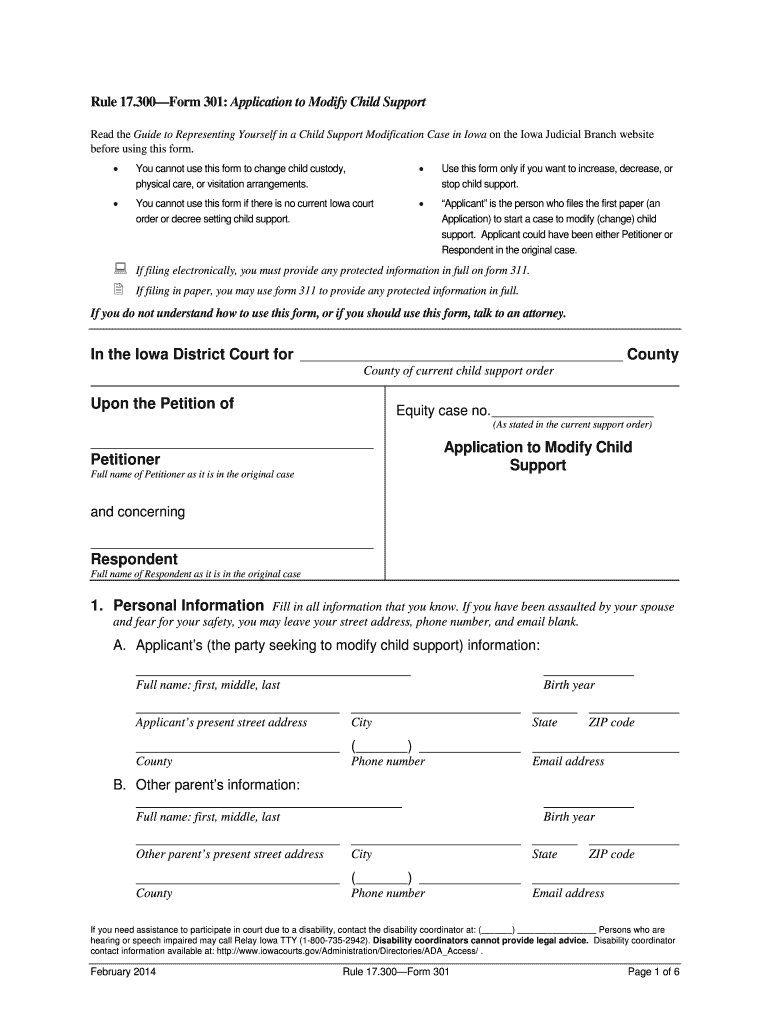
Fore using this form. You cannot use this form to change child custody, physical care, or visitation arrangements. Use this form only if you want to increase, decrease, or stop child support. You cannot use this form if there is no current Iowa court order or decree setting child support. Applicant is the person who files the first paper (an Application) to start a case to modify (change) child support. Applicant could have been either Petitioner or Respondent in the.
Loading

Open form follow the instructions

Easily sign the form with your finger

Send filled & signed form or save
How to fill out the IA Form 301 online
The IA Form 301 is used to request modifications to child support orders. This guide provides a comprehensive step-by-step approach to help you navigate the process of filling out this important document online.
Follow the steps to successfully complete your IA Form 301 online.
- Click the ‘Get Form’ button to obtain the IA Form 301 and open it in your preferred editor.
- Begin filling out Section 1 by providing your personal information as the applicant, including your full name, street address (you may leave it blank for safety reasons), phone number, and email address.
- In Section 1B, include the other parent’s information, such as their full name, address, contact information, and birth year.
- Complete Section 2 by entering details about the current child support order, including the date it was entered, the county and state, and the case number.
- In Section 3, indicate your request regarding child support. Check all that apply, such as raising, lowering, or ending the support payment.
- Fill out the necessary information in Section 4 regarding attorney assistance, if applicable.
- Carefully review all the information you have provided for accuracy.
- Once completed, save the changes to your form, and download, print, or share it as needed.
Start completing your IA Form 301 online today to modify your child support situation.
Experience a faster way to fill out and sign forms on the web. Access the most extensive library of templates available.
Related content
You cannot use this form to change child custody, physical care, or visitation...
Failure to receive the proper form does not relieve the taxpayer from the obligation of...
Jul 1, 2011 — this information will largely duplicate information collected on Form ADV...
Get answers to your most pressing questions about US Legal Forms API.
What is a CBP Form 301?
The CBP Form 301 is the official document used for securing a continuous customs bond, also known as the IA Form 301. This form provides U.S. Customs and Border Protection with the necessary information about the bond and the responsibilities of the bond obligor. By filing the CBP Form 301, importers can ensure continuous bond coverage for their import activities.
Which employers are required to complete OSHA Form 300 and 301?
Employers with 10 or more employees must maintain OSHA Form 300, while Form 301 specifically applies to employers in certain high-risk industries. Both forms help organizations track workplace injuries and illnesses. Using the IA Form 301 can assist businesses in complying with various regulatory requirements, including customs.
What is the difference between Form 300 and 301?
Form 300 is primarily used for reporting workplace injuries and illnesses, focusing on occupational safety, while the IA Form 301 is specific to customs bonding. The Form 301 ensures that importers adhere to customs regulations by providing a financial guarantee. Understanding these distinct forms can help organizations manage their compliance more effectively.
Who needs to fill out the U.S. Customs Declaration Form?
Anyone entering the United States with goods valued over a certain threshold must fill out the U.S. Customs Declaration Form. This includes tourists, business travelers, and even returning residents. Utilizing the IA Form 301 can help streamline the customs process for businesses that frequently import goods.
What is the purpose of Form 301?
The IA Form 301, also known as the Customs Bond, serves to secure payments for duties and taxes associated with imported goods. It provides the U.S. Customs and Border Protection (CBP) with a means to ensure compliance among businesses. By using this form, importers can maintain a continuous bond, making their import processes more efficient.
Who is required to have a customs bond?
Any business that participates in importing goods into the United States may need a customs bond. This requirement typically includes importers, brokers, and other entities involved in cross-border trade. To meet these obligations, they often use the IA Form 301 to establish and manage their continuous bond.
Who fills out Form 301?
The IA Form 301 is filled out by employees to indicate their tax withholding preferences. This form provides employers with the necessary information to determine your federal and state tax deductions. Understanding how to complete this form is crucial for maintaining personal financial health. If you need assistance or templates, platforms like uslegalforms make it easy to access the right forms for your needs.
How to fill out an employee's withholding certificate?
To fill out an employee's withholding certificate like the IA Form 301, begin by collecting essential details about the employee. Include personal information, filing status, and any relevant allowances or exemptions. This ensures the employer can withhold the correct amounts from paychecks. Employees should verify their entries to optimize their tax withholding and potentially maximize their refunds.
How to fill out Employee Withholding Certificate form?
Filling out the Employee Withholding Certificate, such as the IA Form 301, requires you to gather basic personal information first. Start by entering your name, address, and social security number. Next, indicate your filing status and the number of allowances you claim. Finally, ensure everything is accurate before submitting to your employer for proper withholding adjustments.
How to fill out an assessment form?
To fill out an assessment form, start by reading the instructions carefully, ensuring clarity on each section. Provide accurate information, including your details and any required documentation. Depending on the specific form type, you may need to include numerical data or descriptions. If you're not sure, platforms like uslegalforms can provide resources to guide you in completing any assessment form correctly.
Use professional pre-built templates to fill in and sign documents online faster. Get access to thousands of forms.
If you believe that this page should be taken down, please follow our DMCA take down process here.