Loading
Get Ga Divorce Final Decree (long Form) 1999-2026
How it works
-

Open form follow the instructions
-

Easily sign the form with your finger
-

Send filled & signed form or save
How to fill out the GA Divorce Final Decree (Long Form) online
Filling out the GA Divorce Final Decree (Long Form) online can seem daunting, but with clear guidance, you can navigate through the process easily. This guide provides step-by-step instructions to help you complete the form accurately and efficiently.
Follow the steps to complete the form effectively.
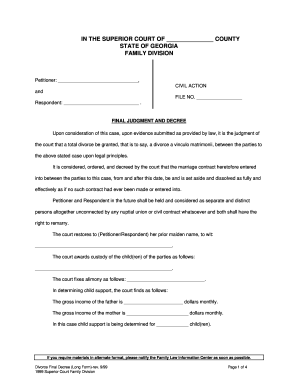
- Press the ‘Get Form’ button to obtain the GA Divorce Final Decree (Long Form) and open it for filling out.
- Begin by completing the header section, which includes your county, state, and the names of both parties involved — the Petitioner and the Respondent.
- In the Civil Action section, write the relevant file number provided by the court.
- Move to the Final Judgment and Decree area. Here, affirm the court's judgment granting divorce by reading through the provided text. This section is already filled in but may require verification of personal details.
- Indicate the name of the party whose previous surname is restored by filling in the blank where it specifies 'prior maiden name'.
- Complete the custody section, specifying how custody of the child or children is awarded.
- Enter alimony details in the designated blank, ensuring to clarify the amount awarded.
- Provide the gross monthly incomes of both parents in the respective fields, required for calculating child support obligations.
- Detail the total number of children for whom child support is being calculated.
- Refer to the table provided in the form to identify the applicable percentage of gross income based on the number of children, and perform the necessary calculations.
- Indicate any special circumstances that apply by marking the relevant options and providing details if necessary.
- Complete the final determination of child support by entering the monthly payment amount and the start date for payments.
- Ensure all sections are accurately filled out, and review the entire document for errors.
- Once completed, you can save your changes, download the document, print it for physical submission, or share it as needed.
Start completing your GA Divorce Final Decree (Long Form) online today.
Related links form
To determine if your divorce is final in Georgia, check for the issuance of your GA Divorce Final Decree (Long Form). This legally binding document outlines the terms of your divorce and indicates that the marriage has been officially terminated. If you have any doubts, you can always contact your attorney or the court to confirm your status.