Loading
Form preview
  • US Legal Forms
  • Other Templates
  • Legal Forms
  • Connecticut Legal Forms
  • Ct Seec Form 20 2012

Get Ct Seec Form 20 2012-2026

Er Is contributor a lobbyist, spouse, or dependent child of a lobbyist? Yes No Is this contribution associated with a fundraising event listed in Section L1? If yes, list Event # If contribution is in excess of $400 to a candidate for a chief executive officer of a municipality, does contributor or business he/she is associated with have a contract with said municipality valued at more than $5,000? Yes No Yes No Is contributor a principal of a state contractor or prospective state contracto.

How it works

  1. Open form

    Open form follow the instructions

  2. Easily sign form

    Easily sign the form with your finger

  3. Share form

    Send filled & signed form or save

How to fill out the CT SEEC Form 20 online

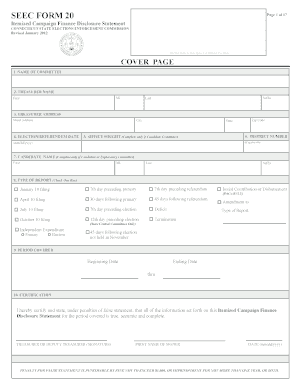
Filling out the CT SEEC Form 20 is crucial for disclosing campaign finances effectively. This guide provides step-by-step instructions to navigate the form online, ensuring accurate and complete information submission.

Follow the steps to complete your CT SEEC Form 20 online.

  1. Use the ‘Get Form’ button to access the CT SEEC Form 20 in your preferred editor.
  2. Begin with the cover page and enter the committee name in the designated field.
  3. Provide the treasurer's name, including the first name, middle initial, last name, and suffix, if applicable.
  4. Fill in the treasurer's address, including street address, city, state, and zip code.
  5. Indicate the election or referendum date in the specified format (mm/dd/yyyy).
  6. If applicable, enter the district number and the office sought.
  7. If you're filling out for a candidate committee, include the candidate’s name, first, middle initial, last, and suffix.
  8. Select the type of report by checking one of the boxes indicating the report type you are submitting.
  9. Complete the reporting period, specifying the beginning and ending dates.
  10. Review the certification statement and have the treasurer or deputy treasurer sign, print their name, and date the entry.
  11. Continue to fill out the summary page totals by entering financial figures as requested in the sections for contributions and expenses.
  12. Fill in all necessary sections covering monetary receipts, expenditures, fundraising events, and any non-monetary receipts.
  13. At the conclusion of completing the form, save any changes made to your document.
  14. Consider downloading or printing a copy for your records before performing any final actions.
  15. Finally, share the completed form as needed according to your committee's requirements.

Complete your CT SEEC Form 20 online today to ensure compliance and transparency in campaign finance.

Get form

Experience a faster way to fill out and sign forms on the web. Access the most extensive library of templates available.
Get form

Related content

SEEC FORM 20
SEEC FORM 20. Itemized Campaign Finance Disclosure Statement. CONNECTICUT STATE ELECTIONS...
Learn more
Connecticut Ranks Among the Best in Campaign...
Jul 3, 2022 — The form can be found here. Page 4. NEWSLETTER. STATE ELECTIONS...
Learn more
ccecco
Remove all power ac and dc, when removing or assem· bling major components, working in...
Learn more

Related links form

CA MAD-FCS-007 - Madera County 2020 CA CR-017 - County Of El Dorado 2025 TX I-27 Feasibility Study Team Public Meeting Comment Form 2025 VA 10-10D 2025

Get This Form Now!

Use professional pre-built templates to fill in and sign documents online faster. Get access to thousands of forms.
Get form
If you believe that this page should be taken down, please follow our DMCA take down processhere.
Get CT SEEC Form 20
Get form
  • Adoption
  • Bankruptcy
  • Contractors
  • Divorce
  • Home Sales
  • Employment
  • Identity Theft
  • Incorporation
  • Landlord Tenant
  • Living Trust
  • Name Change
  • Personal Planning
  • Small Business
  • Wills & Estates
  • Packages A-Z
  • Affidavits
  • Bankruptcy
  • Bill of Sale
  • Corporate - LLC
  • Divorce
  • Employment
  • Identity Theft
  • Internet Technology
  • Landlord Tenant
  • Living Wills
  • Name Change
  • Power of Attorney
  • Real Estate
  • Small Estates
  • Wills
  • All Forms
  • Forms A-Z
  • Other Templates
  • Legal Hub
  • About Us
  • Help Portal
  • Legal Resources
  • Blog
  • Affiliates
  • Contact Us
  • Delete My Account
  • Site Map
  • Industries
  • Forms in Spanish
  • Localized Forms
  • State-specific Forms
  • Forms Kit
  • Real Estate Handbook
  • All Guides
  • Notarize
  • Incorporation services
  • For Consumers
  • For Small Business
  • For Attorneys
  • USLegal
  • FormsPass
  • pdfFiller
  • signNow
  • altaFlow
  • DocHub
  • Instapage
Form Packages
  • Adoption
  • Bankruptcy
  • Contractors
  • Divorce
  • Home Sales
  • Employment
  • Identity Theft
  • Incorporation
  • Landlord Tenant
  • Living Trust
  • Name Change
  • Personal Planning
  • Small Business
  • Wills & Estates
  • Packages A-Z
Form Categories
  • Affidavits
  • Bankruptcy
  • Bill of Sale
  • Corporate - LLC
  • Divorce
  • Employment
  • Identity Theft
  • Internet Technology
  • Landlord Tenant
  • Living Wills
  • Name Change
  • Power of Attorney
  • Real Estate
  • Small Estates
  • Wills
  • All Forms
  • Forms A-Z
  • Other Templates
Customer Service
  • Legal Hub
  • About Us
  • Help Portal
  • Legal Resources
  • Blog
  • Affiliates
  • Contact Us
  • Delete My Account
  • Site Map
  • Industries
  • Forms in Spanish
  • Localized Forms
  • State-specific Forms
  • Forms Kit
Legal Guides
  • Real Estate Handbook
  • All Guides
Prepared for you
  • Notarize
  • Incorporation services
Our Customers
  • For Consumers
  • For Small Business
  • For Attorneys
Our Sites
  • USLegal
  • FormsPass
  • pdfFiller
  • signNow
  • altaFlow
  • DocHub
  • Instapage
Social Media
Call us now toll free:
+1 833 426 79 33
As seen in:
© Copyright 1999-2026 airSlate Legal Forms, Inc. 17 Station Street, Ste. 203, Brookline, MA 02445
  • Your Privacy Choices
  • Terms of Service
  • Privacy Notice
  • Content Takedown Policy
  • Bug Bounty Program