Loading
Form preview
  • US Legal Forms
  • Other Templates
  • Legal Forms
  • Connecticut Legal Forms
  • Ct Pc-246 2013

Get Ct Pc-246 2013-2026

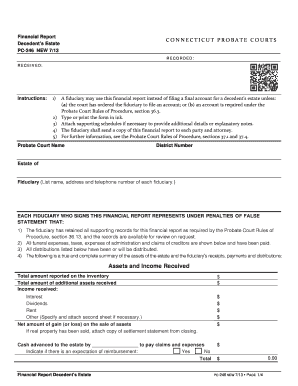
Attach second sheet if necessary. Distributions Already Made as of the Date of this Financial Report Name of Distributee If decedent had a will, specify section providing for distribution Assets Distributed Fair Market Value $ $ $ Subtotal $ $ $ $ Subtotal $ $ $ $ Subtotal $ Total $ Financial Report Decedent s Estate PC-246 NEW 7/13 PAGE / Financial Report Decedent s Estate PC-246 NEW 7/13 C O N N E C T I C U T P R O B A T E C O U R.

How it works

  1. Open form

    Open form follow the instructions

  2. Easily sign form

    Easily sign the form with your finger

  3. Share form

    Send filled & signed form or save

How to fill out the CT PC-246 online

Filling out the CT PC-246 financial report for a decedent's estate can be a straightforward process when you follow the appropriate steps. This guide provides detailed instructions on how to complete the form effectively, ensuring you meet all necessary requirements.

Follow the steps to accurately complete the CT PC-246 online.

  1. Click the ‘Get Form’ button to access the CT PC-246 and open it in your preferred online editor.
  2. Begin by entering the name of the probate court and the district number at the top of the form. Provide the estate of the decedent's name and address details.
  3. List the name, address, and telephone number of each fiduciary in the designated section. Ensure all fiduciaries sign the report.
  4. In the 'Assets and Income Received' section, input the total amount reported on the inventory and any additional assets received. Include income details such as interest, dividends, rent, and any other relevant income.
  5. Detail the funeral and administration expenses. Itemize all fiduciary fees, attorney’s fees, accounting expenses, and other expenses, specifying any required information.
  6. Complete the 'Distributions' section. Provide details of distributions already made and indicate the fair market value of assets distributed. Include any proposed distributions as necessary.
  7. Request approval of the financial report and any proposed distributions. Indicate if a certificate is needed for recording the distribution of real property.
  8. Make sure all fiduciaries sign and date the report. Include a certification stating that a copy of the report was sent to all relevant parties.
  9. Review the completed form for accuracy. Save your changes, and if needed, download, print, or share the form to fulfill any submission requirements.

Complete your documents online with confidence by following this comprehensive guide.

Get form

Experience a faster way to fill out and sign forms on the web. Access the most extensive library of templates available.
Get form

Related content

PC-246.pdf
Instructions: 1) A fiduciary may use this financial report instead of filing a f inal a...
Learn more
Course Description
CAD 246 — Manufacturing Processes and Precision Measuring (2-3 cr). This course is a...
Learn more
Instalação Operação Manutenção
Software Trane Drive Utility - possui fácil acesso ao PC via porta USB para fácil...
Learn more

Related links form

CA NC-325 2023 CA JV-255 2025 Fidelity Investments Return Of Excess Contributions (ROE) 2022 NC CACFP Aplicacion De Elegibilidad De Ingresos Para Adultos 2024

Questions & Answers

Get answers to your most pressing questions about US Legal Forms API.

Contact support

In Connecticut, assets that are solely owned by the deceased and do not have a designated beneficiary are generally subject to probate. This can include bank accounts, real estate, and personal possessions. By understanding how the CT PC-246 form interacts with these assets, you can ensure a smoother transition and resolution of the estate.

The threshold for initiating probate in Connecticut is $40,000 for most estates. If the estate value exceeds this amount, the probate process becomes necessary. Knowing the details of the CT PC-246 can help you navigate what needs to be done when your estate meets or exceeds this threshold.

The PC 264 form is used in Connecticut for the purpose of notifying interested parties about the probate proceedings. This form is essential for ensuring transparency and fulfilling legal obligations during the probate process. By understanding how to properly utilize the CT PC-246 documentation, you can ensure that the PC 264 is completed accurately.

An estate in Connecticut must generally be worth over $40,000 to be subject to probate. If the value is less than this, simpler alternatives may be available. The use of the CT PC-246 form can help demonstrate the estate's value and ensure compliance with state laws.

Not every will in Connecticut must go through probate. If the estate is below the minimum threshold for probate, the process can be avoided entirely. Familiarity with the CT PC-246 form can assist individuals in determining whether probate is necessary and what steps to take next.

Closing an estate in Connecticut involves gathering all assets, paying debts, and distributing what remains to beneficiaries. Executors must file a final accounting with the probate court and provide a clear overview of all transactions. Utilizing resources like the CT PC-246 form simplifies this process, ensuring all legal requirements are met effectively.

Creditors typically have a period of six months to file claims against a deceased person's estate in Connecticut. During this time, the estate executor must notify all known creditors about the probate process. Using the CT PC-246 form can aid in managing these notifications efficiently, streamlining communication with creditors.

In Connecticut, the law requires an estate to have a minimum value of $40,000 to go through probate. If an estate's value falls below this threshold, it may be handled through a simplified process. Understanding the CT PC-246 form can help you navigate this process more smoothly, ensuring that you comply with state regulations.

A letter of testamentary in Connecticut serves as legal authorization for an executor to act on behalf of an estate. This document confirms the executor's status and gives them the authority to manage the estate's assets and liabilities. Once you have this letter, you can perform necessary tasks like paying debts and distributing property. Utilizing CT PC-246 aids in obtaining this important document more effectively.

The time it takes to receive letters of testamentary in Connecticut can vary. Typically, it may take a few weeks from the date you submit the application to the probate court. However, delays can occur if additional information is needed, so it is advantageous to be thorough in your submission. Using CT PC-246 can help keep this process on track, making it easier for you.

Get This Form Now!

Use professional pre-built templates to fill in and sign documents online faster. Get access to thousands of forms.
Get form
If you believe that this page should be taken down, please follow our DMCA take down processhere.
Get CT PC-246
Get form
  • Adoption
  • Bankruptcy
  • Contractors
  • Divorce
  • Home Sales
  • Employment
  • Identity Theft
  • Incorporation
  • Landlord Tenant
  • Living Trust
  • Name Change
  • Personal Planning
  • Small Business
  • Wills & Estates
  • Packages A-Z
  • Affidavits
  • Bankruptcy
  • Bill of Sale
  • Corporate - LLC
  • Divorce
  • Employment
  • Identity Theft
  • Internet Technology
  • Landlord Tenant
  • Living Wills
  • Name Change
  • Power of Attorney
  • Real Estate
  • Small Estates
  • Wills
  • All Forms
  • Forms A-Z
  • Other Templates
  • Legal Hub
  • About Us
  • Help Portal
  • Legal Resources
  • Blog
  • Affiliates
  • Contact Us
  • Delete My Account
  • Site Map
  • Industries
  • Forms in Spanish
  • Localized Forms
  • State-specific Forms
  • Forms Kit
  • Real Estate Handbook
  • All Guides
  • Notarize
  • Incorporation services
  • For Consumers
  • For Small Business
  • For Attorneys
  • USLegal
  • FormsPass
  • pdfFiller
  • signNow
  • altaFlow
  • DocHub
  • Instapage
Form Packages
  • Adoption
  • Bankruptcy
  • Contractors
  • Divorce
  • Home Sales
  • Employment
  • Identity Theft
  • Incorporation
  • Landlord Tenant
  • Living Trust
  • Name Change
  • Personal Planning
  • Small Business
  • Wills & Estates
  • Packages A-Z
Form Categories
  • Affidavits
  • Bankruptcy
  • Bill of Sale
  • Corporate - LLC
  • Divorce
  • Employment
  • Identity Theft
  • Internet Technology
  • Landlord Tenant
  • Living Wills
  • Name Change
  • Power of Attorney
  • Real Estate
  • Small Estates
  • Wills
  • All Forms
  • Forms A-Z
  • Other Templates
Customer Service
  • Legal Hub
  • About Us
  • Help Portal
  • Legal Resources
  • Blog
  • Affiliates
  • Contact Us
  • Delete My Account
  • Site Map
  • Industries
  • Forms in Spanish
  • Localized Forms
  • State-specific Forms
  • Forms Kit
Legal Guides
  • Real Estate Handbook
  • All Guides
Prepared for you
  • Notarize
  • Incorporation services
Our Customers
  • For Consumers
  • For Small Business
  • For Attorneys
Our Sites
  • USLegal
  • FormsPass
  • pdfFiller
  • signNow
  • altaFlow
  • DocHub
  • Instapage
Social Media
Call us now toll free:
+1 833 426 79 33
As seen in:
© Copyright 1999-2026 airSlate Legal Forms, Inc. 17 Station Street, Suite 303, Brookline, MA 02445
  • Your Privacy Choices
  • Terms of Service
  • Privacy Notice
  • Content Takedown Policy
  • Bug Bounty Program