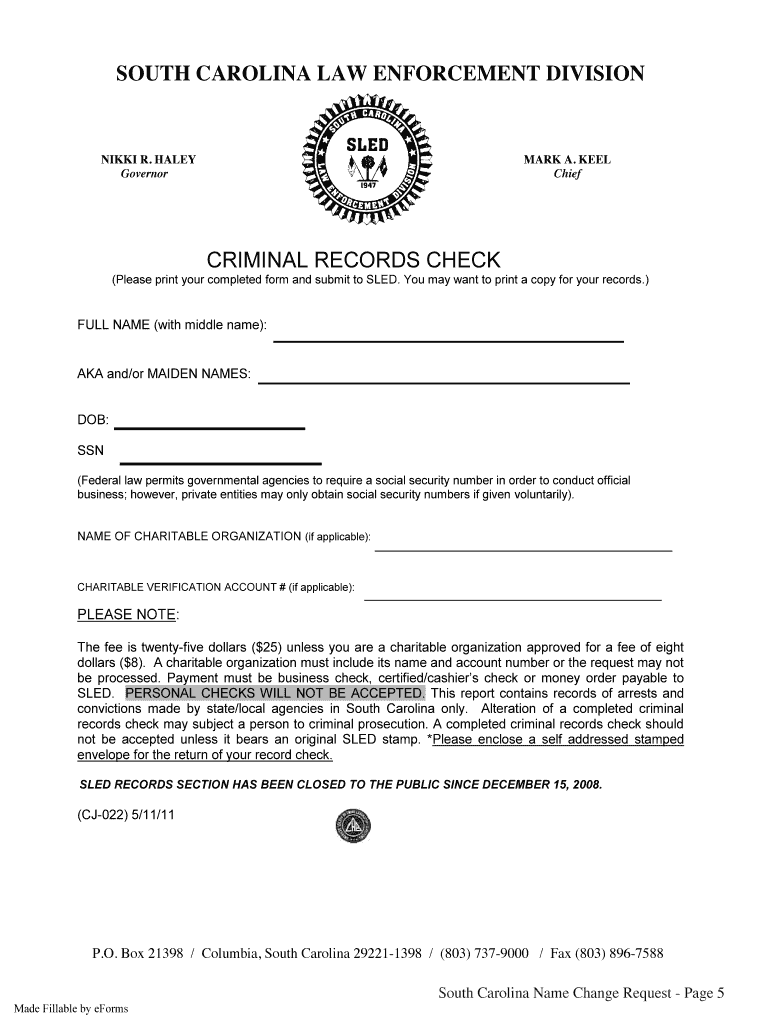
Ds.) FULL NAME (with middle name): AKA and/or MAIDEN NAMES: DOB: SSN (Federal law permits governmental agencies to require a social security number in order to conduct official business; however, private entities may only obtain social security numbers if given voluntarily). NAME OF CHARITABLE ORGANIZATION (if applicable): CHARITABLE VERIFICATION ACCOUNT # (if applicable): PLEASE NOTE: The fee is twenty-five dollars ($25) unless you are a charitable organization approved for a fee of eight do.
Loading

Open form follow the instructions

Easily sign the form with your finger

Send filled & signed form or save
How to fill out the SC CJ-022 online
The SC CJ-022 form is essential for individuals and organizations seeking a criminal records check in South Carolina. This guide will provide you with straightforward steps to successfully complete the form online, ensuring you provide all necessary information accurately.
Follow the steps to fill out the SC CJ-022 form with ease.
- Click ‘Get Form’ button to obtain the form and open it for editing.
- Begin by providing your full name, including your middle name. Ensure you spell your name as it appears on official documents.
- If applicable, list any known alias names or maiden names that you have used previously.
- Input your date of birth (DOB) in the required format, ensuring accuracy as this is critical for identification.
- Enter your Social Security Number (SSN). Federal law permits governmental agencies to require your SSN. Ensure you are comfortable with this before submission.
- If you represent a charitable organization, provide the name of the organization in the designated field.
- Include the charitable verification account number if applicable to ensure your request is processed correctly.
- Be aware that there is a processing fee of twenty-five dollars ($25), or eight dollars ($8) if you are a qualifying charitable organization. Prepare the payment in the form of a business check, certified/cashier’s check, or money order payable to SLED, as personal checks will not be accepted.
- Ensure to enclose a self-addressed stamped envelope for the return of your completed record check.
- Review your form for completeness and accuracy before submitting it. Once satisfied, proceed to save your changes, and you may choose to download, print, or share your completed form.
Start completing your SC CJ-022 form online today to ensure a smooth process for your criminal records check.
Experience a faster way to fill out and sign forms on the web. Access the most extensive library of templates available.
Related content
*SLED RECORDS SECTION HAS BEEN CLOSED TO THE PUBLIC SINCE DECEMBER 15, 2008. (CJ-022)...
Sep 9, 2025 — As a student at SC State, you are responsible for adhering to academic...
Dec 17, 2025 — Chemmy Jones by PharmaServ, a non-irradiated medical cannabis flower with...
Get answers to your most pressing questions about US Legal Forms API.
How to get a sled report in SC?
To obtain a SLED report in South Carolina, visit the SLED website and follow their guidelines on requesting background checks. It’s important to reference SC CJ-022 to understand the required documentation and fees. You may also want to explore uslegalforms, where you can find templates and support to simplify your request process. Taking these steps will help you acquire your report quickly and efficiently.
What is the best way to check your criminal record?
You can check your criminal record through the South Carolina Department of Corrections website or by using third-party services that specialize in records. Using SC CJ-022 as a reference can help streamline your search. Additionally, consider using uslegalforms to request official records or obtain legal advice on how to interpret your findings. This approach ensures accuracy and keeps your process efficient.
What is the phone number for SC CWP?
To reach SC CWP, you can call their main office at the number listed on the official South Carolina government website. It's important to have the SC CJ-022 information handy when you call, so you can get the assistance you need. Customer service representatives are available to answer your questions during normal business hours. They can guide you on the services offered and how to proceed with your inquiries.
What is the deadline to file SC state taxes?
The deadline to file SC state taxes typically falls on April 15th, mirroring the federal tax deadline. If this date falls on a weekend or holiday, the deadline moves to the next business day. It's essential to be aware of these dates to manage your obligations effectively, especially regarding SC CJ-022 compliance.
Does South Carolina have an automatic extension?
South Carolina does not provide an automatic extension for filing state taxes. Taxpayers must actively apply for an extension if they need additional time. To be efficient in handling your SC CJ-022 matters, consider using uslegalforms to simplify the filing process.
How do I file an extension for SC state taxes?
Filing an extension for SC state taxes involves submitting Form SC 1040-ES. You can easily file this form online or by mail before the tax deadline. Using platforms like uslegalforms can assist you in ensuring that your extension request complies with all stipulations associated with SC CJ-022.
How to get an extension for filing?
To get an extension for filing your taxes, you must file an application with the IRS or your state tax authority before the due date. You can often do this online, and it usually requires completing a specific form that indicates your request for an extension. Ensuring you follow the correct procedures is vital, especially when dealing with SC CJ-022 filings.
How to file SC state extension?
To file an SC state extension, you need to complete Form SC 1040-ES and submit it by the original tax due date. This gives you additional time to prepare your tax return without incurring late penalties. Using uslegalforms can streamline the process and ensure that you meet all necessary requirements related to SC CJ-022.
What's the longest time a background check can take?
In some cases, a background check can take as long as 30 days or more, especially if the information is complicated or requires extensive verification. Issues such as outdated records or discrepancies can prolong the process. To avoid delays, using SC CJ-022 will guide you through obtaining thorough checks efficiently, so you stay ahead of potential complications.
How long do background checks take in South Carolina?
Typically, background checks in South Carolina can take anywhere from one to three weeks. However, expedited services may be available that can reduce this time significantly. By opting for SC CJ-022, you can access faster and more reliable service that helps you obtain your background check efficiently and with confidence.
Use professional pre-built templates to fill in and sign documents online faster. Get access to thousands of forms.
If you believe that this page should be taken down, please follow our DMCA take down process here.
This form is available in several versions. Select the version you need from the drop-down list below.