Loading
Get Me Cn-2 2012-2026
How it works
-

Open form follow the instructions
-

Easily sign the form with your finger
-

Send filled & signed form or save
How to fill out the ME CN-2 online
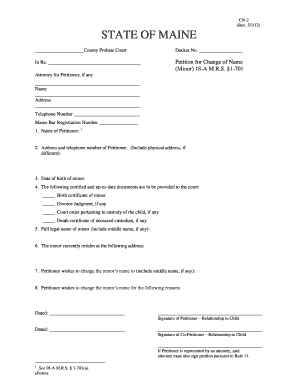
The ME CN-2 form is essential for petitioning a change of name for a minor in the state of Maine. This guide provides clear, step-by-step instructions to help you complete the form accurately and efficiently online.
Follow the steps to fill out the ME CN-2 form online:
- Click the ‘Get Form’ button to access the ME CN-2 form and open it in the editor.
- Enter the docket number in the specified field. This number is assigned to your case and helps in tracking your petition.
- Fill in the name of the petitioner in the designated section, ensuring accurate spelling.
- Provide your address and telephone number. Include the physical address if it differs from your mailing address.
- Enter the date of birth of the minor to identify the individual whose name is being changed.
- Indicate the necessary certified documents that will accompany your petition, such as the minor's birth certificate, any divorce judgment, custody orders, or a death certificate of a deceased custodian.
- Complete the full legal name of the minor, making sure to include any middle names.
- Input the current residence address of the minor to establish their primary location.
- Specify the new name the petitioner wishes to change the minor's name to, including any middle names.
- Elaborate on the reasons for the name change in the section provided, ensuring clarity in your explanation.
- Sign the petition, noting your relationship to the child, and date your signature. If applicable, have a co-petitioner also sign and provide their relationship to the child.
- If you are represented by an attorney, ensure they also sign the petition as required by Rule 11.
- Once all sections are filled out, save the changes, and prepare the document for download, printing, or sharing as needed.
Start filling out your ME CN-2 form online today to ensure a smooth petition process.
To create a CN in Active Directory, you can use tools like the Active Directory Users and Computers interface. Start by navigating to the appropriate organizational unit, then right-click to create a new CN entry. For a smoother experience, consider the guidance provided by the US Legal ME CN-2 feature, which simplifies the complexities around directory management.