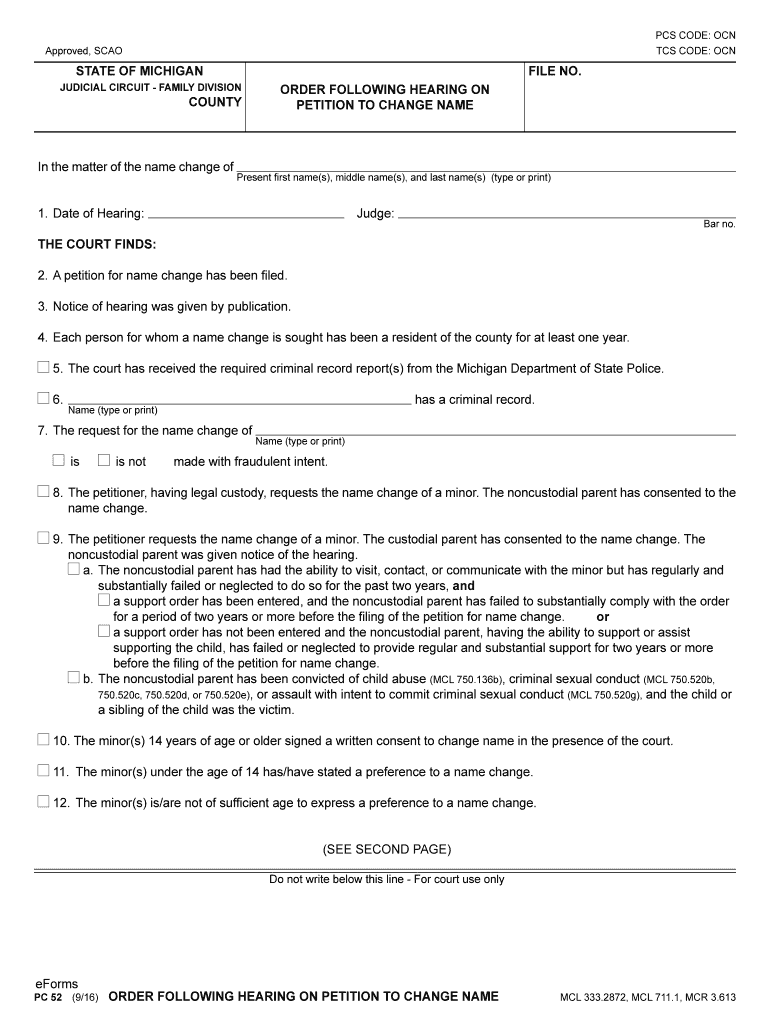
NGE NAME Present first name(s), middle name(s), and last name(s) (type or print) 1. Date of Hearing: Judge: Bar no. THE COURT FINDS: 2. A petition for name change has been filed. 3. Notice of hearing was given by publication. 4. Each person for whom a name change is sought has been a resident of the county for at least one year. 5. The court has received the required criminal record report(s) from the Michigan Department of State Police. 6. has a criminal record. Name (type or print).
Loading

Open form follow the instructions

Easily sign the form with your finger

Send filled & signed form or save
How to fill out the MI PC 52 online
The MI PC 52 form is used for filing a petition to change a person's name in the State of Michigan. This guide will lead you through the process of filling out the form online with clear instructions for each section, ensuring your application is completed correctly.
Follow the steps to complete the MI PC 52 form online.
- Click 'Get Form' button to obtain the form and open it in the online editor.
- Enter the date of the hearing and the name of the judge in the respective fields. These details are essential for the proper documentation of your case.
- In the section labeled 'Present first name(s), middle name(s), and last name(s),' clearly type or print the current legal names of all individuals whose names are being changed.
- Specify whether the individual seeking the name change has a criminal record by filling in the required information regarding any convictions.
- Indicate if the name change request is made with fraudulent intent. Make sure to provide accurate information to avoid any issues with your application.
- If applicable, confirm whether you are requesting the name change for a minor and ensure that you have the consent of the noncustodial parent.
- Complete the section regarding minors by stating their ages and obtaining necessary consents. Note if the minors have expressed a preference for their name change.
- On the second page, clearly input the new names for each person involved, along with their dates of birth to finalize the requested changes.
- If you want to request a new birth certificate upon the name change approval, complete the required fields for the State Registrar.
- Review all filled-out information for accuracy, save your changes, and choose the option to download, print, or share the completed form.
Complete your MI PC 52 form online today to begin the name change process.
Experience a faster way to fill out and sign forms on the web. Access the most extensive library of templates available.
Related content
The petition requests the name change of minor(s). One or more of the following has...
A certified copy of the ORDER FOLLOWING HEARING ON PETITION TO CHANGE NAME PC 52. · Your...
This way, all of the connected devices can communicate digitally with one another via the...
Get answers to your most pressing questions about US Legal Forms API.
How do I legally change my name in Michigan?
To legally change your name in Michigan, start by filling out a legal name change petition. Once submitted to the appropriate court, you need to attend a hearing where a judge will approve your request based on MI PC 52. Following the approval, you will receive documentation to support your new name, which will help in updating IDs and records.
What is the easiest way to legally change your name?
The simplest method to change your name legally involves filling out the required forms and submitting them to a court. Many people find using resources like US Legal Forms helpful, as they provide templates that align with MI PC 52. By ensuring you have the correct documentation and following the steps carefully, you can streamline the process significantly.
What proof do I need to change my name?
To change your name legally, you typically need to provide proof of identification and residency. Documents such as a birth certificate, driver's license, or state ID can serve this purpose. Additionally, you may need to show any court orders or marriage certificates if they relate to your name change. This is all part of the process under MI PC 52.
How to view Xiaomi files on PC?
To view Xiaomi files on your PC, connect your device using a USB cable and select the file transfer mode. Alternatively, you can use MI PC 52 to manage and access files easily. This way, you can navigate through your photos, videos, and documents without hassle. Ensure your computer recognizes the connected device for seamless file viewing.
What is the Xiaomi PC Suite?
The Xiaomi PC Suite, also known as MI PC 52, is software that allows you to manage your Xiaomi devices from a computer. With this tool, you can transfer files, back up data, and keep your software updated. It simplifies the process of managing and synchronizing your mobile content, enhancing the overall user experience. This makes it an essential tool for Xiaomi users.
How to get MIUI version?
To check your MIUI version, go to the 'Settings' on your Xiaomi device and scroll down to 'About phone.' Here, you will see the MIUI version prominently displayed. This information can be helpful when troubleshooting or updating your system through MI PC 52. Keeping your MIUI updated ensures optimal performance and new features.
Is there a PC suite for Xiaomi?
Yes, Xiaomi provides a dedicated PC suite known as MI PC 52. This suite helps manage your Xiaomi devices efficiently, offering functions such as file transfer, backups, and system updates. It provides a user-friendly interface, making it easy for you to keep your device in sync with your PC. You can download it directly from the official Xiaomi website.
How to connect Xiaomi phone to PC suite?
Connecting your Xiaomi phone to a PC suite involves using a USB cable or wireless connection. Launch the PC suite software, like MI PC 52, and follow the prompts to synchronize your phone. Once connected, you can easily access your phone's files and perform various management tasks. This integration streamlines your user experience significantly.
Can I connect Xiaomi to PC?
Yes, you can connect your Xiaomi device to your PC. Use a USB cable to establish a connection, which allows for file transfers and device management. Ensure you select the appropriate connection mode on your Xiaomi device, usually found in the notification settings. This integration effectively enhances your productivity with MI PC 52.
How do I download Mi Home on PC?
To download Mi Home on your PC, visit the official website or trusted app stores. Look for the MI PC 52 installation file suitable for your operating system. Once downloaded, follow the on-screen instructions to complete the installation. After installation, you can easily manage your Xiaomi devices from your computer.
Use professional pre-built templates to fill in and sign documents online faster. Get access to thousands of forms.
If you believe that this page should be taken down, please follow our DMCA take down process here.