Loading
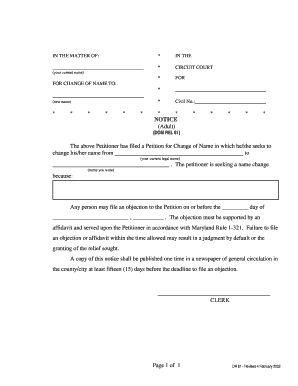
Get Md Cc-dr-061 (formerly Dr 61) 2002
How it works
-

Open form follow the instructions
-

Easily sign the form with your finger
-

Send filled & signed form or save
How to fill out the MD CC-DR-061 (Formerly DR 61) online
This guide provides a clear and supportive overview of how to complete the MD CC-DR-061 form for a name change online. Users with varying levels of experience will find step-by-step instructions to successfully navigate the form's fields.
Follow the steps to fill out the MD CC-DR-061 form online.
- Press the ‘Get Form’ button to access the form and open it in the online editor.
- In the first section, provide your current legal name as the petitioner. Ensure accuracy to avoid delays.
- Next, input the name you wish to change to in the designated field. Double-check the spelling.
- In the subsequent section, explain the reason for your name change. Be concise but clear in your response.
- Fill in the civil number if applicable; otherwise, leave this section blank.
- Look for the notice section, which informs others about your name change request. Review this section closely.
- After completing the form, save your changes. You can choose to download, print, or share the form as needed.
Complete your MD CC-DR-061 form online today to begin your name change process.
Get form
Experience a faster way to fill out and sign forms on the web. Access the most extensive library of templates available.
Yes, you can file for divorce online in Maryland through the Maryland Judiciary’s e-filing system. This convenient option simplifies the process, allowing you to submit necessary documents electronically. MD CC-DR-061 (Formerly DR 61) can guide you in completing your paperwork correctly. If you need support during the process, consider visiting uslegalforms for additional resources.
Get This Form Now!
Use professional pre-built templates to fill in and sign documents online faster. Get access to thousands of forms.