Loading
Get Az Cvnc16f 2017-2026
How it works
-

Open form follow the instructions
-

Easily sign the form with your finger
-

Send filled & signed form or save
How to fill out the AZ CVNC16F online
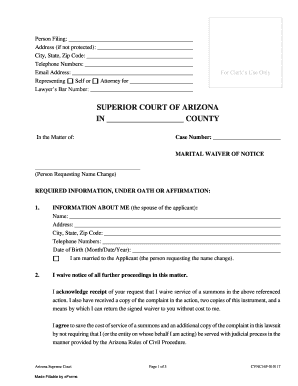
The AZ CVNC16F form is a crucial document in the process of waiving notice for a name change in Arizona. This guide will provide step-by-step instructions for completing the form online, ensuring that users can navigate it easily and effectively.
Follow the steps to complete your AZ CVNC16F form online.
- Click the ‘Get Form’ button to access the AZ CVNC16F document.
- Enter your personal information in the designated fields. This includes your name, address, city, state, zip code, telephone numbers, and email address.
- Indicate your representation status by selecting either ‘Self’ or ‘Attorney for’ and fill in the lawyer’s bar number if applicable.
- Next, provide information about the case, including the case number and the title ‘Marital waiver of notice’.
- Under the section labeled ‘Information about me’, input the required details of the spouse, including their name, address, contact information, and date of birth.
- Confirm that you are married to the applicant by checking the appropriate box.
- Read the acknowledgment statement carefully and confirm your understanding by signing and dating the document.
- Complete the notary section if required, ensuring that all signatures and dates are correctly filled out.
- Review the completed form for accuracy, then save your changes. You can download, print, or share the form as needed.
Complete your AZ CVNC16F form online today for a seamless filing experience.
An Arizona resale certificate remains valid until it is revoked or until the holder ceases operations. Typically, businesses should ensure they remain compliant with local tax regulations to avoid issues. It's always best practice to stay updated on any policy changes regarding resale certificates. For comprehensive information, visit AZ CVNC16F.