Loading
Form preview
  • US Legal Forms
  • Other Templates
  • Legal Forms
  • West Virginia Legal Forms
  • Wv Wv-2848 2015

Get Wv Wv-2848 2015-2026

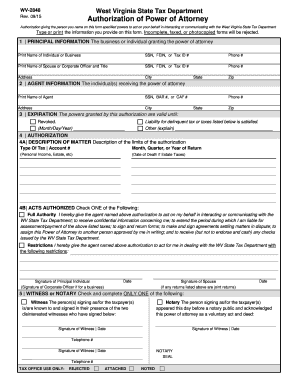
Your behalf in interacting or communicating with the West Virginia State Tax Department Type or print the information you provide on this form. Incomplete, faxed, or photocopied forms will be rejected. 1 PRINCIPAL INFORMATION The business or individual granting the power of attorney Print Name of Individual or Business SSN, FEIN, or Tax ID # Phone # Print Name of Spouse or Corporate Officer and Title SSN, FEIN, or Tax ID # Phone # Address City State Zip 2 AGENT INFORMATION The in.

How it works

  1. Open form

    Open form follow the instructions

  2. Easily sign form

    Easily sign the form with your finger

  3. Share form

    Send filled & signed form or save

How to fill out the WV WV-2848 online

Filling out the WV WV-2848 form is an essential process for granting power of attorney in tax matters to an agent. This guide provides a detailed, step-by-step overview tailored for users with varying levels of experience in digital document management.

Follow the steps to complete the form accurately and effectively.

  1. Click ‘Get Form’ button to obtain the form and open it for entry.
  2. Begin with the principal information section. Clearly print the name of the individual or business granting the power of attorney. Include their SSN, FEIN, or Tax ID number, along with a phone number to ensure easy contact.
  3. Next, fill in the name of the spouse or corporate officer, along with their identification and contact details. This ensures all parties involved are properly documented.
  4. Move to the agent information section. Here, you will input the name of the agent receiving the power of attorney, their identification details, and contact information.
  5. Designate an expiration date for the powers granted. This can be set to a specific date or marked as ‘Revoked’ or ‘Other,’ providing flexibility in managing the power granted.
  6. In the authorization section, detail the matter of authorization by specifying the type of tax, account number, and relevant time frame for the return. This ensures clarity on the scope of powers.
  7. Choose the level of authority granted to the agent by checking either ‘Full Authority’ or defining restrictions under the acts authorized section.
  8. The principal individual must sign and date the form, and if applicable, the spouse must sign as well. This validates the authorization.
  9. Finally, complete the witness or notary section. Select either witness or notary, complete the appropriate details, and secure the necessary signatures to finalize the document.
  10. Once all sections are filled accurately, save your changes, download, print, or share the completed form as needed.

Complete your WV WV-2848 form online today to ensure your tax matters are addressed efficiently.

Get form

Experience a faster way to fill out and sign forms on the web. Access the most extensive library of templates available.
Get form

Related content

2848.pdf
WV-2848. Rev. 12/15. West Virginia State Tax Department. Authorization of Power of...
Learn more
W. Va. Code R. § 121-1-16 - Appearances and...
A Petitioner may use the West Virginia Tax Department form WV-2848 ... Any person who has...
Learn more
2014 Instructions for Form 1040NR
Apr 15, 2015 — To do this, you can use Form 2848. You can have an agent in the. United...
Learn more

Related links form

STATE TAX FORM 128-5C Authorizations - CareAffiliate Training Manual 167-16 RESOLUTION APPROVING EASEMENT AND DEED OF Phone:85228101399

Questions & Answers

Get answers to your most pressing questions about US Legal Forms API.

Contact support

Yes, if you plan to operate a business in WV, you typically need a business license. The specific requirements can vary based on your business type and location, so it’s important to check with local authorities. Ensuring you have the necessary licenses will help you comply with state regulations. US Legal Forms can help you find templates related to business licensing in WV, making compliance easier.

You can find your WV tax account number by reviewing past tax returns or any official notices sent from the tax department. If you haven't kept these documents, consider contacting the West Virginia State Tax Department, as they can provide this information directly. Utilizing resources from US Legal Forms can also assist in managing your tax-related documents effectively.

Finding your WV tax account number can be done by checking your tax return documents or any correspondence from the West Virginia State Tax Department. If you cannot locate these documents, you can contact the department directly for assistance. They will help you retrieve your account number. The US Legal Forms platform has resources that may simplify your interaction with tax authorities.

To get a WV tax ID number, you will need to visit the West Virginia State Tax Department's website and complete the online application. Ensure that you provide accurate information to avoid delays. If you prefer, you can also fill out a paper application and mail it to the department. The US Legal Forms platform offers templates that guide you through filling these forms accurately and efficiently.

The fastest way to get a tax ID number in WV is to apply online through the West Virginia State Tax Department's website. This method allows for immediate processing, saving time compared to mailing in your application. Having all required documentation on hand will help expedite your application. US Legal Forms can provide templates that ensure you have all documents prepared correctly.

To obtain a power of attorney in WV, you need to create a document that clearly outlines the powers you wish to grant. This document must be signed in the presence of a notary public or witnesses, depending on the specific powers involved. You can find templates on the US Legal Forms platform that comply with WV regulations, making this task easier.

Getting a WV personal property tax credit involves understanding the specific qualifications and filing requirements outlined by the state. You must submit the necessary forms to your local assessor’s office before the deadline. Make sure to check your eligibility each year, as your circumstances may change. For help navigating this, the US Legal Forms platform provides easy-to-use resources.

To obtain a WV tax ID number, you need to fill out the necessary forms provided by the West Virginia State Tax Department. You can apply online, by mail, or in person, depending on your preference. Ensure you have all required documentation ready to streamline the process. For detailed guidance, consider visiting the US Legal Forms platform, as it simplifies this process with step-by-step templates.

A West Virginia title does not typically require notarization for most transactions. However, it is recommended to have important documents notarized to prevent future disputes. If you are transferring ownership via a power of attorney, such as the WV WV-2848, ensure that you have all necessary signatures and documentation in order. For assistance and templates, rely on US Legal Forms to guide you.

Yes, both parties generally need to be present for a title transfer in West Virginia to sign the title. This ensures proper verification of identities and consent for the transaction. However, if one party has appointed someone else through a power of attorney, that individual can represent them during the transfer. Using the WV WV-2848 from US Legal Forms can streamline this process for both parties.

Get This Form Now!

Use professional pre-built templates to fill in and sign documents online faster. Get access to thousands of forms.
Get form
If you believe that this page should be taken down, please follow our DMCA take down processhere.
Get WV WV-2848
Get form
  • Adoption
  • Bankruptcy
  • Contractors
  • Divorce
  • Home Sales
  • Employment
  • Identity Theft
  • Incorporation
  • Landlord Tenant
  • Living Trust
  • Name Change
  • Personal Planning
  • Small Business
  • Wills & Estates
  • Packages A-Z
  • Affidavits
  • Bankruptcy
  • Bill of Sale
  • Corporate - LLC
  • Divorce
  • Employment
  • Identity Theft
  • Internet Technology
  • Landlord Tenant
  • Living Wills
  • Name Change
  • Power of Attorney
  • Real Estate
  • Small Estates
  • Wills
  • All Forms
  • Forms A-Z
  • Other Templates
  • Legal Hub
  • About Us
  • Help Portal
  • Legal Resources
  • Blog
  • Affiliates
  • Contact Us
  • Delete My Account
  • Site Map
  • Industries
  • Forms in Spanish
  • Localized Forms
  • State-specific Forms
  • Forms Kit
  • Real Estate Handbook
  • All Guides
  • Notarize
  • Incorporation services
  • For Consumers
  • For Small Business
  • For Attorneys
  • USLegal
  • FormsPass
  • pdfFiller
  • signNow
  • altaFlow
  • DocHub
  • Instapage
Form Packages
  • Adoption
  • Bankruptcy
  • Contractors
  • Divorce
  • Home Sales
  • Employment
  • Identity Theft
  • Incorporation
  • Landlord Tenant
  • Living Trust
  • Name Change
  • Personal Planning
  • Small Business
  • Wills & Estates
  • Packages A-Z
Form Categories
  • Affidavits
  • Bankruptcy
  • Bill of Sale
  • Corporate - LLC
  • Divorce
  • Employment
  • Identity Theft
  • Internet Technology
  • Landlord Tenant
  • Living Wills
  • Name Change
  • Power of Attorney
  • Real Estate
  • Small Estates
  • Wills
  • All Forms
  • Forms A-Z
  • Other Templates
Customer Service
  • Legal Hub
  • About Us
  • Help Portal
  • Legal Resources
  • Blog
  • Affiliates
  • Contact Us
  • Delete My Account
  • Site Map
  • Industries
  • Forms in Spanish
  • Localized Forms
  • State-specific Forms
  • Forms Kit
Legal Guides
  • Real Estate Handbook
  • All Guides
Prepared for you
  • Notarize
  • Incorporation services
Our Customers
  • For Consumers
  • For Small Business
  • For Attorneys
Our Sites
  • USLegal
  • FormsPass
  • pdfFiller
  • signNow
  • altaFlow
  • DocHub
  • Instapage
Social Media
Call us now toll free:
+1 833 426 79 33
As seen in:
© Copyright 1999-2026 airSlate Legal Forms, Inc. 17 Station Street, Ste. 203, Brookline, MA 02445
  • Your Privacy Choices
  • Terms of Service
  • Privacy Notice
  • Content Takedown Policy
  • Bug Bounty Program