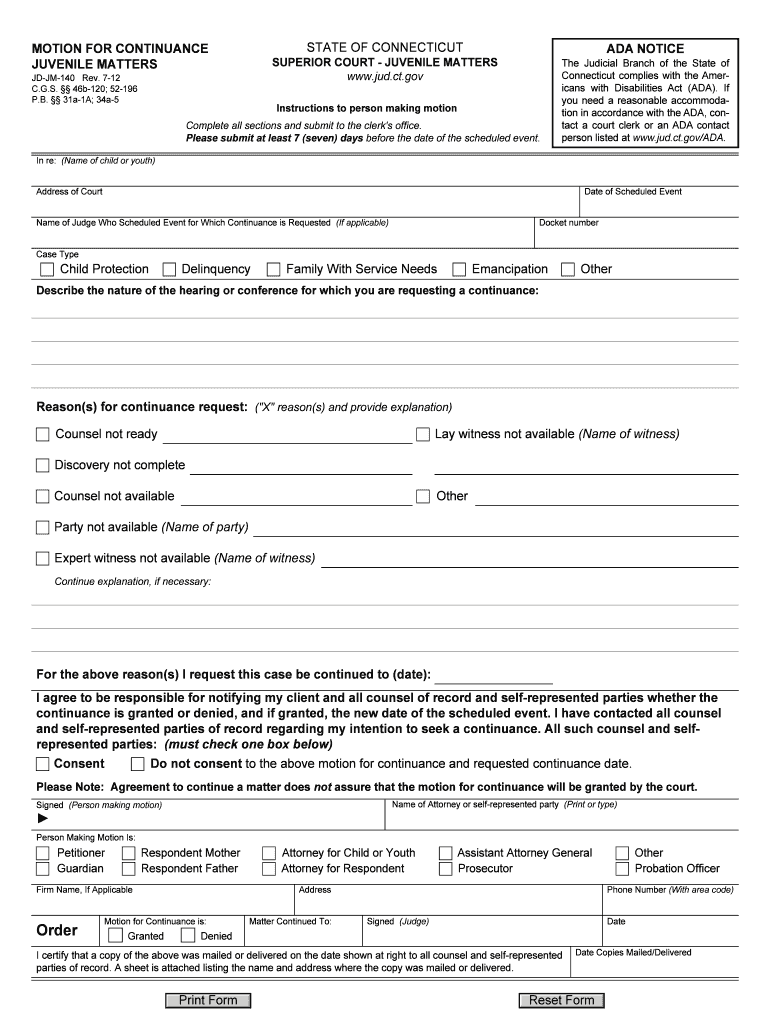
5 Instructions to person making motion Complete all sections and submit to the clerk's office. Please submit at least 7 (seven) days before the date of the scheduled event. The Judicial Branch of the State of Connecticut complies with the Americans with Disabilities Act (ADA). If you need a reasonable accommodation in accordance with the ADA, contact a court clerk or an ADA contact person listed at www.jud.ct.gov/ADA. In re: (Name of child or youth) Address of Court Date of Scheduled Event D.
Loading

Open form follow the instructions

Easily sign the form with your finger

Send filled & signed form or save
How to fill out the CT JD-JM-140 online
The CT JD-JM-140 form is a motion for continuance in juvenile matters, aimed at notifying the court of your request for a delay in scheduled proceedings. This guide provides detailed, step-by-step instructions on how to successfully complete the form online.
Follow the steps to fill out the form correctly
- Click the ‘Get Form’ button to obtain the form and open it in your online editor.
- Fill out the section labeled 'In re:' with the name of the child or youth involved in the case.
- Enter the address of the court that is handling your case in the designated area.
- Specify the date of the scheduled event, ensuring accuracy to avoid any issues.
- Include the docket number associated with the case in the appropriate field.
- If applicable, write the name of the judge who scheduled the event for which you are requesting the continuance.
- Select the case type from the options provided, which include child protection, delinquency, family with service needs, emancipation, or other.
- Describe the nature of the hearing or conference for which the continuance is being requested.
- Check the appropriate reason(s) for the continuance request, such as 'counsel not ready' or 'lay witness not available', and provide an explanation as needed.
- State the requested new date for the scheduled event, confirming it aligns with court availability.
- Acknowledge your responsibility to notify your client and all parties involved regarding the status of the motion, checking the relevant consent box.
- Print or type the name of the attorney or self-represented party making the motion in the designated area.
- Ensure to sign the form as the person making the motion, keeping in mind that your signature signifies agreement to the presented details.
- Complete the order section by indicating whether the motion for continuance is granted or denied.
- Confirm the mailing or delivery of copies of the motion to all relevant parties, noting the date copies were served.
- Finally, save changes, download, print, or share the filled form as required.
Complete your documents online today for efficient processing.
Experience a faster way to fill out and sign forms on the web. Access the most extensive library of templates available.
Related content
JD-JM-140 Rev. 1-22. C.G.S. §§ 46b-120; 52-196. P.A. 21-15; P.B. §§ 31a-1A; 34a-5. In...
by EN Oliveira · 2023 — O transtorno de estresse pós-traumático (TEPT) consiste em...
We are honoured to present the 2017 edition of the European Association of Urology (EAU)...
Get answers to your most pressing questions about US Legal Forms API.
What is a petition in juvenile justice?
A petition in juvenile justice is a formal request made to the court outlining allegations against a juvenile. This document initiates legal proceedings and helps the court understand the issues at hand. If you are considering filing a petition, using resources like USLegalForms can help you create tailored documents that adhere to CT JD-JM-140 standards.
How long do you have to sue someone in CT?
In Connecticut, the statute of limitations for filing a lawsuit ranges typically from two to six years, depending on the type of claim. This time frame starts from when the complaint arises, so it is important to act promptly. Familiarize yourself with CT JD-JM-140 regulations to ensure you meet all legal deadlines and requirements.
How do I get sent to Juvie?
A juvenile may be sent to a juvenile detention center, often referred to as 'juvie,' through various routes, including being arrested for a delinquent act or violating a court order. The court assesses the situation and makes a determination during the intake process. Understanding the implications of CT JD-JM-140 can prepare families for the potential outcomes of such cases.
What are the three types of cases handled in juvenile court?
Juvenile court handles three major types of cases: delinquency, status offenses, and dependency cases. Delinquency cases involve criminal behavior, while status offenses pertain to actions considered illegal due to the youth's age, such as truancy. Dependency cases focus on the welfare of minors who may be neglected or abused. Familiarizing yourself with CT JD-JM-140 ensures you're informed about how these cases are approached.
What are the 4 steps in the juvenile justice process?
The juvenile justice process typically involves four steps: intake, detention, adjudication, and disposition. First, law enforcement evaluates whether a juvenile should be formally processed. Next, a detention hearing occurs, followed by an adjudication where evidence is presented. Finally, the court determines the appropriate disposition, which may include rehabilitation. Understanding CT JD-JM-140 can provide clarity throughout these steps.
How to file a petition in juvenile court?
Filing a petition in juvenile court involves submitting a written request that outlines the issues regarding a juvenile's welfare. You'll need to complete the appropriate forms and file them with the court. Leveraging USLegalForms can assist you in preparing a petition that complies with CT JD-JM-140 requirements.
Are juvenile records public in Connecticut?
In Connecticut, juvenile records are generally not public to protect the privacy of minors. However, certain situations may allow for limited access under specific circumstances. If you're dealing with legal matters related to CT JD-JM-140, consider consulting an attorney for guidance on accessing juvenile records.
Do you tell someone you are taking them to small claims court?
It is usually a good practice to inform the person you plan to take to small claims court. This step gives them a chance to resolve the matter before the court process begins. Open communication can lead to settling disputes amicably, which might save both parties time and effort under CT JD-JM-140.
Is it worth taking someone to small claims court?
Taking someone to small claims court can be worthwhile if you have a legitimate claim and seek to recover damages or enforce a contract. The process is generally easier and quicker than other legal routes, often costing less. If you pursue a case under CT JD-JM-140, you can assert your rights without the need for expensive legal representation.
What is the minor law in CT?
Minor law in Connecticut delineates the rights and responsibilities of individuals under the age of 18. This includes rules regarding contracts, criminal responsibility, and the juvenile justice system, as outlined in CT JD-JM-140. Understanding these laws is vital for both minors and their guardians to navigate various legal obligations. For comprehensive tools and resources, UsLegalForms can assist you in finding the necessary legal documentation.
Use professional pre-built templates to fill in and sign documents online faster. Get access to thousands of forms.
If you believe that this page should be taken down, please follow our DMCA take down process here.