Loading
Form preview
  • US Legal Forms
  • Other Templates
  • Legal Forms
  • Minnesota Legal Forms
  • Mn Ucb 10.1.3 2018

Get Mn Ucb 10.1.3 2018-2026

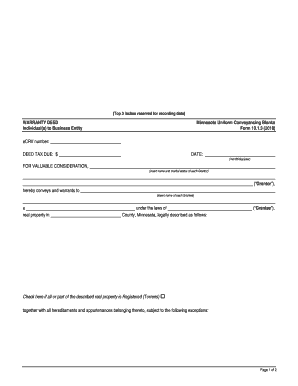
(Top 3 inches reserved for recording data)WARRANTY DEED Individual(s) to Business EntityMinnesota Uniform Conveyancing Blanks Form 10.1.3 (2018)eCRV number: DEED TAX DUE: $ FOR VALUABLE CONSIDERATION,DATE:(month/day/year)(insert.

How it works

  1. Open form

    Open form follow the instructions

  2. Easily sign form

    Easily sign the form with your finger

  3. Share form

    Send filled & signed form or save

How to fill out the MN UCB 10.1.3 online

Filling out the MN UCB 10.1.3 form is an essential step in the process of conveying property in Minnesota. This guide will provide you with clear, step-by-step instructions to help you complete this form accurately and efficiently online.

Follow the steps to complete your MN UCB 10.1.3 form with ease.

  1. Click ‘Get Form’ button to obtain the form and access it in the editor.
  2. Enter the eCRV number at the top of the form to ensure proper identification of the property transaction.
  3. Fill in the deed tax due amount next to 'DEED TAX DUE:' as required for your transaction.
  4. Input the date of the transaction in the format (month/day/year) in the designated area.
  5. List the name and marital status of each Grantor in the specified section to clearly identify the individuals conveying the property.
  6. Identify the Grantee by inserting the name of each recipient in the appropriate field.
  7. State the county where the property is located and provide a detailed legal description of the real property being conveyed.
  8. If applicable, check the box indicating that all or part of the described real property is Registered (Torrens).
  9. Select the applicable certification regarding wells on the property. Choose one of the provided options and fill in any required details.
  10. Have each Grantor sign the document where indicated to verify the conveyance.
  11. In the acknowledgement section, provide the date of acknowledgement and the Grantors' names for notarization.
  12. Insert the notarial officer's signature, title, and expiration date of the commission to validate the document.
  13. Fill in the drafter's name and address at the bottom of the form.
  14. Lastly, provide the legal name and address of the Grantee for tax statement delivery.
  15. Once you have completed all sections of the form, save your changes and download, print, or share the form as needed.

Complete your MN UCB 10.1.3 form online today to ensure a smooth property transaction process.

Get form

Experience a faster way to fill out and sign forms on the web. Access the most extensive library of templates available.
Get form

Related content

Minnesota Uniform Conveyancing Blanks Form 10.1.3...
Minnesota Uniform Conveyancing Blanks. Form 10.1.3 (2018). eCRV number: DEED TAX DUE: $...
Learn more
Von Neumann Algebras.
by VFR Jones · 2009 · Cited by 85 — The purpose of these notes is to provide a rapid...
Learn more
Pennsylvania State University
5 days ago — It is a large research university especially famous for engineering...
Learn more

Related links form

Electron Beam Lithography System Song For Zula Piano Sheet Music Convert Between Yards Feet And Inches Answer Key Converting Metric Distances

Questions & Answers

Get answers to your most pressing questions about US Legal Forms API.

Contact support

To add a person to a deed in Minnesota, you would typically create a new deed, such as a quit claim deed, that names both the original owner and the new person as co-owners. This deed needs to be completed, signed, and notarized before being filed with the local county recorder's office. This ensures that all legalities are met and ownership is properly documented. Following the guidelines in MN UCB 10.1.3 will simplify this process.

To transfer property title to a family member in Minnesota, you can use a quit claim deed. This process usually involves filling out the deed with accurate legal descriptions and transferring the title directly to your family member. Once the deed is signed and notarized, it should be filed with the county recorder’s office to complete the transfer legally. Understanding MN UCB 10.1.3 can help clarify any specifics related to the transfer.

Filing a quitclaim deed in Minnesota involves preparing the document, obtaining the necessary signatures, and notarizing the deed. Once completed, you should take the deed to the county recorder's office where the property is located for official recording. This action ensures that your claim to the property is recognized by law. For a comprehensive guide, refer to MN UCB 10.1.3, which outlines the essential steps.

Yes, a quit claim deed must be notarized in Minnesota to be legally valid. The grantor needs to sign the document in front of a notary public, who will verify their identity and willingness to sign. This step is essential to avoid any potential disputes about the authenticity of the deed. By following MN UCB 10.1.3 guidelines, you can navigate the notary requirements smoothly.

To file a quit claim deed in Minnesota, first ensure that the document is completed correctly and signed by the grantor in front of a notary. After signing, you must submit the quit claim deed to your local county recorder’s office for recording. This step establishes your claim publicly and protects your rights to the property. Familiarizing yourself with MN UCB 10.1.3 will enhance your understanding of the filing process.

The best way to obtain a quit claim deed is to reach out to a qualified professional who can guide you through the process. Many choose to use templates available on platforms like USLegalForms, which provide clear instructions and legally compliant documents. After obtaining the correct template, fill it out with accurate property information and ensure all parties involved agree on the terms. Remember, using MN UCB 10.1.3 can facilitate this process.

A warranty deed provides a guarantee from the seller that they hold clear title to the property and have the right to sell it. Unlike a quitclaim deed, a warranty deed offers protection to the buyer against potential claims. Understanding the distinctions between these deeds, particularly within the framework of MN UCB 10.1.3, can help you make informed decisions. Resources on uslegalforms can clarify these differences for you.

Filling out a MN quit claim deed involves clearly detailing the grantor's and grantee's names, along with the property description. Next, include any relevant consideration, which is often a dollar amount or a phrase like 'for love and affection.' Once you've completed the form, make sure to have it signed in front of a notary to comply with MN UCB 10.1.3. Platforms like uslegalforms can provide you with ready-to-use templates.

One significant risk of using a quitclaim deed is that it offers no guarantees regarding the title. If there are unresolved liens or claims against the property, the grantee assumes those risks upon acceptance. Thus, it's vital to ensure clarity of ownership before proceeding. Understanding this risk is crucial, especially when dealing with MN UCB 10.1.3 agreements.

To complete a quitclaim deed in Minnesota, start by gathering the necessary information about the property and the parties involved. You'll need to include details like the names of the grantor and grantee, the legal description of the property, and the date of transfer. Once filled out, it’s critical to execute the deed properly according to MN UCB 10.1.3 guidelines. Using platforms like uslegalforms can simplify this process greatly.

Get This Form Now!

Use professional pre-built templates to fill in and sign documents online faster. Get access to thousands of forms.
Get form
If you believe that this page should be taken down, please follow our DMCA take down processhere.
Get MN UCB 10.1.3
Get form
  • Adoption
  • Bankruptcy
  • Contractors
  • Divorce
  • Home Sales
  • Employment
  • Identity Theft
  • Incorporation
  • Landlord Tenant
  • Living Trust
  • Name Change
  • Personal Planning
  • Small Business
  • Wills & Estates
  • Packages A-Z
  • Affidavits
  • Bankruptcy
  • Bill of Sale
  • Corporate - LLC
  • Divorce
  • Employment
  • Identity Theft
  • Internet Technology
  • Landlord Tenant
  • Living Wills
  • Name Change
  • Power of Attorney
  • Real Estate
  • Small Estates
  • Wills
  • All Forms
  • Forms A-Z
  • Other Templates
  • Legal Hub
  • About Us
  • Help Portal
  • Legal Resources
  • Blog
  • Affiliates
  • Contact Us
  • Delete My Account
  • Site Map
  • Industries
  • Forms in Spanish
  • Localized Forms
  • State-specific Forms
  • Forms Kit
  • Real Estate Handbook
  • All Guides
  • Notarize
  • Incorporation services
  • For Consumers
  • For Small Business
  • For Attorneys
  • USLegal
  • FormsPass
  • pdfFiller
  • signNow
  • altaFlow
  • DocHub
  • Instapage
Form Packages
  • Adoption
  • Bankruptcy
  • Contractors
  • Divorce
  • Home Sales
  • Employment
  • Identity Theft
  • Incorporation
  • Landlord Tenant
  • Living Trust
  • Name Change
  • Personal Planning
  • Small Business
  • Wills & Estates
  • Packages A-Z
Form Categories
  • Affidavits
  • Bankruptcy
  • Bill of Sale
  • Corporate - LLC
  • Divorce
  • Employment
  • Identity Theft
  • Internet Technology
  • Landlord Tenant
  • Living Wills
  • Name Change
  • Power of Attorney
  • Real Estate
  • Small Estates
  • Wills
  • All Forms
  • Forms A-Z
  • Other Templates
Customer Service
  • Legal Hub
  • About Us
  • Help Portal
  • Legal Resources
  • Blog
  • Affiliates
  • Contact Us
  • Delete My Account
  • Site Map
  • Industries
  • Forms in Spanish
  • Localized Forms
  • State-specific Forms
  • Forms Kit
Legal Guides
  • Real Estate Handbook
  • All Guides
Prepared for you
  • Notarize
  • Incorporation services
Our Customers
  • For Consumers
  • For Small Business
  • For Attorneys
Our Sites
  • USLegal
  • FormsPass
  • pdfFiller
  • signNow
  • altaFlow
  • DocHub
  • Instapage
Social Media
Call us now toll free:
+1 833 426 79 33
As seen in:
© Copyright 1999-2026 airSlate Legal Forms, Inc. 17 Station Street, Ste. 203, Brookline, MA 02445
  • Your Privacy Choices
  • Terms of Service
  • Privacy Notice
  • Content Takedown Policy
  • Bug Bounty Program