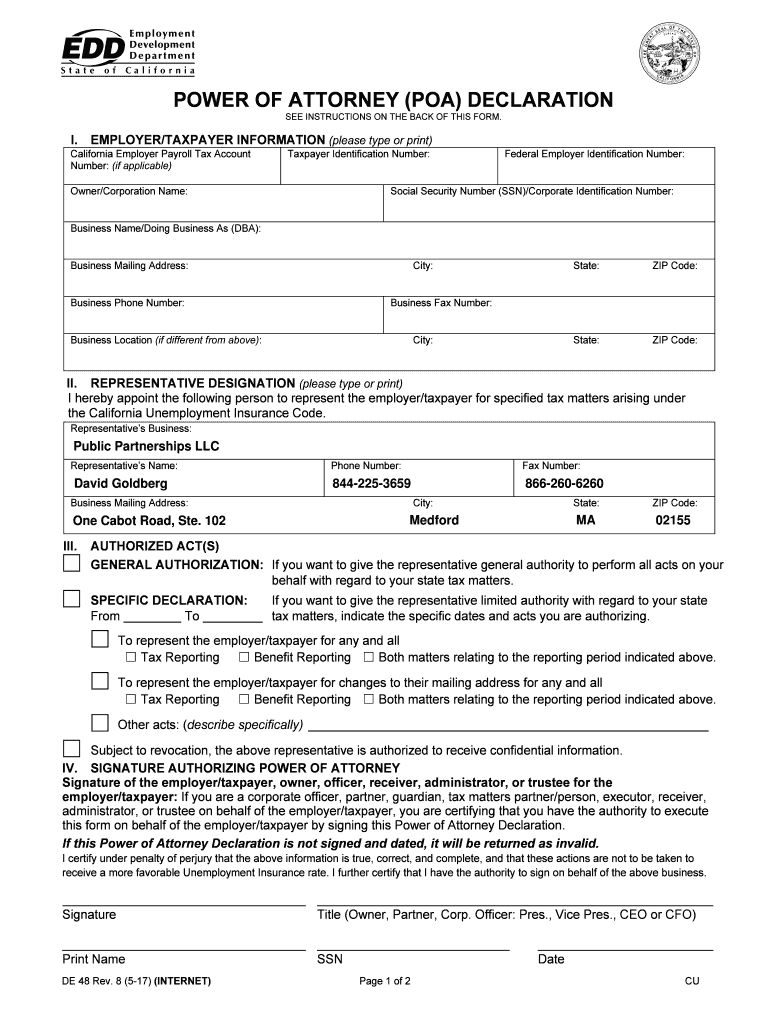
Taxpayer Identification Number: Owner/Corporation Name: Federal Employer Identification Number: Social Security Number (SSN)/Corporate Identification Number: Business Name/Doing Business As (DBA): Business Mailing Address: City: Business Phone Number: State: ZIP Code: State: ZIP Code: Business Fax Number: Business Location (if different from above): City: II. REPRESENTATIVE DESIGNATION (please type or print) I hereby appoint the following person to represent the employer/taxpayer f.

Open form follow the instructions

Easily sign the form with your finger

Send filled & signed form or save
How to fill out the CA DE 48 online
The CA DE 48, also known as the Power of Attorney Declaration, is a form that authorizes an individual or entity to act on your behalf in tax and benefit reporting matters. This guide provides step-by-step instructions for completing the form online, ensuring users can effectively manage their submissions.
Follow the steps to complete the CA DE 48 form online.
- Click ‘Get Form’ button to obtain the form and open it in the editor.
- In section I, enter your employer/taxpayer information, including the California Employer Payroll Tax Account Number (if applicable), Taxpayer Identification Number, Owner or Corporation Name, Federal Employer Identification Number, Social Security Number (SSN)/Corporate Identification Number, Business Name/Doing Business As (DBA), and the Business Mailing Address along with the City, State, ZIP Code, Business Phone Number, Business Fax Number, and Business Location (if different).
- In section II, designate your representative by inputting their Business Name, Representative’s Name, Phone Number, Fax Number, and Business Mailing Address.
- In section III, specify the Authorized Act(s). Choose either the ‘General Authorization’ option or the ‘Specific Declaration’ by checking the corresponding boxes. If you select the specific declaration, indicate the specific dates and acts you are authorizing for your representative.
- In section IV, sign the form as the employer/taxpayer or authorized representative. Ensure the title is accurately filled out, and include your printed name, Social Security Number, and the date of signing. This section is crucial as the form will be returned if not properly signed.
- Finally, review all the information entered for accuracy. Once confirmed, you can save changes, download the completed form, print it, or share it as necessary.
Complete your power of attorney declaration online today to ensure effective management of your tax matters.
Experience a faster way to fill out and sign forms on the web. Access the most extensive library of templates available.
Related content
This Power of Attorney (POA) Declaration (DE 48) is your written authorization for an...
2025 Poverty Guidelines: 48 Contiguous States (all states except Alaska and Hawaii)...
The thermonuclear smoke devil, often referred to as thermy, is the boss version of the...
Get answers to your most pressing questions about US Legal Forms API.
What is the California tax form for EDD?
The California tax form for the Employment Development Department (EDD) includes various forms like the DE 4 and DE 48. These forms help in reporting employee withholding allowances and other pertinent tax information. It’s essential to select the correct forms to ensure compliance with state tax regulations. For comprehensive options and features, consider exploring the CA DE 48 as a primary resource for your EDD needs.
How to file California tax form de 4?
Filing the California tax form DE 4 involves completing the form accurately with your personal information and desired allowances. Once you fill it out, provide it to your employer, who will use it to adjust your withholding. It’s crucial to keep your information updated, especially if your financial circumstances change. Using the CA DE 48 can help ensure that you fill out this form correctly.
What is a DE48?
The DE 48 is a key form provided by the California Employment Development Department, focusing on employee withholding allowances. This form assists employees in determining the number of allowances they can claim, which directly affects their state tax withholdings. Understanding this form is essential for accurate payroll and tax preparation. Always refer to the CA DE 48 to fully grasp how it influences your financial situation.
How to complete the CA state tax form?
Completing the CA state tax form involves gathering your income documents, personal information, and any deductions you're eligible for. Follow the instructions carefully, taking your time to ensure accuracy. Once you’ve filled everything out, review your form before submission to avoid errors. For additional information, the CA DE 48 offers resources that can assist during the form completion process.
How to file exempt on W4 California PDF?
To file exempt on the W4 California PDF form, you need to indicate your exempt status directly on the form. You should complete the relevant sections accurately and confirm that you meet the criteria for exemption from withholding tax. Once complete, submit the form to your employer, who will adjust your withholding accordingly. Utilize the CA DE 48 for detailed guidance on how to complete these forms correctly.
How many allowances should I claim in California DE4?
The number of allowances you should claim on California's DE 4 form can vary based on your personal tax situation. Generally, claiming more allowances reduces your withholding, while fewer allowances increase withholding. It's beneficial to review your financial circumstances thoroughly, like your dependents and income sources, before making this decision. The CA DE 48 can serve as a helpful resource for understanding allowances better.
How do I close my California payroll account?
To close your California payroll account, you must notify the Employment Development Department (EDD) in writing. It’s important to settle all outstanding taxes and liabilities before closing your account. Once the EDD receives your notice, they will process your request and confirm the closure of your account. Ensure you have all your documentation in order, including recent forms like the CA DE 48, to streamline the process.
What is a form 4 in California?
A Form 4 in California refers to the Employee Withholding Allowance Certificate, which helps employees determine how much state tax to withhold from their paychecks. This form is essential for employees to provide their tax withholding preferences to their employers. To fill out this form correctly, ensure you have accurate personal information and understand your tax situation. Using the CA DE 48 can help clarify details on withholding allowances.
How to cancel EDD California?
To cancel your EDD benefits in California, you need to contact the Employment Development Department directly. You can do this online or by phone, specifying your intent to cancel your benefits. If you're unsure of how to proceed, consult resources available on platforms like UsLegalForms, which can assist in streamlining the cancellation process.
How long does EDD last in CA?
In California, EDD benefits typically last for a maximum of 26 weeks during a 12-month period. However, this duration may vary based on specific federal programs or exceptional circumstances. It's important to stay informed about your eligibility and how the CA DE 48 form might affect your duration of benefits.
Use professional pre-built templates to fill in and sign documents online faster. Get access to thousands of forms.
If you believe that this page should be taken down, please follow our DMCA take down process here.
This form is available in several versions. Select the version you need from the drop-down list below.