Get Ct Jd-jm-119 2015-2026
How it works
-

Open form follow the instructions
-

Easily sign the form with your finger
-

Send filled & signed form or save
How to fill out the CT JD-JM-119 online
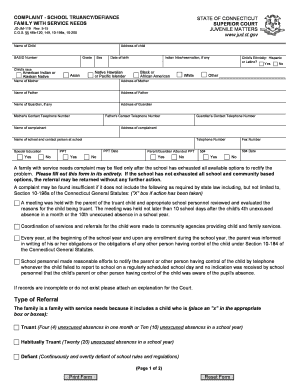
Filling out the CT JD-JM-119 form, also known as the Complaint - School Truancy/Defiance, is a vital step in addressing educational challenges faced by children. This guide provides you with clear and supportive instructions for completing the form online, ensuring you have all necessary information at hand.
Follow the steps to successfully complete the CT JD-JM-119 form.
- Click ‘Get Form’ button to obtain the form and open it in the editor for online completion.
- Begin by entering the name, address, and SASID number of the child in the respective fields. Ensure that all information is accurate and complete.
- Provide the child's grade and race options, selecting from the specified categories. Include the child's date of birth for identification purposes.
- Fill in the names and addresses of the child's mother, father, and any guardians. Include their contact telephone numbers for follow-up.
- Identify the complainant's name and address, along with their contact details. This will connect any follow-up actions to the person making the complaint.
- List the name of the school and the contact person at the school, including their telephone number. This ensures clear communication with the relevant educational institution.
- Document the type of referral being made by marking the appropriate checkboxes indicating whether the child is truant, habitually truant, or defiant. Ensure this is based on the criteria outlined in the form.
- In the 'Attendance' section, meticulously record specific dates of unexcused absences. Avoid reference to any included attendance report—provide clear and separate details.
- If applicable, detail any in-school conduct that demonstrates the child's defiance, including dates and descriptions of behavior that highlight the pattern over time.
- For community service efforts, provide documentation of attempts made to refer to community agencies. List the agency names, towns, and outcomes to highlight engagement with available resources.
- In the 'Parent/Guardian Meeting' area, accurately record dates of any meetings held and attendance status of the parent or guardian. This includes documenting if they cooperated with the school.
- Lastly, complete the notification section to indicate whether the parent or guardian has been informed of the complaint filing. If applicable, provide the date they were notified.
- Sign the form as required, ensuring to print or type your name and the date signed for proper verification.
- After reviewing all entries for accuracy, save your changes, and download or print the completed form as needed for submission.
Complete your CT JD-JM-119 online today to address your child's educational needs effectively.
To file Connecticut taxes online, visit the Connecticut Department of Revenue Services website, where you can access the e-filing system. Choose your forms, provide your information, and follow the steps to submit your return securely. Utilizing this online method aligns with efficient practices noted in CT JD-JM-119, simplifying your tax obligations.