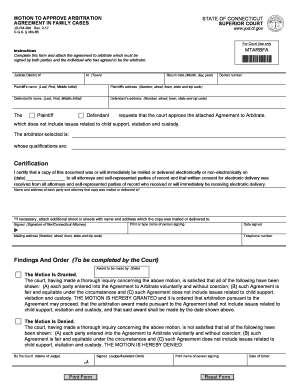
Ct. gov JD-FM-200 Rev. 2-17 C. G.S. 46b-66 For Court Use only MTARBFA Instructions Complete this form and attach the agreement to arbitrate which must be signed by both parties and the individual who has agreed to be the arbitrator. MOTION TO APPROVE ARBITRATION AGREEMENT IN FAMILY CASES STATE OF CONNECTICUT SUPERIOR COURT www. jud. Judicial District of At Town Return date Month day year Plaintiff s name Last First Middle Initial Plaintiff s address Number street town state and zip code Defendan.

How it works
  • Open form

    Open form follow the instructions

  • Easily sign form

    Easily sign the form with your finger

  • Share form

    Send filled & signed form or save

How to fill out the CT JD-FM-200 online

The CT JD-FM-200 form, also known as the Motion to Approve Arbitration Agreement in Family Cases, is essential for individuals seeking to have their arbitration agreement recognized by the court. This guide will provide you with step-by-step instructions to ensure that you complete the form accurately and effectively.

Follow the steps to complete the CT JD-FM-200 form.

  1. Click the ‘Get Form’ button to access the CT JD-FM-200 form and open it in your browser.
  2. Begin by filling in the Judicial District where your case is filed, followed by the town where the court is located.
  3. Enter the return date by specifying the month, day, and year for when you want the court to review the Motion.
  4. Complete the Plaintiff's name section with the last name, first name, and middle initial. Then, provide the Plaintiff's complete address including number, street, town, state, and zip code.
  5. Fill out the Defendant's name section in the same format as the Plaintiff's name, followed by their complete address.
  6. Indicate which party is requesting the court approval — either the Plaintiff or Defendant — by marking the appropriate box.
  7. Input the docket number associated with your case.
  8. Provide the selected arbitrator's name and their qualifications to ensure the court can assess their suitability.
  9. In the Certification section, specify the date when a copy of this document will be mailed or delivered to all parties involved. Ensure to list the name and address of everyone contacted.
  10. The individual signing the document must print or type their name in the designated field and provide their signature and date of signing.
  11. Finally, enter the telephone number and complete mailing address for the person filing the motion.
  12. Once you have filled out all necessary fields, review your form for accuracy. Save your changes, then download, print, or share the completed form as needed.

Take the necessary steps to complete the CT JD-FM-200 form online today!

Get form

Experience a faster way to fill out and sign forms on the web. Access the most extensive library of templates available.

Related content

MOTION TO APPROVE ARBITRATION AGREEMENT IN ...

JD-FM-200 Rev. 6-21. C.G.S. § 46b-66; P.A. 21-104 § 21. Instructions. Complete this form...

Learn more
Bosniak Classification of Cystic Renal Masses...

by SG Silverman · 2019 · Cited by 517 — This CT-based classification was introduced in...

Learn more
O Novo Padrão

Design Circumaural Supra-auricular de Costas. Fechadas • Curva de EQ para Música e...

Learn more
Questions & Answers

Get answers to your most pressing questions about US Legal Forms API.

Contact support

Can you file for divorce online with CT?

Yes, individuals can file for divorce online in Connecticut, and the CT JD-FM-200 form plays a significant role in this process. The state provides resources for online filing, making it convenient to submit your paperwork from home. Ensure that all filings are completed accurately to facilitate a smoother divorce process.

Filing a complaint in Connecticut involves completing the necessary paperwork, including forms such as the CT JD-FM-200. You can obtain these forms through the court or online resources. After filling out the forms, submit them to the proper court along with applicable fees, ensuring that you keep copies for your records.

To file a criminal complaint in Connecticut, you need to complete the appropriate forms, such as the CT JD-FM-200, which provides a clear structure for presenting your case. After completing the form, you should file it with the local court along with any necessary documents. It’s important to ensure that you follow the local rules for submissions, as this will help avoid delays in your complaint processing.

Whatever the name, most financial affidavits require similar information. Each state requires both spouses to submit a financial affidavit to the court early in the divorce case. Most states also require the parties to exchange financial affidavits with one another.

Generally, all documents filed in a court action are public records, accessible in the court clerk's office and sometimes over the Internet; divorce records are no exception. Once the dissolution petition is filed with the court, divorce pleadings are generally open to public viewing.

To find out where the divorce records you want are located, Google it. Luckily most divorce records can be obtained at no charge, with some states charging a fee.There are a multitude of free directories for public records. Your best bet is to search your state's website or contact your local court clerk.

Ask the clerk of court in the county in which the divorce was filed about the procedure to obtain a copy of your divorce decree. Some counties require photo identification and proof of your current address. You may need to pay a record search or copying fee.

Court Clerk's Office The civil court where you filed your divorce keeps a copy of the divorce decree in its records, both electronic and hardcopy. ... Your first step is to visit the clerk's office of this court, once you have verified the location of the decree with an online search.

Ask the clerk of court in the county in which the divorce was filed about the procedure to obtain a copy of your divorce decree. Some counties require photo identification and proof of your current address. You may need to pay a record search or copying fee.

Court documents can be handwritten. Just make sure they are legible and most courts prefer black ink - it makes for better copies. But, if you have access to a computer and a printer, you can get the judicial council forms and fill them out online. Typed documents look better and are easier to read.

Get This Form Now!

Use professional pre-built templates to fill in and sign documents online faster. Get access to thousands of forms.

If you believe that this page should be taken down, please follow our DMCA take down process here.

Get CT JD-FM-200