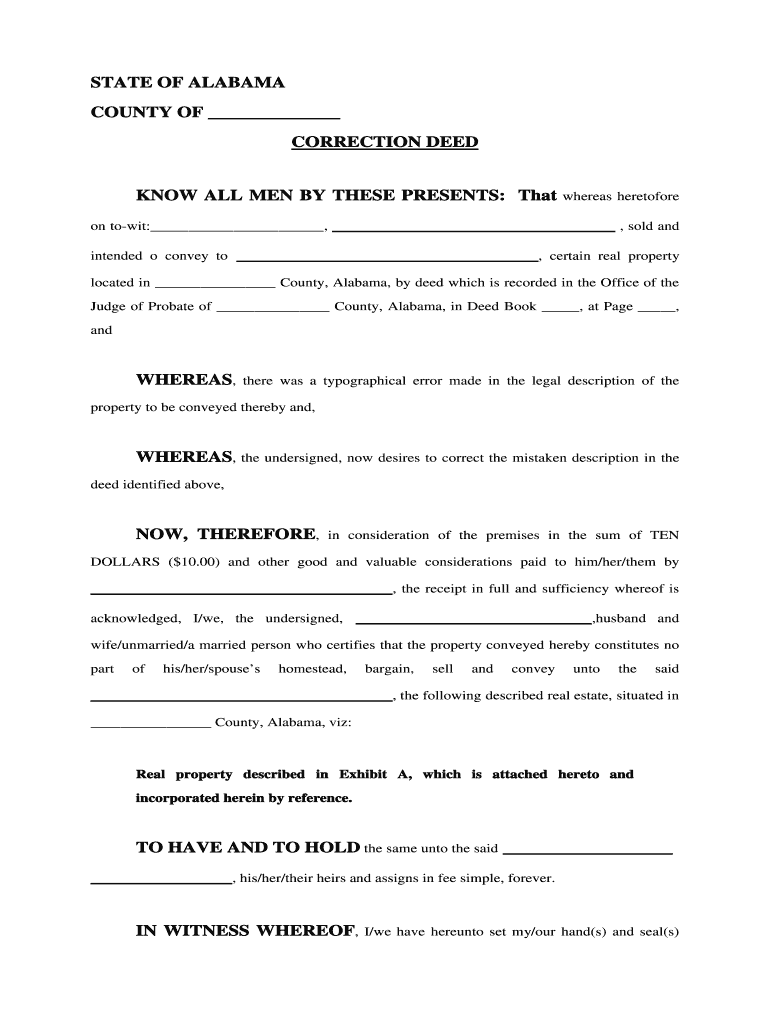
Ended o convey to , certain real property located in County, Alabama, by deed which is recorded in the Office of the Judge of Probate of County, Alabama, in Deed Book , at Page , and WHEREAS, there was a typographical error made in the legal description of the property to be conveyed thereby and, WHEREAS, the undersigned, now desires to correct the mistaken description in the deed identified above, NOW, THEREFORE,.
Loading

Open form follow the instructions

Easily sign the form with your finger

Send filled & signed form or save
How to fill out the AL Correction Deed online
The AL Correction Deed is an important document used to rectify typographical errors in previously executed deeds. This guide will provide you with detailed, step-by-step instructions on how to complete the form online, ensuring your property records are accurate.
Follow the steps to complete the AL Correction Deed online.
- Press the ‘Get Form’ button to access the correction deed form and open it in your preferred online editor.
- Begin by filling in the County where the property is located in the designated field at the top of the form.
- In the section labeled 'Know all men by these presents,' provide the name of the grantors who originally executed the deed.
- Next, specify the date of the original deed where it says 'on to-wit' along with the names of the individuals or entities who sold the property.
- Identify the current grantee—the individual or entity receiving the corrected deed—by entering their name in the provided space.
- Fill in the County of the property location in the relevant field and ensure accuracy when detailing the legal description, as this is where the correction is being made.
- Complete the monetary consideration section, stating 'TEN DOLLARS ($10.00)' in acknowledgment of the transaction.
- Indicate the marital status of the grantors in the specified section, selecting from options like 'husband and wife' or 'unmarried.'
- Insert the complete legal description of the real property in the space provided, which should reference an attached Exhibit A if necessary.
- Conclude by filling in the date at the bottom of the document where indicated, along with the signatures of the grantors.
- Ensure a Notary Public witnesses the signing of the document, and capture their details in the notarial section at the bottom of the form.
- Once all fields are completed, save your changes, and choose to download, print, or share the corrected deed as needed.
Complete your property corrections by filling out the AL Correction Deed online today.
Experience a faster way to fill out and sign forms on the web. Access the most extensive library of templates available.
Related content
To correct an error on the face of an Alabama title, the owner or lienholder of record...
The correction deed with the proper description is effective between the parties on the...
Disclaimer: This document provides technical guidance on how to evaluate the feasibility...
Get answers to your most pressing questions about US Legal Forms API.
What type of deed is most likely used to correct a misspelled name on a deed?
The type of deed most commonly used to correct a misspelled name on a deed is a correction deed, or AL Correction Deed. This document allows for straightforward amendments without needing a new deed. It's important that all parties validate the corrections and sign the document before filing it with the relevant authorities.
What are the requirements for a correction deed in Texas?
In Texas, the requirements for a correction deed include providing a full legal description of the property and stating the corrections clearly. All parties who originally signed the deed must also sign the correction deed. It’s advisable to file it with the county clerk's office where the property is located. Using an AL Correction Deed can help streamline this process.
Where can I get a correction deed?
You can obtain a correction deed from various sources, including local county recorder's offices and legal document service providers. Online platforms like uslegalforms offer customizable templates for AL Correction Deeds, making the process easier and more efficient. Make sure to follow your state’s specific requirements when preparing this document.
What is the strongest form of deed?
The strongest form of deed is generally considered to be the warranty deed. A warranty deed provides the highest level of protection to the buyer, ensuring that the seller fully owns the property and can legally sell it without issues. It also guards against future claims on the property. If you need to clarify ownership issues, consider using an AL Correction Deed.
How to correct a deed in California?
To correct a deed in California, you need to file a correction deed, known as an AL Correction Deed, with the county recorder's office. Make sure to include accurate property details and the error you want to rectify. It's essential to have all parties involved sign the correction deed to ensure legality. Once filed, this document will update the public record.
Can I sell a house with a special warranty deed in Texas?
Selling a house with a special warranty deed in Texas is possible, but it may limit the buyer's protection regarding title issues. This type of deed only covers claims during the seller's ownership period, meaning buyers should proceed with caution. Clear title documentation is crucial for a successful sale. If there are discrepancies, consider leveraging an AL Correction Deed to ensure a smooth transfer process.
How do I correct a title mistake in Alabama?
To correct a title mistake in Alabama, you typically need to file a corrective deed that outlines the mistake. This document should be filed with the county recorder to ensure proper public recordkeeping. Ensuring accuracy in property records is crucial for protecting ownership rights. Utilizing services like uslegalforms can assist you in drafting an AL Correction Deed to clarify any Title issues.
What are the different types of deeds in Texas?
In Texas, there are several types of deeds, including warranty deeds, quick claim deeds, and special warranty deeds. Each type serves a specific purpose in property transactions, including transferring ownership and addressing specific interests. Understanding these types helps ensure you choose the right one for your needs. If you encounter inaccuracies, an AL Correction Deed can help rectify issues seamlessly.
How to change deed on house in Alabama?
Changing a deed on a house in Alabama involves preparing a new deed that reflects the desired changes. The new deed must be signed, notarized, and recorded at the local courthouse to take effect. It’s critical to ensure all necessary details and legal requirements are followed for a smooth transition. Engaging with resources like uslegalforms can guide you in creating an AL Correction Deed to amend any inaccuracies.
What is a correction instrument in Texas?
A correction instrument in Texas refers to any legal document that amends the details of an existing property deed. This includes correcting inaccuracies present in the original deed, ensuring public records are reliable and true. Using a correction instrument simplifies the process, helping to maintain trust in property transactions. If you're facing issues, recognizing the role of an AL Correction Deed can be beneficial.
Use professional pre-built templates to fill in and sign documents online faster. Get access to thousands of forms.
If you believe that this page should be taken down, please follow our DMCA take down process here.