Loading
Get Ct Jd-fm-111 2017
How it works
-

Open form follow the instructions
-

Easily sign the form with your finger
-

Send filled & signed form or save
How to fill out the CT JD-FM-111 online
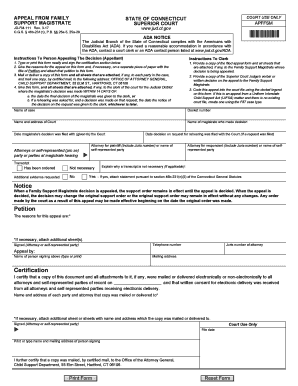
The CT JD-FM-111 form is essential for appealing a Family Support Magistrate's decision in Connecticut. This guide provides step-by-step instructions on completing the form online, ensuring a smooth and efficient submission process.
Follow the steps to successfully complete your appeal form.
- Press the ‘Get Form’ button to acquire the CT JD-FM-111 form and open it in your preferred editor.
- Carefully fill in the 'Name of case' field with the title of your case. Ensure that all names are spelled correctly to avoid any confusion.
- Enter the 'Docket number' as assigned to the case. If unsure, consult the court documents to find the correct number.
- Provide the 'Name and address of Court' where the original decision was made. Include all relevant details to ensure proper filing.
- Identify the 'Name of magistrate who made the decision.' This information is crucial for correctly routing your appeal.
- Specify the 'Date magistrate's decision was filed with the Court.' Include complete and accurate dates to support your appeal.
- Indicate whether you are represented by an attorney or are self-represented. Provide the name of the 'Attorney for plaintiff' or 'name of self-represented party.' If you have an attorney, include their Juris number.
- In the section titled 'Petition,' clearly explain the reasons for your appeal. If needed, use additional paper, attaching it to the form.
- Review the section about the necessity of a transcript. Select 'Yes' or 'No' as applicable and provide an explanation if necessary.
- Sign and date the certification at the bottom of the form, ensuring that you have mailed or electronically delivered copies to all relevant parties.
- Once all information is filled in and double-checked, save your changes. You may also download, print, or share the form as necessary.
Complete your appeal by filling out the CT JD-FM-111 online today!
Get form
Experience a faster way to fill out and sign forms on the web. Access the most extensive library of templates available.
To terminate child support in Connecticut, you must file a motion with the court that issued the original child support order. Changes in circumstances, such as a change in income or the child's emancipation, can justify this request. The court will review your situation to make an informed decision. Using the CT JD-FM-111 form can streamline the process and help clarify your reasons for seeking termination.
Get This Form Now!
Use professional pre-built templates to fill in and sign documents online faster. Get access to thousands of forms.