Loading
Form preview
  • US Legal Forms
  • Other Templates
  • Legal Forms
  • Connecticut Legal Forms
  • Ct Jd-cv-71 2010

Get Ct Jd-cv-71 2010-2026

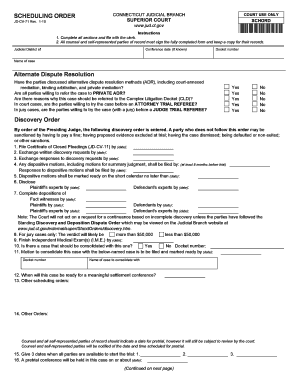
El and self-represented parties of record must sign the fully completed form and keep a copy for their records. Judicial District of Conference date (If known) Docket number Name of case Alternate Dispute Resolution Have the parties discussed alternative dispute resolution methods (ADR), including court-annexed mediation, binding arbitration, and private mediation? Are all parties willing to refer the case to PRIVATE ADR? Are there reasons why this case should be referred to the Complex Liti.

How it works

  1. Open form

    Open form follow the instructions

  2. Easily sign form

    Easily sign the form with your finger

  3. Share form

    Send filled & signed form or save

How to fill out the CT JD-CV-71 online

The CT JD-CV-71 form is a scheduling order used within the Connecticut judicial system. This guide will assist users in completing the form online with clear, step-by-step instructions tailored to anyone, regardless of their legal experience.

Follow the steps to successfully fill out the CT JD-CV-71 form.

  1. Click the ‘Get Form’ button to obtain the form and open it in the online editor.
  2. Indicate the judicial district of your case by selecting the appropriate option from the dropdown menu provided.
  3. Enter the conference date if known, along with the docket number and the name of the case in the designated fields.
  4. Address the questions regarding alternative dispute resolution (ADR). Select 'Yes' or 'No' for each question based on the parties' discussions and agreements.
  5. Complete the discovery order section by filling in the required deadlines for filing and exchanging motions and disclosures as highlighted.
  6. Fill out the specific deadlines for revealing expert witnesses and completing depositions, ensuring you provide all required dates accurately.
  7. If applicable, indicate whether this case should be consolidated with another case, and provide the docket number for any associated case.
  8. Provide three available trial dates and fill in the date for the pretrial conference in the specified fields.
  9. In the agreement section, enter the names of all attorneys or self-represented parties involved, ensuring to sign and certify the proposed order.
  10. Lastly, confirm that a copy of the motion was delivered to all counsel and self-represented parties, including names and addresses. Review all sections for completeness.
  11. Once all fields are completed, save your changes. You may then choose to download, print, or share the completed form as needed.

Complete your documents online and ensure compliance with the court's requirements.

Get form

Experience a faster way to fill out and sign forms on the web. Access the most extensive library of templates available.
Get form

Related content

Forms you may need after a Civil Lawsuit is...
Certificate of Closed Pleadings (JD-CV-11) (PDF); Scheduling Order (JD-CV-71) (PDF);...
Learn more
Posiçoes aparentes das estrelas na paseagem...
ADS Classic is now deprecated. It will be completely retired in October 2019. This page...
Learn more
O Novo Padrão
Design Circumaural Supra-auricular de Costas. Fechadas • Curva de EQ para Música e...
Learn more

Related links form

Surety Bond Brokers Work On Hand Schedule (Completed And Uncompleted Work) 2011 AZ 70-4434 2025 MD MCPS Form 455-22 2020 SSA-792 2025

Questions & Answers

Get answers to your most pressing questions about US Legal Forms API.

Contact support

You should file a Certificate of Closed Pleadings in Connecticut after you have concluded all pleading activities in your case. This filing typically occurs after a judgment is entered or a settlement reached. Utilizing the CT JD-CV-71 can streamline this process. Remember, being proactive can help in simplifying your case, and resources on platforms like uslegalforms can point you to the correct procedure.

Neglecting to attend court for a judgment can lead to serious consequences. The court may issue a default judgment against you, resulting in more financial burdens or liens. By understanding how to manage your case with forms like the CT JD-CV-71, you can better handle potential outcomes. It is always beneficial to seek support from legal platforms like uslegalforms to navigate these scenarios.

Avoiding a judgment requires understanding your legal rights and options. You may negotiate a settlement or seek a payment plan that fits your financial situation. Consulting with a legal expert on filling out a CT JD-CV-71 can guide you through the process of managing your obligations effectively. Legal aids like uslegalforms can help you find the right resources and paperwork for your needs.

In Connecticut, a judgment lien typically lasts for five years. This duration starts from the date the judgment is entered and can be extended. By filing a CT JD-CV-71 form, you can ensure your rights are protected and the lien is maintained. It is essential to stay informed about this timeline to manage your financial planning effectively.

crafted motion to dismiss should include a statement of the case, the legal grounds for dismissal, and supporting arguments backed by relevant law. Citing statutes such as CT JDCV71 strengthens your position. Additionally, clear and concise language can enhance the persuasiveness of your motion. Consider using platforms like uslegalforms to streamline your documentation process.

The rule 19 motion to dismiss addresses the failure to join an indispensable party in a lawsuit. Without all necessary parties, the court may lack the ability to provide complete relief. Understanding this rule is crucial for those working with CT JD-CV-71. It ensures that all relevant entities are included in legal proceedings.

In Connecticut, common grounds for a motion to dismiss include lack of jurisdiction, failure to state a claim, or untimeliness. Each of these grounds serves as a valid reason to contest the legitimacy of a suit. Familiarizing yourself with CT JD-CV-71 will provide insight into these grounds. This understanding can aid in formulating an effective legal strategy.

Writing a strong motion to dismiss involves clearly outlining the legal grounds for your request. Start by stating the relevant facts, then reference the applicable law or rules, such as CT JD-CV-71, that support your case. Make sure your arguments are concise and persuasive. Reviewing similar motions can help shape your approach.

The rule 12 motion to dismiss in Connecticut allows a defendant to challenge the legal sufficiency of a complaint. This motion asserts that, even if all alleged facts are true, they do not establish a legal claim. Understanding this process can be integral when filing CT JD-CV-71. Always consider consulting legal resources for detailed guidance.

While there's no strict dress code for jury duty in Connecticut, wearing jeans is generally discouraged. It’s advisable to dress in a manner that shows respect for the court. A smart-casual attire can help create a positive impression. Consider how CT JD-CV-71 relates to your responsibilities as a juror.

Get This Form Now!

Use professional pre-built templates to fill in and sign documents online faster. Get access to thousands of forms.
Get form
If you believe that this page should be taken down, please follow our DMCA take down processhere.
Get CT JD-CV-71
Get form
  • Adoption
  • Bankruptcy
  • Contractors
  • Divorce
  • Home Sales
  • Employment
  • Identity Theft
  • Incorporation
  • Landlord Tenant
  • Living Trust
  • Name Change
  • Personal Planning
  • Small Business
  • Wills & Estates
  • Packages A-Z
  • Affidavits
  • Bankruptcy
  • Bill of Sale
  • Corporate - LLC
  • Divorce
  • Employment
  • Identity Theft
  • Internet Technology
  • Landlord Tenant
  • Living Wills
  • Name Change
  • Power of Attorney
  • Real Estate
  • Small Estates
  • Wills
  • All Forms
  • Forms A-Z
  • Other Templates
  • Legal Hub
  • About Us
  • Help Portal
  • Legal Resources
  • Blog
  • Affiliates
  • Contact Us
  • Delete My Account
  • Site Map
  • Industries
  • Forms in Spanish
  • Localized Forms
  • State-specific Forms
  • Forms Kit
  • Real Estate Handbook
  • All Guides
  • Notarize
  • Incorporation services
  • For Consumers
  • For Small Business
  • For Attorneys
  • USLegal
  • FormsPass
  • pdfFiller
  • signNow
  • altaFlow
  • DocHub
  • Instapage
Form Packages
  • Adoption
  • Bankruptcy
  • Contractors
  • Divorce
  • Home Sales
  • Employment
  • Identity Theft
  • Incorporation
  • Landlord Tenant
  • Living Trust
  • Name Change
  • Personal Planning
  • Small Business
  • Wills & Estates
  • Packages A-Z
Form Categories
  • Affidavits
  • Bankruptcy
  • Bill of Sale
  • Corporate - LLC
  • Divorce
  • Employment
  • Identity Theft
  • Internet Technology
  • Landlord Tenant
  • Living Wills
  • Name Change
  • Power of Attorney
  • Real Estate
  • Small Estates
  • Wills
  • All Forms
  • Forms A-Z
  • Other Templates
Customer Service
  • Legal Hub
  • About Us
  • Help Portal
  • Legal Resources
  • Blog
  • Affiliates
  • Contact Us
  • Delete My Account
  • Site Map
  • Industries
  • Forms in Spanish
  • Localized Forms
  • State-specific Forms
  • Forms Kit
Legal Guides
  • Real Estate Handbook
  • All Guides
Prepared for you
  • Notarize
  • Incorporation services
Our Customers
  • For Consumers
  • For Small Business
  • For Attorneys
Our Sites
  • USLegal
  • FormsPass
  • pdfFiller
  • signNow
  • altaFlow
  • DocHub
  • Instapage
Social Media
Call us now toll free:
+1 833 426 79 33
As seen in:
© Copyright 1999-2026 airSlate Legal Forms, Inc. 17 Station Street, Ste. 203, Brookline, MA 02445
  • Your Privacy Choices
  • Terms of Service
  • Privacy Notice
  • Content Takedown Policy
  • Bug Bounty Program