Loading
Form preview
  • US Legal Forms
  • Other Templates
  • Legal Forms
  • Connecticut Legal Forms
  • Ct Jd-cv-106 2014

Get Ct Jd-cv-106 2014-2026

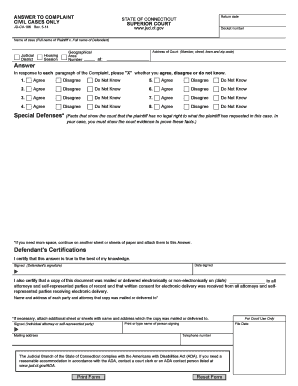
Jud. ct. gov Docket number Name of case Full name of Plaintiff v. Full name of Defendant Judicial District Answer Housing Session Geographical Area Number Address of Court Number street town and zip code at In response to each paragraph of the Complaint please X whether you agree disagree or do not know. ANSWER TO COMPLAINT CIVIL CASES ONLY Return date STATE OF CONNECTICUT SUPERIOR COURT JD-CV-106 Rev* 5-14 www. Agree Disagree Do Not Know Special Defenses Facts that show the court that the plain.

How it works

  1. Open form

    Open form follow the instructions

  2. Easily sign form

    Easily sign the form with your finger

  3. Share form

    Send filled & signed form or save

How to fill out the CT JD-CV-106 online

The CT JD-CV-106 form is crucial for responding to a complaint in civil cases in Connecticut. This guide will provide you with step-by-step instructions to help you successfully complete the form online.

Follow the steps to complete the CT JD-CV-106 form online.

  1. Click ‘Get Form’ button to obtain the form and access it in the online editor.
  2. Begin by filling in the 'Docket number' field, which is essential for identifying your case in court records.
  3. Enter the 'Name of case' by providing the full name of the Plaintiff followed by the full name of the Defendant.
  4. Indicate the corresponding 'Judicial District' and 'Geographical Area Number' applicable to your case.
  5. Complete the 'Address of Court' section by including the full address, including number, street, town, and zip code.
  6. In the main section addressing the complaint, respond to each paragraph by marking 'Agree', 'Disagree', or 'Do Not Know' as applicable.
  7. Utilize the section assigned for 'Special Defenses' to provide any relevant facts that demonstrate the plaintiff's lack of legal right in this case.
  8. Once all fields are appropriately filled, confirm the date you are signing the document by entering the 'Date signed'.
  9. Sign the document in the 'Signed (Defendant's signature)' section and provide any additional required information, such as contact details if necessary.
  10. Review your filled form for accuracy, then choose to save changes, download, print, or share the completed form as needed.

Complete your CT JD-CV-106 form online today to ensure your response is filed in a timely manner.

Get form

Experience a faster way to fill out and sign forms on the web. Access the most extensive library of templates available.
Get form

Related content

ANSWER TO COMPLAINT - Connecticut Judicial Branch
JD-CV-106 Rev. 1-24. P.B. §§ 10-46 through 10-54. Signed (Defendant's signature). ▷...
Learn more
Trump v. Twitter
May 6, 2022 — Former President Donald J. Trump, the American Conservative Union, and...
Learn more
O Novo Padrão
Design Circumaural Supra-auricular de Costas. Fechadas • Curva de EQ para Música e...
Learn more

Related links form

CA Laura Lindholm‐Cardinale Brief Focused Assessment Questionnaire 2010 SC Application For A Limited Certificate Of Admission To Practice Law 2017 WI DT2005 2003 NY DOH-4220I ES 2023

Questions & Answers

Get answers to your most pressing questions about US Legal Forms API.

Contact support

Section 10-35 of the Connecticut Practice Book outlines the rules and guidelines for the pleadings in civil cases. It provides clarity on how pleadings should be filed, amended, and addressed within the legal process. Familiarity with this section can enhance your understanding of the CT JD-CV-106 and ensure compliance with the legal standards required.

You should file the certificate of closed pleadings in Connecticut once both parties have submitted their pleadings and no further documents are anticipated. This action enables the court to ensure the case is ready for the next steps, such as trial or settlement discussions. Being proactive with the CT JD-CV-106 can help you maintain the momentum of your case.

Filing a claim in small claims court in Connecticut begins with completing the necessary forms, such as the CT JD-CV-106. You must submit your claim and any required documentation to the appropriate court. Using resources like US Legal Forms can simplify this process and help ensure that you include all vital information.

A certificate of closed pleadings is a formal document indicating that no further pleadings will be filed in a case. This certificate is essential for moving forward in the legal process, as it allows the court to assess the case based on the existing documents. Familiarizing yourself with this certificate will enhance your experience when managing your legal paperwork, such as the CT JD-CV-106.

When pleadings are closed, it signifies that both parties have submitted their complaints and responses, concluding any further additions to the case. At this stage, the court can proceed with hearings or trials, focusing on the issues presented. Understanding this process is crucial for utilizing the CT JD-CV-106 effectively.

Pleading not guilty to a ticket in Connecticut online can simplify the process. Visit the official Connecticut court website where you can find instructions on how to enter your plea electronically. Having CT JD-CV-106 available will help you structure your submission correctly. This method saves time and allows you to address your case efficiently.

Fighting a ticket in Connecticut involves a few strategic steps. First, gather evidence that supports your case, such as photographs or witness statements. You can use CT JD-CV-106 to organize your documents and prepare your defense. Consult with a legal professional if necessary, as they can provide valuable insights based on your specific situation.

Writing a not guilty plea for a speeding ticket requires a clear statement and basic information about your case. Begin by providing your name, address, and the ticket number, then express your case for pleading not guilty. You can also reference the CT JD-CV-106 as a guide for your documentation. This structured approach helps ensure that you convey your argument effectively.

To plead not guilty to a ticket in Connecticut, you need to appear before the court listed on your ticket. Ensure you inform the court of your plea during your appearance, as this will impact the proceedings. Additionally, CT JD-CV-106 can assist you in preparing the necessary documents and understanding your rights as you navigate the legal process. It’s crucial to make a well-informed plea.

The best defense against a speeding ticket often revolves around the circumstances of the stop. You may challenge the accuracy of the speed measurement, question the officer's reasoning for the ticket, or provide evidence that you were driving safely. Consider utilizing CT JD-CV-106 to manage your legal documentation efficiently. Remember, your situation is unique, and I recommend seeking advice tailored to your specific case.

Get This Form Now!

Use professional pre-built templates to fill in and sign documents online faster. Get access to thousands of forms.
Get form
If you believe that this page should be taken down, please follow our DMCA take down processhere.
Get CT JD-CV-106
Get form
  • Adoption
  • Bankruptcy
  • Contractors
  • Divorce
  • Home Sales
  • Employment
  • Identity Theft
  • Incorporation
  • Landlord Tenant
  • Living Trust
  • Name Change
  • Personal Planning
  • Small Business
  • Wills & Estates
  • Packages A-Z
  • Affidavits
  • Bankruptcy
  • Bill of Sale
  • Corporate - LLC
  • Divorce
  • Employment
  • Identity Theft
  • Internet Technology
  • Landlord Tenant
  • Living Wills
  • Name Change
  • Power of Attorney
  • Real Estate
  • Small Estates
  • Wills
  • All Forms
  • Forms A-Z
  • Other Templates
  • Legal Hub
  • About Us
  • Help Portal
  • Legal Resources
  • Blog
  • Affiliates
  • Contact Us
  • Delete My Account
  • Site Map
  • Industries
  • Forms in Spanish
  • Localized Forms
  • State-specific Forms
  • Forms Kit
  • Real Estate Handbook
  • All Guides
  • Notarize
  • Incorporation services
  • For Consumers
  • For Small Business
  • For Attorneys
  • USLegal
  • FormsPass
  • pdfFiller
  • signNow
  • altaFlow
  • DocHub
  • Instapage
Form Packages
  • Adoption
  • Bankruptcy
  • Contractors
  • Divorce
  • Home Sales
  • Employment
  • Identity Theft
  • Incorporation
  • Landlord Tenant
  • Living Trust
  • Name Change
  • Personal Planning
  • Small Business
  • Wills & Estates
  • Packages A-Z
Form Categories
  • Affidavits
  • Bankruptcy
  • Bill of Sale
  • Corporate - LLC
  • Divorce
  • Employment
  • Identity Theft
  • Internet Technology
  • Landlord Tenant
  • Living Wills
  • Name Change
  • Power of Attorney
  • Real Estate
  • Small Estates
  • Wills
  • All Forms
  • Forms A-Z
  • Other Templates
Customer Service
  • Legal Hub
  • About Us
  • Help Portal
  • Legal Resources
  • Blog
  • Affiliates
  • Contact Us
  • Delete My Account
  • Site Map
  • Industries
  • Forms in Spanish
  • Localized Forms
  • State-specific Forms
  • Forms Kit
Legal Guides
  • Real Estate Handbook
  • All Guides
Prepared for you
  • Notarize
  • Incorporation services
Our Customers
  • For Consumers
  • For Small Business
  • For Attorneys
Our Sites
  • USLegal
  • FormsPass
  • pdfFiller
  • signNow
  • altaFlow
  • DocHub
  • Instapage
Social Media
Call us now toll free:
+1 833 426 79 33
As seen in:
© Copyright 1999-2026 airSlate Legal Forms, Inc. 17 Station Street, Ste. 203, Brookline, MA 02445
  • Your Privacy Choices
  • Terms of Service
  • Privacy Notice
  • Content Takedown Policy
  • Bug Bounty Program