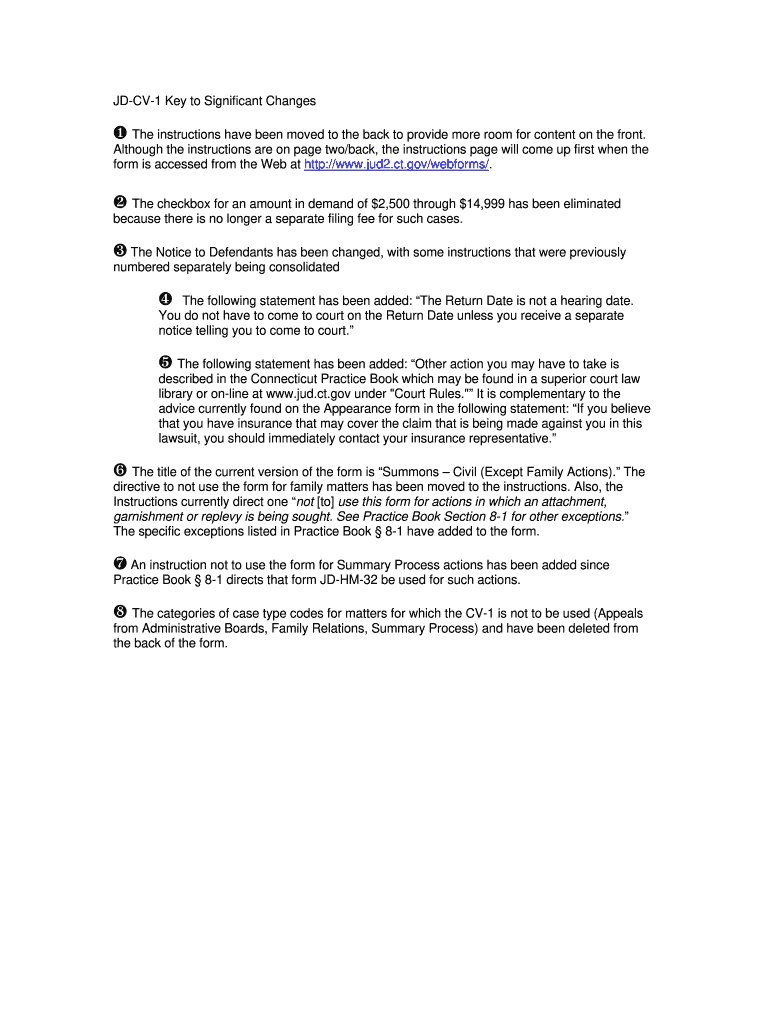
E Notice to Defendants has been changed, with some instructions that were previously numbered separately being consolidated The following statement has been added: The Return Date is not a hearing date. You do not have to come to court on the Return Date unless you receive a separate notice telling you to come to court. The following statement has been added: Other action you may have to take is described in the Connecticut Practice Book which may be found in a superior court la.
Loading

Open form follow the instructions

Easily sign the form with your finger

Send filled & signed form or save
How to fill out the CT JD-CV-1 online
Completing the CT JD-CV-1 form correctly is essential for initiating a civil lawsuit in Connecticut. This guide offers a clear and supportive walkthrough to help you navigate the process seamlessly.
Follow the steps to complete the form accurately.
- Click ‘Get Form’ button to obtain the CT JD-CV-1 form and open it in the editor.
- Carefully read the instructions provided, which are located on the back page of the form. Ensure you understand each requirement before proceeding.
- Enter the address of the court clerk where the writ and other papers will be filed, including the complete street address, town, and zip code.
- Input the telephone number of the court clerk, including the area code.
- Fill in the GA number and select the appropriate Housing Session if applicable.
- Mark the appropriate box to indicate the amount in demand—whether it is less than $2,500, $2,500 or more, or if you are claiming other relief.
- Specify the Return Date, which must fall on a Tuesday, and enter the corresponding month, day, and year.
- Choose the appropriate case type code based on the nature of your claim. Refer to the list provided within the form for guidance.
- Complete the section regarding the plaintiff's information, including the name and address of the attorney or self-represented plaintiff, and their telephone number.
- List the names and addresses of all plaintiffs and defendants, ensuring each entry is clear and complete.
- Review all entries for accuracy before signing the form, which is required for a plaintiff who is self-represented.
- Save any changes made to the form and download a copy for your records. You may then print the completed form or share it as needed.
Complete your CT JD-CV-1 form online today for a streamlined legal process.
Experience a faster way to fill out and sign forms on the web. Access the most extensive library of templates available.
Related content
A civil summons is a notice that you are being sued. The complaint attached states the...
DAZA JD, CV 1 JUAN DIEGO DAZA, CURRICULUM VITAE Visiting professor, Sam Houston State...
ATTENTION: This drive contains ESD (Electrostatic Discharge) sensitive parts and...
Get answers to your most pressing questions about US Legal Forms API.
How to write a written response to a summons?
To write a written response to a summons, start by formatting your document correctly, including the court’s name and case details at the top. Next, clearly state your response to each allegation, using straightforward language to admit or deny claims. Always remember to submit your response before the deadline to avoid potential negative repercussions.
Can you say no to a court summons?
While you can express your disagreement with a court summons, you must still respond appropriately. Ignoring a summons can lead to default judgment against you. If you believe the summons is unjust, it's essential to file a proper response with the court. Resources from USLegalForms can assist you in crafting a suitable reply.
How do you settle a debt after being summoned?
To settle a debt after being summoned, first review the summons details and then gather your financial information. Contact the creditor directly to discuss possible settlement options, such as payment plans or lump-sum agreements. Document any agreements you reach. If needed, an organization like USLegalForms can provide resources to guide you through the process.
Can you respond to a summons without a lawyer?
Yes, you can respond to a summons without a lawyer, although it is often advisable to seek legal advice. You must ensure your response is timely and accurately addresses the claims made against you. Many individuals find success using templates or examples available on platforms like USLegalForms. This can help you format your response correctly.
How do you write a summons answer?
Writing a summons answer requires addressing the court and including the case details. Begin by clearly stating your position on each claim made in the summons. Use specific language to admit or deny each allegation. Submitting the answer on time is crucial to ensure you protect your rights in the proceedings.
How to write a written response to the court?
To write a written response to the court, start by clearly addressing the court and stating your name, case number, and title of the document. Next, outline your arguments and facts concisely and logically. Remember to refer to relevant laws or evidence to support your claims. You can also use resources like USLegalForms to help you draft a proper response.
When to file certificate of closed pleadings CT?
You should file the certificate of closed pleadings CT after all parties have completed their pleadings. This document confirms that there are no more outstanding responses or motions. Filing the certificate signals to the court that the case is ready to move forward. Ensure you follow proper procedures to avoid any delays.
How to enter an Appearance in court?
To enter an Appearance in court, you must submit a formal notice to the court indicating your involvement in the case, whether as a party or an attorney representing someone. This allows you to take part in all proceedings related to the case. Follow the guidelines set by the CT JD-CV-1 when preparing this document to ensure it meets all requirements. Doing this properly can significantly impact your position within the legal framework.
What does a certificate of closed pleadings mean?
A certificate of closed pleadings serves as a formal notice that all necessary legal documents have been submitted by the parties involved in a case. This certificate indicates that the court can now move forward with reviewing the case or scheduling a trial. For those navigating the CT JD-CV-1, this document is a vital step in confirming readiness for the next phase in your legal journey. It sets the stage for the resolution of the matter at hand.
What does it mean when pleadings are closed?
When pleadings are closed, it signifies that all parties have submitted their respective statements and cannot make further amendments without permission. This closure is important as it defines the boundaries of the case, allowing the court to proceed to trial or other resolutions. Understanding this concept is essential, especially when filling out forms like the CT JD-CV-1. This clarity helps maintain order and focus in legal proceedings.
Use professional pre-built templates to fill in and sign documents online faster. Get access to thousands of forms.
If you believe that this page should be taken down, please follow our DMCA take down process here.
This form is available in several versions. Select the version you need from the drop-down list below.