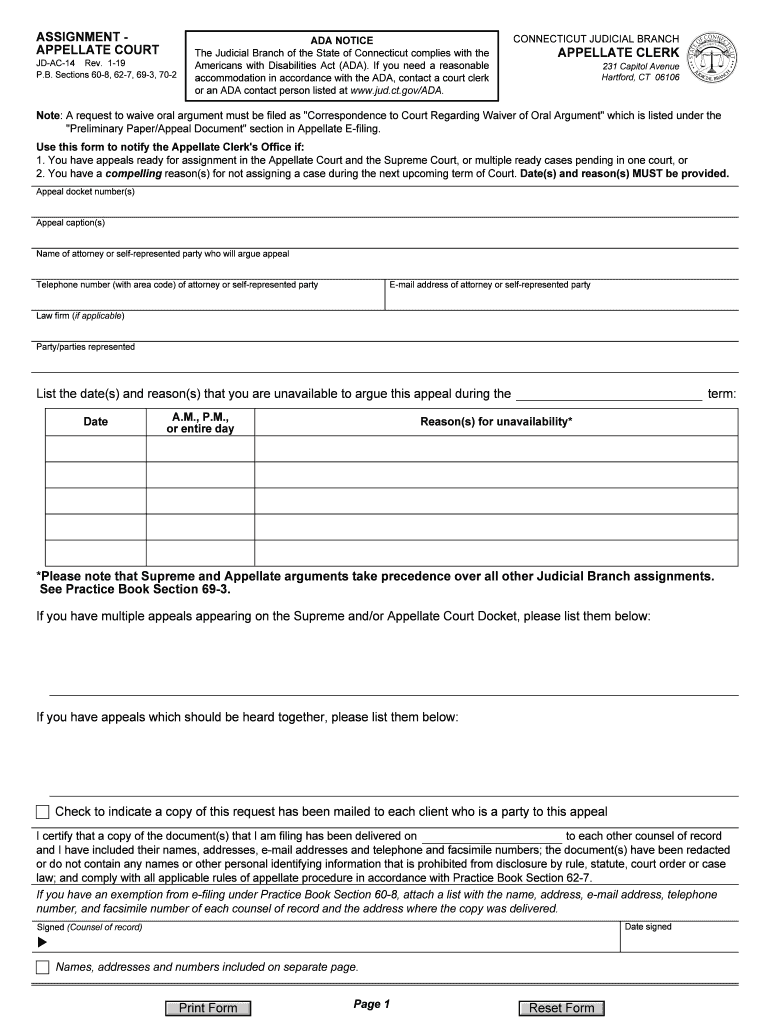
ASSIGNMENT APPELLATE COURTJDAC14 Rev. 119 P.B. Sections 608, 627, 693, 702ADA NOTICE The Judicial Branch of the State of Connecticut complies with the Americans with Disabilities Act (ADA). If you.
Loading

Open form follow the instructions

Easily sign the form with your finger

Send filled & signed form or save
How to fill out the CT JD-AC-14 online
Completing the CT JD-AC-14 form is an essential step for notifying the Appellate Clerk's Office regarding appeal assignments. This guide provides clear, step-by-step instructions to help users navigate the online form effectively.
Follow the steps to complete the CT JD-AC-14 online.
- Click the ‘Get Form’ button to obtain the CT JD-AC-14 form and open it in your editor of choice.
- Begin by entering the appeal docket number(s) in the designated section. Ensure this information is accurate to avoid any delays.
- Fill in the appeal caption(s) to identify each case you are referring to. Be precise in this field.
- Provide the name of the attorney or the self-represented party who will argue the appeal. Include their telephone number with area code for further contact.
- Enter the email address of the attorney or self-represented party to facilitate electronic communication.
- If applicable, include the name of the law firm representing the party or parties in the appeal.
- List all party or parties being represented in the case to clarify your client relationships.
- In the unavailability section, indicate the specific date(s) you are not available to argue the appeal. Be sure to specify whether it's for the A.M., P.M., or the entire day.
- Provide the reasons for your unavailability, ensuring they are clear and compelling. Remember that Supreme and Appellate arguments take precedence over all other Judicial Branch assignments.
- If you have multiple appeals or if certain appeals should be heard together, list them in the designated areas provided on the form.
- Check the box to confirm that a copy of this request has been mailed to each client who is a party to the appeal.
- Certify your filing by signing and entering the date you signed the document. Make sure your signature is included where indicated.
- If applicable, attach a list with contact information for each counsel of record for those with exemptions from e-filing.
- Finally, review all entered information for accuracy, then save any changes, download, print, or share the completed form as needed.
Complete your CT JD-AC-14 form online for efficient processing of your appeal assignments.
Experience a faster way to fill out and sign forms on the web. Access the most extensive library of templates available.
Related content
JD-AC-14 Rev. 1-19. P.B. Sections 60-8, 62-7, 69-3, 70-2. CONNECTICUT JUDICIAL BRANCH...
Normal measurements in pediatric radiology is being compiled by pediatric radiologists...
14 - High AC Frequency ... A switch shorts the CT circuit for single generator operation...
Get answers to your most pressing questions about US Legal Forms API.
How do I reschedule my jury duty in CT?
To reschedule jury duty in Connecticut, you should contact the court as soon as possible. You may be able to request a new date online or via phone, explaining your circumstances for needing to reschedule. Staying proactive about jury duty, especially in connection with your CT JD-AC-14 issues, can help you manage your legal responsibilities more effectively.
How to postpone jury duty in CT?
Postponing jury duty in Connecticut requires submitting a request for deferral to the court. You can typically do this through the court's website or by calling the court directly for instructions. If you need to address your CT JD-AC-14 situation while managing jury duty obligations, consider this option to ensure you fulfill both responsibilities.
How long do you have to file small claims in CT?
In Connecticut, you typically have small claims filing deadlines that align with the statute of limitations. Generally, you need to file your claim within six years of the incident that led to your dispute. Being aware of this time limit can help you take timely action in your CT JD-AC-14 case and secure your rights efficiently.
How long do you have to sue someone in CT?
In Connecticut, the time frame to file a lawsuit varies based on the nature of the complaint. Generally, you have six years to sue someone for most claims, including contracts, while some tort claims may require quicker action. Understanding these timelines, particularly in relation to your CT JD-AC-14 case, is essential to ensure you do not miss your opportunity to seek justice.
How do I fill out a w4 form 2019?
Step 1: Congrats on the new job! ... Step 2: Complete lines 1 to 4 of the 2019 W4 Form. ... Step 3: Skip lines 5 and 6 on the 2019 W4 Form and complete line 7. ... Step 4: Fill out the Personal Allowances Worksheet (Page 3)
How do I fill out a w4 2019?
Step 1: Congrats on the new job! ... Step 2: Complete lines 1 to 4 of the 2019 W4 Form. ... Step 3: Skip lines 5 and 6 on the 2019 W4 Form and complete line 7. ... Step 4: Fill out the Personal Allowances Worksheet (Page 3)
Why do I owe taxes if I claim 0 married?
The cause of your problem is that each of your jobs calculates your tax withholding using only that single job's income. With a dual-income household, the "married" choice usually under withholds (even with "0" allowances), leading to money owed when you file.
Does claiming 0 mean more taxes taken out?
Practically speaking, claiming 0 withholding allowances on a W-4 means that your employer will withhold the maximum amount of income taxes from your paycheck. Do not get that statement confused with 'you will pay more taxes'. This is an important distinction. ... Withhold too little, and you'll pay at the end of the year.
How can I get a bigger tax refund?
Know Available Deductions and Your Exemptions. ... Build Your Retirement Savings. ... Pay for Medical Expenses with a Flexible Spending Account (FSA) ... Deduct Medical and Dental Costs. ... 5. Make Charitable Donations. ... Consult a Tax Professional. ... Do Tax Deductions Really Increase Your Refund? ... Get Your Bigger Refund Faster.
Do you get a bigger tax refund if you make less money?
This increases your chances of over-withholding, which leads to a bigger tax refund. That's why it's called a refund: you are just getting money back that you overpaid to the IRS during the year. By claiming fewer allowances, you give the federal government your money for the year, tax-free.
Use professional pre-built templates to fill in and sign documents online faster. Get access to thousands of forms.
If you believe that this page should be taken down, please follow our DMCA take down process here.