Loading
Get Ct Form 13
How it works
-

Open form follow the instructions
-

Easily sign the form with your finger
-

Send filled & signed form or save
How to fill out the CT Form 13 online
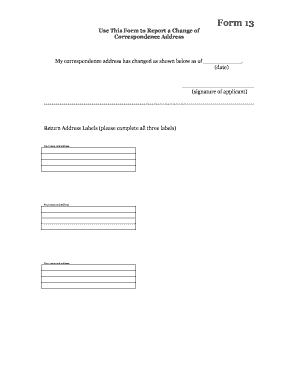
Filling out the CT Form 13 online is a straightforward process that allows you to report a change in your correspondence address. This guide provides clear, step-by-step instructions to help you complete the form accurately and efficiently.
Follow the steps to successfully complete the CT Form 13 online.
- Press the ‘Get Form’ button to access the form and open it in your browser.
- Locate the section where you need to indicate your new correspondence address. Enter your updated address clearly and ensure all details are accurate.
- Identify the date field and enter the effective date of your address change. This should be the date on which the change takes effect.
- Provide your signature in the designated field, confirming that the information you have provided is accurate and complete.
- Fill out the return address labels. You need to complete all three labels with your name and address, ensuring that they match the information provided in the previous sections.
- Once all sections are filled out, review the information to ensure accuracy. Make any necessary corrections.
- Save your changes, and then you may choose to download, print, or share the form as needed.
Complete your CT Form 13 online today and ensure your correspondence is directed to the correct address.
To get CT tax forms, head over to the Connecticut Department of Revenue Services website, where you can find all necessary tax forms, including CT Form 13, in a downloadable format. If you prefer a physical copy, visit a local government office or library. They often have printed versions available for public use.