Loading
Form preview
  • US Legal Forms
  • Form Library
  • Legal Forms
  • Colorado Legal Forms
  • Co Jdf 884 2008

Get Co Jdf 884 2008-2026

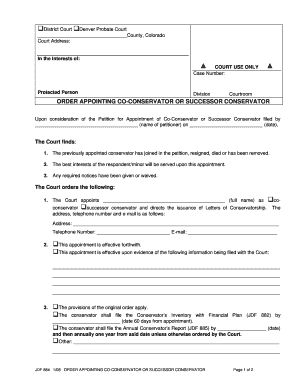
ER APPOINTING CO-CONSERVATOR OR SUCCESSOR CONSERVATOR Upon consideration of the Petition for Appointment of Co-Conservator or Successor Conservator filed by (name of petitioner) on (date), The Court finds: 1. The previously appointed conservator has joined in the petition, resigned, died or has been removed. 2. The best interests of the respondent/minor will be served upon this appointment. 3. Any required notices have been give.

How it works

  1. Open form

    Open form follow the instructions

  2. Easily sign form

    Easily sign the form with your finger

  3. Share form

    Send filled & signed form or save

How to fill out the CO JDF 884 online

The CO JDF 884 is a crucial form for appointing a co-conservator or successor conservator in Colorado. This guide will provide step-by-step instructions to help you complete the form accurately and effectively online.

Follow the steps to successfully complete the CO JDF 884 form

  1. Click ‘Get Form’ button to obtain the form and open it in the editor.
  2. Begin by entering the court address. You will need to fill in the specific district and probate court along with the county name, which is significant for official records.
  3. In the 'In the Interests of:' section, specify the name of the protected person for whom the conservatorship is being sought.
  4. Fill out the case number, division, and courtroom information. This information helps in tracking the case within the court system.
  5. Next, input the name of the petitioner and the date when the petition was filed. Ensure accuracy to avoid delays in processing.
  6. Indicate the name of the person being appointed as co-conservator or successor conservator in the specified field.
  7. Provide the contact details for the appointed conservator, including their address, telephone number, and email.
  8. Specify the effectiveness of the appointment, either forthwith or contingent on additional information being filed with the court.
  9. Complete the sections related to the conservator's inventory and annual report filing dates, detailing any required documentation.
  10. Decide whether the conservator will serve with or without a bond, and provide the necessary justifications if required.
  11. In the final section, any additional instructions or orders can be specified by the court.
  12. Once all sections are completed, ensure to save changes, then download, print, or share the completed form as required.

Complete your CO JDF 884 online today for a smooth conservatorship appointment process.

Get form

Experience a faster way to fill out and sign forms on the web. Access the most extensive library of templates available.
Get form

Related content

Seasonal rhythms of net primary production and...
by MJ Lutz · 2007 · Cited by 539 — We investigate the functioning of the ocean's...
Learn more
Class 55-lnclicators and Recorders
INDI. CATION BEING EITHER AUDIBLE OR VISUAL. 5/20/41. CBM;884A. CBM:SK-5295 .CZ. All 0.
Learn more

Related links form

TN BK-205 - Hamilton County 2025 AZ Terros Health Crisis Prevention And Support Team (D2) Referral Form 2015 CA DE 2501 2024 TX DL-101 2004

Questions & Answers

Get answers to your most pressing questions about US Legal Forms API.

Contact support

To file a protest with the Colorado Department of Revenue, begin by preparing a clear and concise written statement that outlines your disagreement. Include relevant details such as your taxpayer information, the specific issue you are protesting, and any supporting documents. By submitting this protest according to the department's guidelines, you will ensure that it is properly reviewed and addressed.

Filing a protest with the Colorado Department of Revenue is simple when you follow the required procedures. First, you must submit a written protest detailing your disagreement with the department's assessment. Include your contact information, the specific issues in question, and reference any applicable regulations or laws. This ensures your protest is thoroughly considered for a resolution.

To file a complaint with the Colorado Department of Revenue, start by gathering any relevant documents and information related to your issue. You can submit your complaint online through their official website or by mail using the designated forms. Make sure to include your contact details and clearly outline your concerns. This process can help you receive a timely resolution.

The two main types of conservatorship in Colorado are general and limited conservatorships. A general conservatorship grants broad authority over an individual's finances, while a limited conservatorship allows for specific, decided areas of control. Identifying which type suits your situation is essential for effective management. For detailed explanations and templates, USLegalForms is an excellent place to start.

In Colorado, guardianship and conservatorship serve different purposes. A guardian typically manages personal affairs, such as health care decisions, while a conservator manages financial matters, including assets and income. Understanding this distinction is vital when planning for someone’s care and management. Resources like USLegalForms clearly outline these differences when you explore the forms related to CO JDF 884.

While a conservatorship can provide necessary support, it also has disadvantages. The process can be time-consuming and may involve ongoing court oversight. Additionally, the conservatorship can limit the individual’s autonomy and decision-making capacity. Awareness of these factors is crucial before proceeding, and USLegalForms can help clarify the process for you.

Setting up a conservatorship in Colorado involves several steps, including filing a petition and notifying the interested parties. Complete the CO JDF 884 to ensure you have all required information. Following this, you will attend a court hearing where a judge will review your case. Consider using USLegalForms for templates and detailed instructions to make this process smoother.

To file for a conservatorship in Colorado, you must prepare the necessary documents, including the CO JDF 884 form. It is essential to gather financial records and any relevant supporting documents. Once completed, file them with the appropriate court in your county. Utilizing a platform like USLegalForms can simplify this process by providing you with the required forms and guidance.

Filing for emergency conservatorship in Colorado involves completing several legal forms, beginning with the appropriate application, which outlines why immediate action is necessary. You should gather all supporting documents and evidence to present your case effectively. Utilizing resources available through USLegalForms, including instructions relevant to the CO JDF 884, can streamline your filing process and enhance your chances for a successful outcome.

To fill out a motion for court, begin by clearly stating the type of motion you are filing. Include all necessary details, such as your name, the case number, and a brief explanation of the motion's purpose. Using the CO JDF 884 as a reference can simplify this process, and platforms like USLegalForms can help you draft a clear and effective motion.

Get This Form Now!

Use professional pre-built templates to fill in and sign documents online faster. Get access to thousands of forms.
Get form
If you believe that this page should be taken down, please follow our DMCA take down processhere.
Get CO JDF 884
Get form
  • Adoption
  • Bankruptcy
  • Contractors
  • Divorce
  • Home Sales
  • Employment
  • Identity Theft
  • Incorporation
  • Landlord Tenant
  • Living Trust
  • Name Change
  • Personal Planning
  • Small Business
  • Wills & Estates
  • Packages A-Z
  • Affidavits
  • Bankruptcy
  • Bill of Sale
  • Corporate - LLC
  • Divorce
  • Employment
  • Identity Theft
  • Internet Technology
  • Landlord Tenant
  • Living Wills
  • Name Change
  • Power of Attorney
  • Real Estate
  • Small Estates
  • Wills
  • All Forms
  • Forms A-Z
  • Form Library
  • Legal Hub
  • About Us
  • Help Portal
  • Legal Resources
  • Blog
  • Affiliates
  • Contact Us
  • Delete My Account
  • Site Map
  • Industries
  • Forms in Spanish
  • Localized Forms
  • State-specific Forms
  • Forms Kit
  • Real Estate Handbook
  • All Guides
  • Notarize
  • Incorporation services
  • For Consumers
  • For Small Business
  • For Attorneys
  • USLegal
  • FormsPass
  • pdfFiller
  • signNow
  • altaFlow
  • DocHub
  • Instapage
Form Packages
  • Adoption
  • Bankruptcy
  • Contractors
  • Divorce
  • Home Sales
  • Employment
  • Identity Theft
  • Incorporation
  • Landlord Tenant
  • Living Trust
  • Name Change
  • Personal Planning
  • Small Business
  • Wills & Estates
  • Packages A-Z
Form Categories
  • Affidavits
  • Bankruptcy
  • Bill of Sale
  • Corporate - LLC
  • Divorce
  • Employment
  • Identity Theft
  • Internet Technology
  • Landlord Tenant
  • Living Wills
  • Name Change
  • Power of Attorney
  • Real Estate
  • Small Estates
  • Wills
  • All Forms
  • Forms A-Z
  • Form Library
Customer Service
  • Legal Hub
  • About Us
  • Help Portal
  • Legal Resources
  • Blog
  • Affiliates
  • Contact Us
  • Delete My Account
  • Site Map
  • Industries
  • Forms in Spanish
  • Localized Forms
  • State-specific Forms
  • Forms Kit
Legal Guides
  • Real Estate Handbook
  • All Guides
Prepared for you
  • Notarize
  • Incorporation services
Our Customers
  • For Consumers
  • For Small Business
  • For Attorneys
Our Sites
  • USLegal
  • FormsPass
  • pdfFiller
  • signNow
  • altaFlow
  • DocHub
  • Instapage
Social Media
Call us now toll free:
+1 833 426 79 33
As seen in:
© Copyright 1999-2026 airSlate Legal Forms, Inc. 3720 Flowood Dr, Flowood, Mississippi 39232
  • Your Privacy Choices
  • Terms of Service
  • Privacy Notice
  • Content Takedown Policy
  • Bug Bounty Program