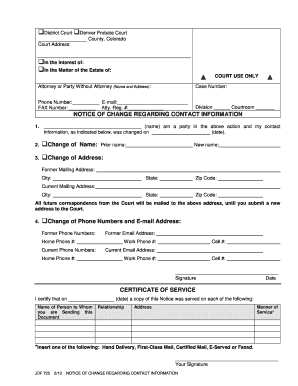
(Name and Address): Case Number: Phone Number: E-mail: FAX Number: Atty. Reg. #: Division Courtroom NOTICE OF CHANGE REGARDING CONTACT INFORMATION 1. (name) am a party in the above action and my contact (date). information, as indicated below, was changed on 2. Change of Name: 3. Change of Address: Prior name: New name: Former Mailing Address: City: State: Zip Code:.

How it works
  • Open form

    Open form follow the instructions

  • Easily sign form

    Easily sign the form with your finger

  • Share form

    Send filled & signed form or save

How to fill out the CO JDF 725 online

The CO JDF 725 form is a notification document used to update a court regarding changes to contact information. This guide provides clear, step-by-step instructions for completing the form online, ensuring straightforward navigation for all users.

Follow the steps to successfully fill out the CO JDF 725 online.

  1. Press the ‘Get Form’ button to obtain the CO JDF 725 and open it in your preferred form editor.
  2. Enter the court type by selecting either 'District Court' or 'Denver Probate Court'.
  3. Fill in the county name where the action is filed.
  4. Complete the court address section, providing the necessary details.
  5. Identify if you are filling this out in the interest of someone or regarding an estate and complete the appropriate section.
  6. In the 'Attorney or Party Without Attorney' section, enter your name, address, phone number, email, fax number, and attorney registration number if applicable.
  7. Note the division and courtroom information.
  8. In the section labeled 'Notice of Change Regarding Contact Information,' write your name and the date the change occurred.
  9. Select the type of change you are reporting — either a change of name, address, or contact numbers and email.
  10. If changing your name, provide both your prior and new name clearly.
  11. For an address change, list your former mailing address and your new mailing address, including city, state, and zip code.
  12. If you are changing your phone numbers and email, list the former phone numbers and email address followed by the current details.
  13. Sign and date the form where indicated at the bottom.
  14. Lastly, in the 'Certificate of Service' section, include the date you served this notice and provide details for each person to whom the document is sent, including their relationship and address.
  15. Insert the manner of service used for delivering the document, then sign again at the bottom.

Complete your document online today to ensure a smooth updating process.

Get form

Experience a faster way to fill out and sign forms on the web. Access the most extensive library of templates available.

Related content

JDF 725 - Contact Information Change (probate)

JDF 725 is a notice of change for contact information, including name, address, phone, and...

Learn more
Loricariidae): An Evolutionary Analysis in a High...

by CA Lorscheider · 2018 · Cited by 13 — ABSTRACT. The karyotypes of three armored...

Learn more
The Furrow

May 21, 2019 — The company claims it can be 390 times more productive than in a...

Learn more
Questions & Answers

Get answers to your most pressing questions about US Legal Forms API.

Contact support

How to fill out a motion for court?

When filling out a motion for court, begin by clearly stating the title of the motion and the relief you seek. Be sure to include essential information such as case number, party names, and pertinent facts supporting your request. Using a resource like US Legal Forms can be beneficial, as it provides templates and FAQs that can help you understand how to use the CO JDF 725 effectively.

Filling out a JDF 76 involves providing specific information about your case, including the names of parties involved and relevant case details. It is crucial to follow the instructions carefully, as errors can complicate your filing. You can access detailed guidance and templates for the CO JDF 725 on platforms like US Legal Forms, which can make this process more straightforward.

To file a satisfaction of judgment in Colorado, you first need to obtain a Satisfaction of Judgment form, which can be found through official legal resources or platforms such as US Legal Forms. After completing the form with accurate details, you must file it with the court where the original judgment was issued. Remember, submitting the CO JDF 725 can help ensure your records reflect that the judgment has been satisfied.

In Colorado, a court case number typically follows a standard format that includes the year, a prefix indicating the type of case, and a sequential number. For instance, the format might look like '2022CV12345', where '2022' is the year, 'CV' denotes a civil case, and '12345' is the unique identifier for that specific case. Understanding this format can help you locate case details more easily, especially when using resources like CO JDF 725.

To properly fill out a JDF 76 form, first read the instructions carefully to understand the requirements. Ensure you include all relevant case details, and always double-check for accuracy. For additional support with the CO JDF 725, consider utilizing USLegalForms, which offers step-by-step guides on completing various forms.

An order to show cause is a legal document that compels a party to appear in court and explain why a specific action should not be taken. In Colorado, this order is often used in family law cases, including those concerning custody or support issues. Understanding its format and context is crucial, and USLegalForms can provide templates that incorporate the CO JDF 725, making the process easier.

Yes, you can file for divorce electronically in Colorado. The state provides an online platform for submitting legal documents, including divorce filings, which streamlines the process. Utilizing services like USLegalForms can help ensure you have the correct documentation such as the CO JDF 725 needed for your electronic submission.

To fill out the JDF 76 form, start by collecting all necessary information regarding your case. Ensure you accurately complete each section, paying special attention to dates and names as they appear on other legal documents. If you need assistance or templates, USLegalForms offers resources that guide you in filling out this form correctly.

To acquire a mining claim in Colorado, start by finding a location that interests you and is open for claims. You need to file a claim with the proper authorities, mentioning CO JDF 725 regulations throughout the process. This involves submitting the necessary forms and fees. Consider using online platforms like US Legal Forms to access resources that can simplify your claim acquisition.

Yes, you can still patent a mining claim in certain conditions, although the process has changed over the years. Patenting, which provides full ownership of both land and mineral rights, requires compliance with CO JDF 725. This makes sure you meet all necessary legal criteria. Always check the current regulations as they can affect your ability to patent.

Get This Form Now!

Use professional pre-built templates to fill in and sign documents online faster. Get access to thousands of forms.

If you believe that this page should be taken down, please follow our DMCA take down process here.

Get CO JDF 725