Loading
Get Co Jdf 342 2000-2026
How it works
-

Open form follow the instructions
-

Easily sign the form with your finger
-

Send filled & signed form or save
How to fill out the CO JDF 342 online
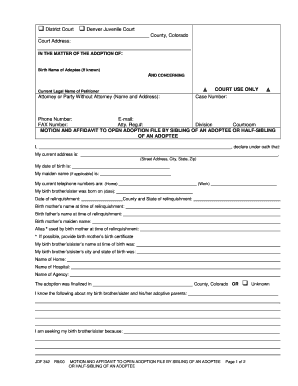
The CO JDF 342 form is a motion and affidavit to open adoption files by a sibling or half-sibling of an adoptee. This guide provides comprehensive and clear instructions for users to complete the form accurately and efficiently online.
Follow the steps to fill out the CO JDF 342 form correctly.
- Press the ‘Get Form’ button to access the CO JDF 342 form and open it in your online editor.
- Begin by entering the birth name of the adoptee if known. This field is crucial for the court to identify the relevant adoption case.
- Fill in the current legal name of the petitioner. This identifies you as the individual requesting to open the adoption file.
- If you are an attorney or a party without an attorney, enter your name and address in the provided field. Include the case number, phone number, email, FAX number, attorney registration number, division, and courtroom, if applicable.
- Complete the declaration section by providing your current address, date of birth, maiden name if applicable, and your current phone numbers. Ensure all information is accurate.
- Provide details regarding your birth brother/sister, including their birth date, date of relinquishment, and the county and state of relinquishment. Include relevant names, such as the birth mother’s name at the time of relinquishment.
- Document the details of the birth brother’s/sister’s birth name, city, and state of birth. Include the names of relevant hospitals, homes, or agencies involved with the adoption.
- Indicate where the adoption was finalized, either specifying the county in Colorado or selecting 'Unknown' if you do not have this information.
- In the final sections, write a brief statement about what you know regarding your birth brother/sister and their adoptive parents. Then, describe your reasons for seeking this information.
- Conclude by signing and dating the form in the designated areas. Make sure to include details for the notary public section, as this form requires notarization.
- After completing the form, you can save changes, download the document, print it for mailing or in-person submission, or share it as necessary.
Take the first step towards accessing important adoption records by completing the CO JDF 342 form online.
Contact the courthouse in the county where you received your divorce decree. ... File a motion for enforcement or contempt, depending on the instructions you receive from the court. ... Attend the scheduled court hearing so a judge can address your problem.