Loading
Get Co Jdf 204 2004-2026
How it works
-

Open form follow the instructions
-

Easily sign the form with your finger
-

Send filled & signed form or save
How to fill out the CO JDF 204 online
The CO JDF 204 is a crucial form for requesting payment of expert witness fees and expenses related to court cases in Colorado. This guide aims to provide clear, step-by-step instructions to help you accurately complete the form online.
Follow the steps to complete the CO JDF 204 form.
- Press the ‘Get Form’ button to access the CO JDF 204 form and open it in your preferred online editor.
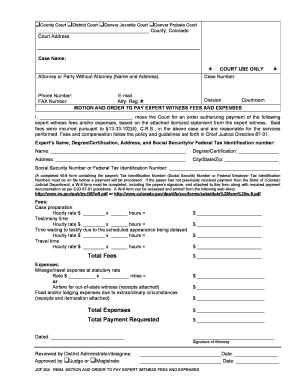
- Enter the court address information at the top of the form, ensuring you include the county and accurate court name.
- Fill in the case name and case number in the specified fields, which are crucial for identifying your motion within the court system.
- Provide your contact information including your name, address, phone number, fax number, and email address in the section designated for the attorney or party without an attorney.
- Identify the appropriate division and courtroom by filling in the respective fields as directed.
- In the motion section, write your name in the designated blank to indicate who is requesting the order for expert witness fees.
- Detail the expert's name, degree or certification, address, and either Social Security number or Federal Tax Identification number. This information must be accurate for payment processing.
- Calculate and enter the fees incurred for different services, including case preparation, testimony time, waiting to testify, and travel time. Use the designated fields to ensure clarity.
- Document any expenses incurred, such as mileage, airfare, food, or lodging. Attach receipts and itemization as indicated to substantiate these claims.
- Sum the fees and expenses to determine the total payment requested, ensuring all calculations are accurate and double-checked.
- Date the form and provide your signature as the attorney, confirming the submission of the motion.
- If required, ensure the form is reviewed and approved by the designated district administrator or a judge/magistrate before final submission.
- After completing the form, you can save any changes made, download a copy for your records, print it for submission, or securely share it as necessary.
Complete your CO JDF 204 form online today and ensure timely processing of your expert witness payment request.
Contact the courthouse in the county where you received your divorce decree. ... File a motion for enforcement or contempt, depending on the instructions you receive from the court. ... Attend the scheduled court hearing so a judge can address your problem.