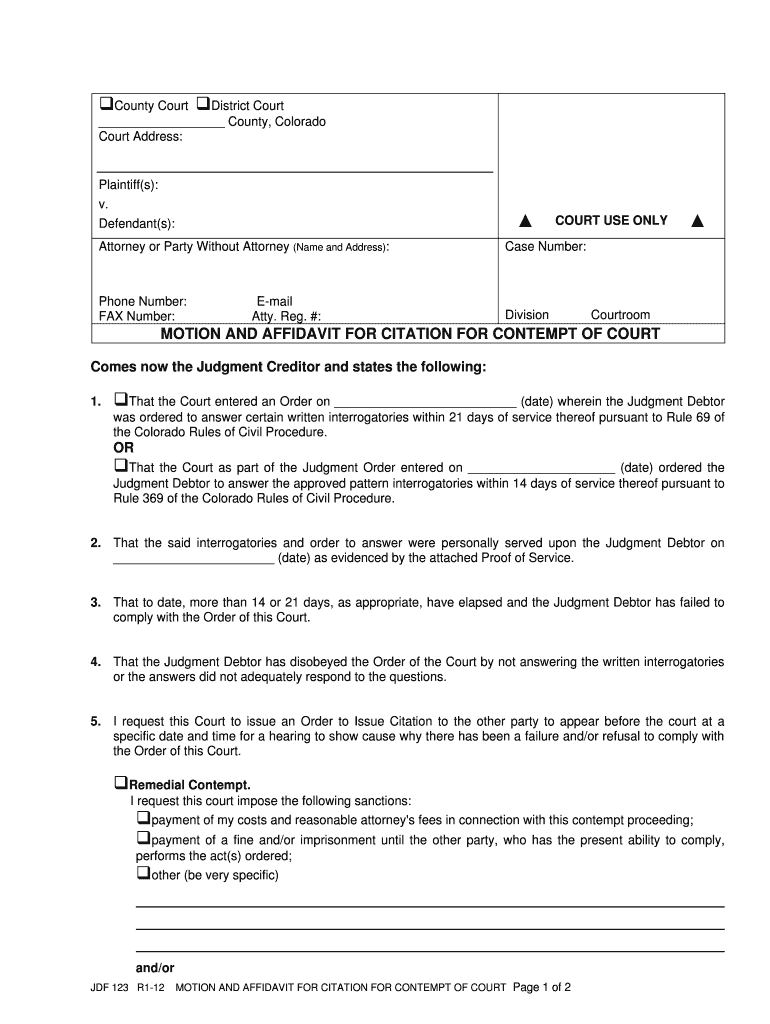
Er: Phone Number: FAX Number: Division E-mail Atty. Reg. #: Courtroom MOTION AND AFFIDAVIT FOR CITATION FOR CONTEMPT OF COURT Comes now the Judgment Creditor and states the following: 1. That the Court entered an Order on (date) wherein the Judgment Debtor was ordered to answer certain written interrogatories within 21 days of service thereof pursuant to Rule 69 of the Colorado Rules of Civil Procedure. OR That the Court as part of the Judgment Order ent.
Loading

Open form follow the instructions

Easily sign the form with your finger

Send filled & signed form or save
How to fill out the CO JDF 123 online
Filling out the CO JDF 123 form is an essential step in addressing issues of contempt of court. This guide will provide you with clear, step-by-step instructions on how to complete this form online, ensuring you have the necessary information to proceed effectively.
Follow the steps to fill out the CO JDF 123 form correctly.
- Press the ‘Get Form’ button to obtain the CO JDF 123 form and open it in your preferred online editor.
- Begin by filling in the court type at the top of the form, specifying whether it is County Court or District Court. Then, enter the county name where the court is located.
- Input the court address in the designated field for clarity. This ensures the court can process your documents appropriately.
- In the Plaintiff(s) and Defendant(s) sections, clearly outline the names of all parties involved in the case. This section is crucial for identifying who is bringing the motion and who is being accused.
- Complete the Attorney or Party Without Attorney section if applicable. Include your name, address, phone number, email, and attorney registration number, if you have one.
- Fill in the case number in the appropriate field. This number can typically be found on previous court documents related to your case.
- Follow the subsequent prompts in the motion section, specifying the details of the contempt situation as per the provided options. Be sure to state any orders that were not complied with and the dates of those orders.
- Select the type of contempt you are addressing: Remedial or Punitive. Provide detailed requests for remedies or sanctions you believe are appropriate in the context of your case.
- At the verification and acknowledgment section, ensure you sign and date the form as the Judgment Creditor, confirming your oath that the information provided is true to the best of your knowledge.
- Finalize the document by ensuring all fields are properly filled and review for accuracy. Once completed, you can save changes, download, print, or share the form as necessary.
Begin the process of completing the CO JDF 123 online today to effectively address your legal matters.
Experience a faster way to fill out and sign forms on the web. Access the most extensive library of templates available.
Related content
Judgment Debtor to answer the approved pattern interrogatories within 14 days of service...
This chapter will review predictive factors currently in use and discuss some of the...
If the JDF job has a target path specified in the job, JDF output is always created. For...
Get answers to your most pressing questions about US Legal Forms API.
How to enforce a judgment in Colorado?
Enforcing a judgment in Colorado involves several steps, starting with obtaining a certified copy of the judgment from the court. You can then choose to garnish wages or bank accounts, or place liens on property if necessary. Utilize resources available through uslegalforms for guidance on executing your judgment effectively and understanding your rights.
How to file a small claims case in Jefferson County, Colorado?
To file a small claims case in Jefferson County, first gather your documentation and complete the required JDF forms, including the CO JDF 123. You can file your claim at the county courthouse in person or use electronic filing options if available. Reference uslegalforms for guidance in preparing and submitting your documents properly.
How long do you have to file a small claims case in Colorado?
In Colorado, you generally have two years from the date of the incident to file a small claims case. It is essential to be aware of this timeline to ensure your ability to pursue your claim. If you miss this deadline, your opportunity to seek resolution will be forfeited. For detailed procedures, consider tools available on uslegalforms.
How to fill out a JDF 76?
To fill out a JDF 76 form, start by obtaining the form from the appropriate court's website or through uslegalforms, which simplifies the process. Carefully follow the instructions provided, ensuring that all fields are accurately completed. Make sure to save the completed form and audit it for any errors before submission, as an incorrect form may delay your case.
How to fill out JDF 76?
Filling out JDF 76 is a straightforward process if you focus on each section. Begin with your name and contact information, followed by pertinent details about your case. Remember to read the instructions carefully to ensure accurate completion. For further assistance, CO JDF 123 offers comprehensive resources to clarify any uncertainties you might have.
How to fill out a motion for court?
Filling out a motion for court involves drafting a clear and concise statement of your request. Include the case number, relevant facts, and the specific relief you seek. Each motion must comply with court rules to be effective. To aid in this process, the CO JDF 123 format provides a structured approach that can save you time and effort.
How do I take someone to small claims court in Colorado?
To take someone to small claims court in Colorado, first, ensure your claim meets the court's guidelines. Gather all necessary documents and evidence to support your case. Next, file your claim at the appropriate court and serve the defendant with the filed paperwork. Utilizing the CO JDF 123 can help streamline your small claims process.
How to fill out a JDF 76 form?
Filling out a JDF 76 form requires attention to detail. Start by clearly providing your personal information, then describe the circumstances related to your case. Be precise and thorough to avoid delays. If you need help with this form, the CO JDF 123 resource provides useful instructions and tips to simplify the process.
What is the order to show cause in Colorado?
An order to show cause is a legal document that requires a party to explain why the court should not take a specific action. This order typically accompanies motions for contempt or to modify existing orders. It gives the recipient a chance to present their side before the court makes a decision. For detailed guidance on this process, refer to CO JDF 123.
What is the contempt rule in Colorado?
The contempt rule in Colorado allows individuals to enforce court orders. If someone does not comply with a ruling, the affected party can file a motion for contempt. This process helps ensure that courts maintain authority. Understanding the CO JDF 123 is essential if you find yourself in such a situation.
Use professional pre-built templates to fill in and sign documents online faster. Get access to thousands of forms.
If you believe that this page should be taken down, please follow our DMCA take down process here.