Loading
Form preview
  • US Legal Forms
  • Other Templates
  • Legal Forms
  • Colorado Legal Forms
  • Co Form 13317 2009

Get Co Form 13317 2009-2026

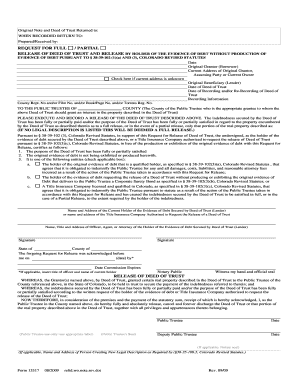
Tle Insurance Company authorized to request the release of the Deed of Trust; NOW THEREFORE, in consideration of the premises and the payment of the statutory sum, receipt of which is hereby acknowledged, I, as the Public Trustee in the County named above, do hereby fully and absolutely release, cancel and forever discharge the Deed of Trust or that portion of the real property described above in the Deed of Trust, together with all privileges and appurtenances thereto belonging. Public Trustee.

How it works

  1. Open form

    Open form follow the instructions

  2. Easily sign form

    Easily sign the form with your finger

  3. Share form

    Send filled & signed form or save

How to fill out the CO Form 13317 online

Filling out the CO Form 13317 online can seem daunting, but with clear guidance, the process becomes manageable. This form is essential for requesting the release of a deed of trust in Colorado and understanding each component will help ensure a smooth submission.

Follow the steps to effectively complete the CO Form 13317 online.

  1. Press the ‘Get Form’ button to acquire the form and open it for editing.
  2. Begin by entering the date in the specified field. This indicates when the request is made.
  3. Fill in the name of the original grantor, also known as the borrower, along with their current address. If the current address is not known, check the designated box.
  4. Enter the name of the original beneficiary, or lender, as well as the date of the deed of trust.
  5. Provide the recording date and related recording information including county receipt number, film number, or book/page number.
  6. Identify the public trustee of the appropriate county by inserting the county's name where the property is located.
  7. State whether the indebtedness has been fully or partially paid. If applicable, specify in the section provided whether this is a full or partial release of the deed of trust.
  8. Check the applicable box corresponding to the certification regarding the original evidence of debt and selected entity type, ensuring compliance with state statutes.
  9. Fill in the name and address of the current holder of the evidence of debt, or the title insurance company, requesting the release.
  10. Sign the form, and if applicable, include the title of the person signing. Ensure the signatures are from authorized individuals.
  11. Complete the notary acknowledgment section, including the date of signing and the expiration date of the notary's commission if required.
  12. Finally, review all entries for accuracy. Once confirmed, save the changes, download, print, or share the completed form as necessary.

Take action now and complete your CO Form 13317 online!

Get form

Experience a faster way to fill out and sign forms on the web. Access the most extensive library of templates available.
Get form

Related content

Pub 100-04 Medicare Claims Processing
Jul 24, 2025 — Review bariatric surgery claims data and determine whether a pre- or...
Learn more
Ion-catalyzed synthesis of N/O co-doped carbon...
Dive into the research topics of 'Ion-catalyzed synthesis of N/O co-doped carbon nanorods...
Learn more
BUDGET OF THE ORGANIZATION 2017 – 2018 – 2019
Exhibit 1. 2017-2019 Budget by Category of Expenditure and Location...
Learn more

Related links form

AZ Form 120 2024 CA Beverly Hills Farmers Market Farmer Application 2006 NY Rental Registration Application - Town Of Clarkstown 2024 Canada Application For Rent-Geared-to-Income (RGI) And Modified Housing - Region Of Durham 2020

Questions & Answers

Get answers to your most pressing questions about US Legal Forms API.

Contact support

To fill out the credit authorization form, begin by providing your personal information, such as name, address, and Social Security number. Next, input the required financial details and specify the authorization parameters clearly. Finally, review the form for accuracy and sign it. Processes related to the CO Form 13317 can help you navigate these steps with ease.

To fill out the Employee Withholding Certificate form, start by entering your basic personal information, followed by the specific details regarding your tax situation. Make sure to correctly number your withholding allowances based on your status. After filling in all pertinent sections, review the form carefully before signing and submitting it to your employer. CO Form 13317 can be a helpful guide in this process.

When deciding whether to claim 0 or 1 on your W4, consider your personal tax situation. Claiming 0 means higher tax withholding, which could lead to a refund come tax season, while claiming 1 may result in less withholding. It's important to evaluate your income and deductions to make the best choice for your circumstances. Consulting resources associated with CO Form 13317 can provide clarity on this decision.

Filling out an employee's withholding certificate involves entering relevant details such as the employee's name, Social Security number, and the number of allowances claimed. It's critical to double-check all entries for accuracy. After completing the form, employees should sign and date it, and then submit it to their employer. For an efficient experience, CO Form 13317 on uslegalforms can help streamline this process.

The employee's withholding certificate is completed by the employee themselves. It's essential that this individual accurately provides their personal information and withholding details. Employers may provide guidance but ultimately, the responsibility lies with the employee. Accessing resources like CO Form 13317 can smooth the way for proper completion.

After completing the employee's withholding allowance certificate, you should submit it to your employer. They will use this information to determine the amount of federal income tax to withhold from your paychecks. Ensure that you keep a copy for your records, as you may need it for future tax filings. Utilizing CO Form 13317 simplifies this submission process.

To fill out the third party authorization form for CO Form 13317, start by entering your personal information, including name and contact details. Next, specify the third party's information, ensuring you include their name and contact method. Lastly, sign the form to give permission for your information to be shared with that third party. Using platforms like uslegalforms can make this process straightforward and efficient.

To release a deed of trust in Colorado, use the CO Form 13317, which serves as the official document required for this purpose. After completing and signing the form, file it with the county recorder's office. This process effectively removes the deed of trust from the property records, confirming that the obligation has been fulfilled.

To remove someone from a deed of trust, you usually need their consent and participation in the process. This often involves creating a new deed of trust or modifying the existing one, using the CO Form 13317 to document the change accordingly. Always consult a legal expert or platform like USLegalForms to ensure all steps comply with local regulations.

You can easily obtain Colorado state tax forms from the Colorado Department of Revenue's website. They offer a range of downloadable forms in PDF format, including the necessary CO Form 13317 if applicable. Alternatively, you can visit local tax offices or request forms by mail for your convenience.

Get This Form Now!

Use professional pre-built templates to fill in and sign documents online faster. Get access to thousands of forms.
Get form
If you believe that this page should be taken down, please follow our DMCA take down processhere.
Get CO Form 13317
Get form
  • Adoption
  • Bankruptcy
  • Contractors
  • Divorce
  • Home Sales
  • Employment
  • Identity Theft
  • Incorporation
  • Landlord Tenant
  • Living Trust
  • Name Change
  • Personal Planning
  • Small Business
  • Wills & Estates
  • Packages A-Z
  • Affidavits
  • Bankruptcy
  • Bill of Sale
  • Corporate - LLC
  • Divorce
  • Employment
  • Identity Theft
  • Internet Technology
  • Landlord Tenant
  • Living Wills
  • Name Change
  • Power of Attorney
  • Real Estate
  • Small Estates
  • Wills
  • All Forms
  • Forms A-Z
  • Other Templates
  • Legal Hub
  • About Us
  • Help Portal
  • Legal Resources
  • Blog
  • Affiliates
  • Contact Us
  • Delete My Account
  • Site Map
  • Industries
  • Forms in Spanish
  • Localized Forms
  • State-specific Forms
  • Forms Kit
  • Real Estate Handbook
  • All Guides
  • Notarize
  • Incorporation services
  • For Consumers
  • For Small Business
  • For Attorneys
  • USLegal
  • FormsPass
  • pdfFiller
  • signNow
  • altaFlow
  • DocHub
  • Instapage
Form Packages
  • Adoption
  • Bankruptcy
  • Contractors
  • Divorce
  • Home Sales
  • Employment
  • Identity Theft
  • Incorporation
  • Landlord Tenant
  • Living Trust
  • Name Change
  • Personal Planning
  • Small Business
  • Wills & Estates
  • Packages A-Z
Form Categories
  • Affidavits
  • Bankruptcy
  • Bill of Sale
  • Corporate - LLC
  • Divorce
  • Employment
  • Identity Theft
  • Internet Technology
  • Landlord Tenant
  • Living Wills
  • Name Change
  • Power of Attorney
  • Real Estate
  • Small Estates
  • Wills
  • All Forms
  • Forms A-Z
  • Other Templates
Customer Service
  • Legal Hub
  • About Us
  • Help Portal
  • Legal Resources
  • Blog
  • Affiliates
  • Contact Us
  • Delete My Account
  • Site Map
  • Industries
  • Forms in Spanish
  • Localized Forms
  • State-specific Forms
  • Forms Kit
Legal Guides
  • Real Estate Handbook
  • All Guides
Prepared for you
  • Notarize
  • Incorporation services
Our Customers
  • For Consumers
  • For Small Business
  • For Attorneys
Our Sites
  • USLegal
  • FormsPass
  • pdfFiller
  • signNow
  • altaFlow
  • DocHub
  • Instapage
Social Media
Call us now toll free:
+1 833 426 79 33
As seen in:
© Copyright 1999-2026 airSlate Legal Forms, Inc. 17 Station Street, Ste. 203, Brookline, MA 02445
  • Your Privacy Choices
  • Terms of Service
  • Privacy Notice
  • Content Takedown Policy
  • Bug Bounty Program