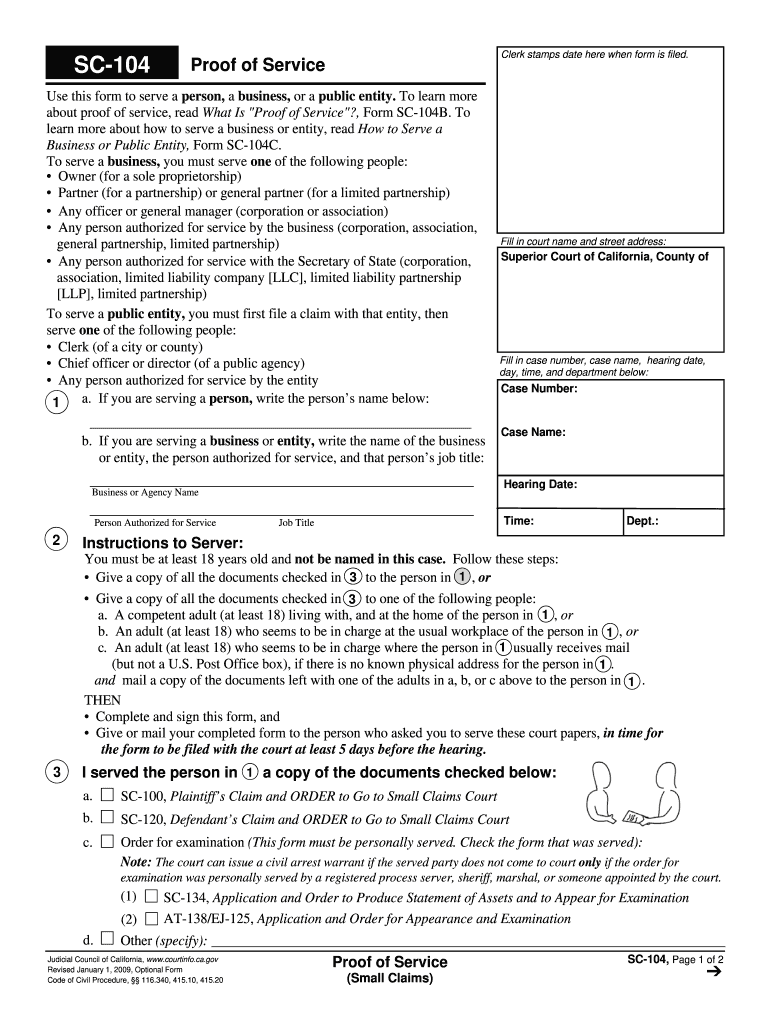
Ant if the served party does not come to court only if the order for examination was personally served by a registered process server, sheriff, marshal, or someone appointed by the court. (1) d. SC-134, Application and Order to Produce Statement of Assets and to Appear for Examination AT-138/EJ-125, Application and Order for Appearance and Examination (2) Other (specify): Judicial Council of California, www.courtinfo.ca.gov Revised January 1, 2009, Optional Form Code of Civil Procedure,.
Loading

Open form follow the instructions

Easily sign the form with your finger

Send filled & signed form or save
How to fill out the CA SC-104 online
The CA SC-104 form, known as the Proof of Service, is essential for serving a person, business, or public entity in legal proceedings. This guide will walk you through the process of filling out the form online, ensuring you understand each section and how to provide accurate information.
Follow the steps to complete the CA SC-104 online:
- Click ‘Get Form’ button to obtain the form and open it in the editor.
- Enter the appropriate court name and street address where your case is filed. This ensures the form is linked to the correct legal matter.
- Provide the case number, case name, hearing date, time, and department. Accurate details are crucial for filing.
- If you are serving an individual, write the person’s name in the designated area. For business or public entities, include the name of the entity, the authorized person for service, and their job title.
- Follow the instructions for service: you can serve documents directly to the person or through a competent adult at their residence or workplace.
- Complete the section indicating what documents were served, checking all applicable boxes. This could include forms like SC-100 or SC-120.
- Fill out either the personal service or substituted service section, indicating the method of service and providing the date and time.
- In the 'Server’s Information' section, input your details, including your name, address, and phone number.
- Finally, review all your entries carefully for accuracy and completeness. Once satisfied, sign the form to verify the information is correct and submit it in alignment with court requirements.
- Save the completed form, download it for your records, or print it for filing as needed.
Complete your documents online to ensure a smooth submission process.
Experience a faster way to fill out and sign forms on the web. Access the most extensive library of templates available.
Related content
Form SC-104 is used to serve a person, business, or public entity. The server must be at...
What is this course about? No matter what stage you are at or what career interests you...
The SV 104 instrument is a revolutionary new approach to occupational health and safety...
Get answers to your most pressing questions about US Legal Forms API.
Are judgments hard to collect?
Collecting judgments can often be challenging, mainly because debtors may not have the funds available or may try to evade payment. The process may involve several steps, including garnishments or liens, which can complicate matters. Using resources like the CA SC-104 can streamline some of these processes, ensuring you have the proper legal documentation to pursue enforcement effectively. With the right tools from US Legal Forms, you can navigate judgment collection with greater ease and confidence.
How do I submit evidence to small claims court in California?
To submit evidence to small claims court in California, ensure that all materials are organized and relevant. Submit your evidence according to the guidelines outlined in the CA SC-104 and file them with the court before your hearing. Consider using USLegalForms to streamline the submission process, ensuring your evidence supports your case effectively.
How do I complete a writ of execution in California?
Completing a writ of execution in California requires filling out specific forms accurately, including the CA SC-104. After completion, file the writ with the appropriate court to enforce the judgment. If you're unsure about the process, leveraging the resources provided by USLegalForms can facilitate the preparation of your documents.
How to represent yourself in small claims court?
Representing yourself in small claims court involves understanding the basics of legal proceedings and familiarizing yourself with the CA SC-104. First, gather all relevant documents and evidence, and then prepare your argument logically and concisely. Resources like USLegalForms can offer guidance and templates to help you navigate the process more effectively.
How to present evidence in small claims court in California?
Presenting evidence in small claims court in California requires you to prepare your exhibits in advance. When you arrive in court, refer to the CA SC-104 guidelines, and clearly explain the relevance of your evidence to the case at hand. You may want to practice your presentation to ensure clarity and confidence when addressing the judge.
How to introduce evidence in court in California?
To introduce evidence in court in California, begin by ensuring your evidence is relevant and permissible. During your presentation, reference the CA SC-104 to substantiate your claims and organize your materials for clarity. Remember, effective organization and adherence to court rules significantly enhance your chances of successfully introducing evidence.
How do I file proof of service in small claims court in California?
Filing proof of service in small claims court in California involves completing the appropriate forms, such as the CA SC-104, which outlines the service method used. After filling out the necessary information, submit the proof to the court by the deadline. For a seamless experience, using USLegalForms can help you complete these forms accurately.
How to request evidence in court?
To request evidence in court, start by identifying the specific documents or items you need. Then, file a formal request through the appropriate legal channels, ensuring you follow any guidelines set forth in the CA SC-104. It's also beneficial to consult legal resources or platforms like USLegalForms to simplify the request process and ensure accuracy.
Can I file my own civil lawsuit?
Yes, you can file your own civil lawsuit in California. The process typically begins with completing the appropriate forms, which may include a complaint and a summons, depending on your case. You can use resources from platforms like USLegalForms to guide you through the necessary paperwork and filing process. Filing your own civil lawsuit allows you to seek justice without incurring high legal fees, making it a viable option for many.
How do I file proof of Service in California court?
Filing proof of Service in California court involves completing the CA SC-104 form, which documents the delivery of legal documents to the opposing party. Ensure that all sections of the form are filled in accurately, noting the service date and method. Once completed, file the form with the court clerk, who will then stamp it and return a copy to you for your records. This step is crucial for the court to recognize your compliance with service requirements.
Use professional pre-built templates to fill in and sign documents online faster. Get access to thousands of forms.
If you believe that this page should be taken down, please follow our DMCA take down process here.