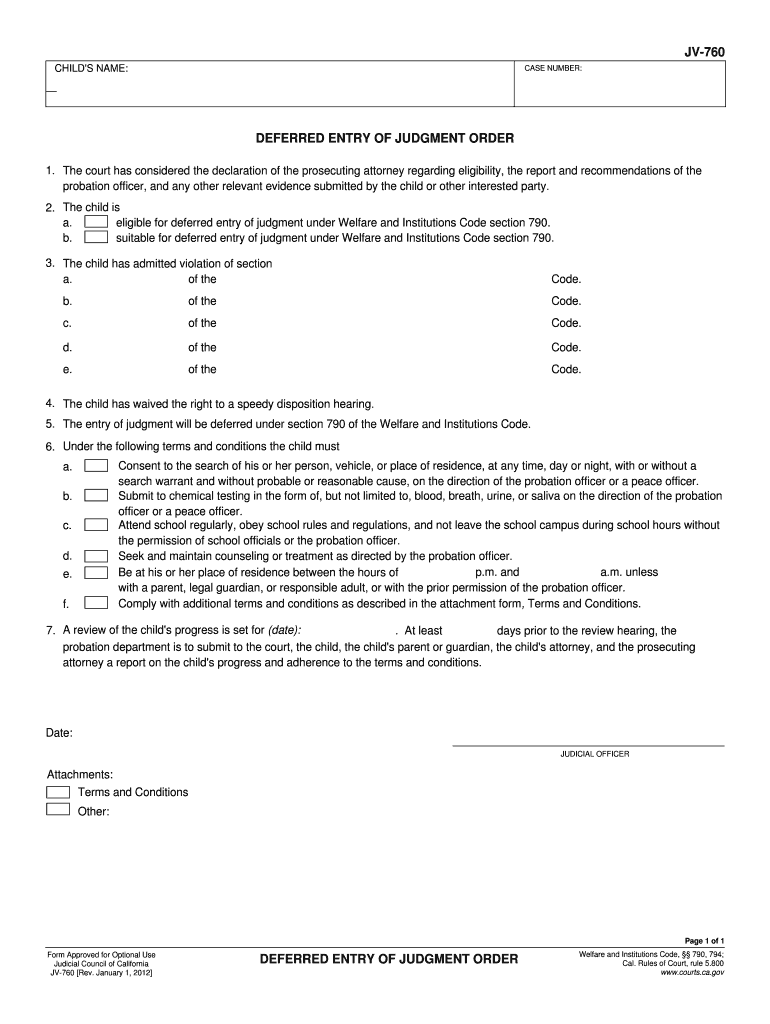
GMENT ORDER 1. The court has considered the declaration of the prosecuting attorney regarding eligibility, the report and recommendations of the probation officer, and any other relevant evidence submitted by the child or other interested party. 2. The child is a. eligible for deferred entry of judgment under Welfare and Institutions Code section 790. b. suitable for deferred entry of judgment under Welfare and Institutions Code section 790. 3. The child has admitted violation of section of the.
Loading

Open form follow the instructions

Easily sign the form with your finger

Send filled & signed form or save
How to fill out the CA JV-760 online
Filling out the CA JV-760 form can seem daunting, but this guide will walk you through each step to ensure a smooth completion process. This form pertains to the deferred entry of judgment order for minors, and it is essential to provide accurate information.
Follow the steps to efficiently complete the CA JV-760 form online.
- Click the ‘Get Form’ button to retrieve the CA JV-760 form and open it in the editing interface.
- Begin by entering the child's name in the designated field at the top of the form. Ensure the name is spelled correctly to avoid any issues.
- Next, you will find a space to input the case number. This number is crucial for identifying the specific case linked to this form.
- In the section titled ‘Deferred Entry of Judgment Order,’ review each item carefully. You will need to check the boxes to confirm that the court has considered necessary evidence and the child's eligibility.
- Indicate if the child is eligible and suitable for deferred entry of judgment under the relevant Welfare and Institutions Code section by marking the appropriate checkboxes.
- Input the specific section of the code that the child has admitted to violating in the available fields. Include the appropriate details as instructed.
- Confirm that the child has waived their right to a speedy disposition hearing by checking the respective box.
- Outline any terms and conditions that the child must adhere to by filling in the identified fields. These may include conditions regarding searches, school attendance, and counseling.
- Set the date for the review of the child's progress, ensuring it aligns with court requirements. Enter this date accurately to facilitate the review process.
- Once all fields are completed thoroughly, review the form for accuracy and completeness. You can then save your changes, download a copy, print the form, or share it if necessary.
Start filling out your documents online today for a more efficient process.
Experience a faster way to fill out and sign forms on the web. Access the most extensive library of templates available.
Related content
Consent to the search of his or her person, vehicle, or place of residence, at any time...
... CA. The EUVE observatory performed well throughout the month of August, completing...
Bourns offers Transient Voltage Suppressor Diodes for surge and ESD protection...
Get answers to your most pressing questions about US Legal Forms API.
What is a deferred entry of judgment for a juvenile?
For juveniles, a deferred entry of judgment allows young offenders to enter a plea while postponing the formal judgment. Similar to the adult process, if they meet court-imposed conditions, their charges may be dismissed, enabling a fresh start without a permanent record. The CA JV-760 emphasizes the importance of providing juveniles a second chance while ensuring accountability.
How long does a deferred judgment stay on your record?
A deferred judgment typically remains on an individual's record for a specific duration, often until the terms of the deferred judgment are fulfilled. In some cases, if conditions are met successfully, the record may be expunged after completion. Engaging with the CA JV-760 framework can clarify your pathway to record clearance. Consulting resources available on US Legal Forms can aid you in this process.
What is a deferred entry of judgment in California?
A Deferred Entry of Judgment (DEJ) in California allows individuals to enter a guilty plea while the judgment remains on hold. If the defendant complies with required conditions, which might include rehabilitation programs, they can ultimately have the charges dismissed. This approach, guided by CA JV-760, is particularly beneficial to individuals seeking to avoid long-term criminal records.
What does it mean to defer to judgment?
To defer to judgment implies postponing a decision regarding a legal matter until specific conditions are met. In the context of CA JV-760, this often relates to deferred judgment processes where the court defers formal judgment in exchange for compliance with rehabilitative measures. This approach offers individuals time and opportunity to rectify their situations before final legal repercussions occur.
What is deferred entry of judgment in California?
Deferred Entry of Judgment (DEJ) is a process in California where a judge allows the defendant to enter a plea without a judgment being officially recorded. This process allows individuals to complete rehabilitation programs, and if successful, they can have the charges dismissed, offering them a chance for a fresh start. The CA JV-760 is integral to understanding how DEJ works and how it can benefit eligible individuals.
Who is eligible for DEJ?
Eligibility for Deferred Entry of Judgment (DEJ) depends on specific criteria. Generally, individuals charged with non-violent offenses and who have not previously committed serious crimes can qualify for DEJ. It's essential to review the specific requirements laid out in the CA JV-760 to determine your eligibility. If you’re navigating this process, platforms like US Legal Forms can provide valuable resources.
What is the difference between deferred prosecution and deferred judgment?
Deferred prosecution and deferred judgment are two distinct legal processes. In deferred prosecution, the prosecution agrees to postpone charges, allowing the individual to fulfill specific conditions to potentially dismiss the case. On the other hand, deferred judgment involves the court postponing the entry of a judgment, often enabling the defendant to seek dismissal after meeting certain criteria. Understanding these differences is vital, especially when dealing with situations involving CA JV-760.
Can you file CA statement of Information online?
Yes, you can file the CA statement of Information online. This process is efficient and allows businesses to maintain compliance with state regulations. Head to the appropriate state agency's website, locate the CA statement of Information form, complete it online, and submit it easily. Online filing saves time and ensures your business details are up-to-date in the system.
What happens after entry of default in California?
After the entry of default in California, the court may issue a default judgment against the party that failed to respond. This judgment typically favors the other party and may grant them the relief they requested. To avoid adverse outcomes, you should act quickly to consult legal advice and potentially utilize the CA JV-760 to seek relief. Timeliness is key in these situations.
What is the relief from entry of default in California?
Relief from entry of default in California is the legal process that allows a party to challenge a default judgment. This request can be based on reasons such as improper notice or newly discovered evidence. By filing the relevant forms, potentially including the CA JV-760, a party can have their case reconsidered. It is important to act promptly to protect your legal rights during this process.
Use professional pre-built templates to fill in and sign documents online faster. Get access to thousands of forms.
If you believe that this page should be taken down, please follow our DMCA take down process here.