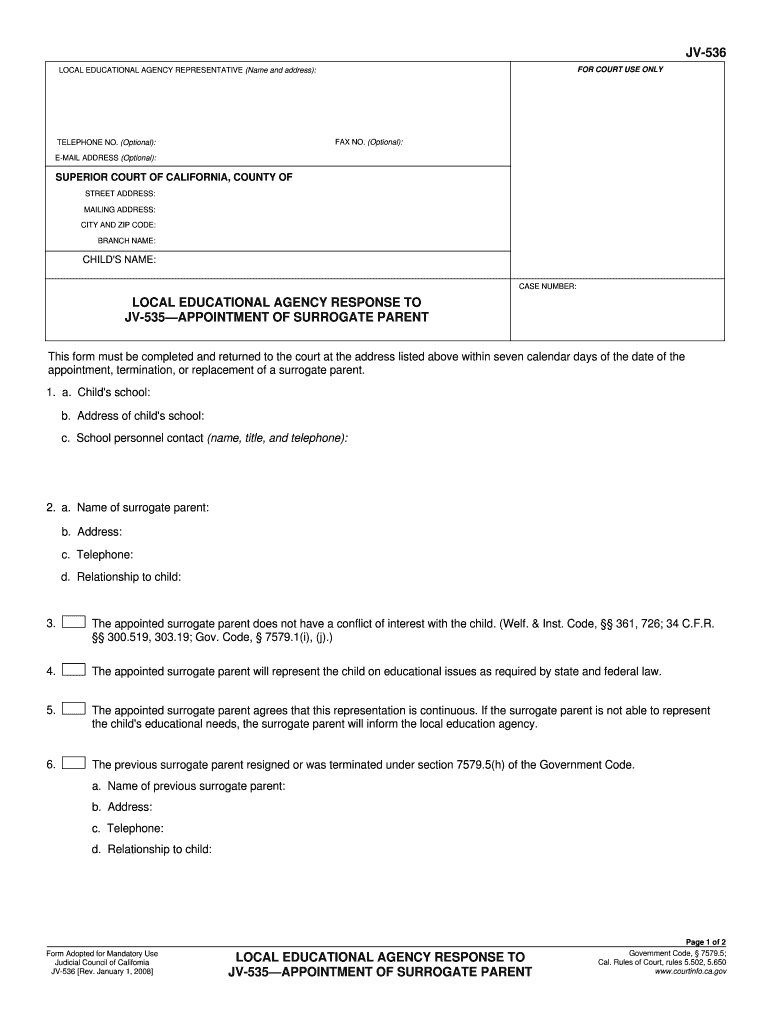
NTY OF STREET ADDRESS: MAILING ADDRESS: CITY AND ZIP CODE: BRANCH NAME: CHILD'S NAME: CASE NUMBER: LOCAL EDUCATIONAL AGENCY RESPONSE TO JV-535 APPOINTMENT OF SURROGATE PARENT This form must be completed and returned to the court at the address listed above within seven calendar days of the date of the appointment, termination, or replacement of a surrogate parent. 1. a. Child's school: b. Address of child's school: c. School personnel contact (name, title, and telephone): 2. a. Name of surr.
Loading

Open form follow the instructions

Easily sign the form with your finger

Send filled & signed form or save
How to fill out the CA JV-536 online
Filling out the CA JV-536 form is an essential step in the process of appointing a surrogate parent for educational purposes. This guide will help you navigate the form's components effectively and ensure that you complete it correctly.
Follow the steps to successfully complete the CA JV-536 form.
- Click ‘Get Form’ button to obtain the form and open it in the editor.
- Enter the name and address of the local educational agency representative at the top of the form. This section may also include optional fields for fax number, telephone number, and email address if available.
- Specify the superior court's name along with the county, street address, mailing address, city, zip code, and branch name in the designated areas.
- Provide the child's name and case number in the appropriate fields to ensure accurate record-keeping.
- Complete the local educational agency response to JV-535 — appointment of surrogate parent by filling in the child's school name, address, and the contact details of school personnel, including their name, title, and telephone number.
- Detail the surrogate parent's information: name, address, telephone number, and their relationship to the child. This information will help clarify who is representing the child's educational interests.
- Acknowledge that the appointed surrogate parent does not have any conflict of interest with the child, which is essential for maintaining ethical standards.
- Indicate that the surrogate parent will represent the child regarding educational issues and agree to continuous representation as mandated by state and federal law.
- If applicable, fill in the previous surrogate parent's name, address, telephone number, and their relationship to the child to document the transition.
- Finalize by adding the date, typing or printing the local education agency representative's name, and providing their signature and title to validate the form.
- Once all sections are filled, review the information for accuracy. Users can save changes, download, print, or share the form as needed.
Complete your form online today to ensure timely submission.
Experience a faster way to fill out and sign forms on the web. Access the most extensive library of templates available.
Related content
This form must be completed and returned to the court at the address listed above within...
It must use court form JV-536 to tell the court, the child's attorney, and the child's...
536. [ ], crh-cyrl.json, 2019-09-24 06:52, 624. [ ], crh-latn.json, 2019-09-24...
Get answers to your most pressing questions about US Legal Forms API.
What form is needed to terminate parental rights in California?
To terminate parental rights in California, you generally need to file a petition along with specific forms, which can include the CA JV-536. This form assists in outlining the reasons for the termination and is crucial for the court's consideration. It’s advisable to work with a legal expert to ensure all necessary documentation is correctly submitted.
How to fill out GC 210 CA?
To fill out the GC-210 CA, start by providing detailed information about yourself and the minor child. Include names, addresses, and any relationships. Be clear and concise, ensuring all sections are completed to prevent delays in the court's processing. Utilizing resources like USLegalForms can help simplify this process.
What is GC-210 CA?
The GC-210 CA form is related to the guardianship process in California, specifically requesting court permission to appoint a guardian. It covers essential details about the proposed guardian and the minor involved. Completing this form accurately is vital for ensuring the court understands the guardianship situation fully.
What is a JV-535 form?
The JV-535 form is used in California to request the termination of a guardianship. It requests the court to end the legal relationship between the guardian and the child. Using this form correctly helps to formalize your intention in a legally binding manner, protecting the child’s best interests.
How hard is it to terminate guardianship in California?
Terminating guardianship in California can be straightforward or complex, depending on the circumstances. This process often requires filing a petition with the court, and you may need to submit forms like the CA JV-536. Seek assistance from legal resources to navigate the process effectively and ensure all legal requirements are met.
How to transfer educational rights in California?
To transfer educational rights in California, you must complete the necessary forms, like the CA JV-536. This form outlines the decision-making responsibilities regarding a child's education and assists in establishing who holds these rights after a guardianship or parental rights change. It's important to file this form with the appropriate court to ensure the transfer is legally recognized.
How to become a guardian ad litem in CA?
To become a guardian ad litem in California, start by reaching out to the appropriate court and understand the application process. You will need to fill out essential forms, including the CA JV-536, which is designed to aid in the appointment of guardians. Completing this application with the required information is crucial to your success in becoming a guardian ad litem.
Do you need to go to law school to be a guardian ad litem?
No, you do not need to attend law school to serve as a guardian ad litem in California. While a legal background may be beneficial, the most important requirement is having a genuine interest in the child's welfare. Tools like the CA JV-536 provide information that can help you understand the process and make a meaningful contribution in this role.
How to become guardian ad litem in California?
To become a guardian ad litem in California, you must show that you understand the role and responsibilities involved in the position. This typically includes completing a court application and passing background checks. Familiarize yourself with the process using forms such as the CA JV-536 to ensure that you meet all requirements and submit a thorough application.
Who pays for guardian ad litem California?
In California, the payment for a guardian ad litem can vary depending on the specific case circumstances. Generally, the court decides who will bear the costs, which may be the parties involved in the case or be covered by public funds if the child qualifies. Understanding the provisions outlined in forms like the CA JV-536 can clarify the financial responsibilities related to a guardian ad litem.
Use professional pre-built templates to fill in and sign documents online faster. Get access to thousands of forms.
If you believe that this page should be taken down, please follow our DMCA take down process here.
This form is available in several versions. Select the version you need from the drop-down list below.