Loading
Form preview
  • US Legal Forms
  • Other Templates
  • Legal Forms
  • California Legal Forms
  • Ca Jv-520 S 2007

Get Ca Jv-520 S 2007-2026

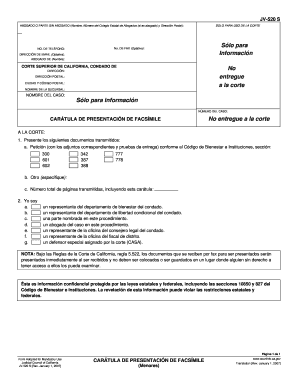
O): NO. DE TEL FONO: DIRECCI N DE EMAIL (Optativa): ABOGADO DE (Nombre): CORTE SUPERIOR DE CALIFORNIA, CONDADO DE No entregue a la corte DIRECCI N: DIRECCI N POSTAL: CIUDAD Y C DIGO POSTAL: NOMBRE DE LA SUCURSAL: NOMBRE DEL CASO: S lo para informaci n N MERO DEL CASO: CAR TULA DE PRESENTACI N DE FACS MILE No entregue a la corte A LA CORTE: 1. Presente los siguientes documentos transmitidos: a. Petici n (con los adjuntos correspondientes y pruebas de entrega) conforme al C d.

How it works

  1. Open form

    Open form follow the instructions

  2. Easily sign form

    Easily sign the form with your finger

  3. Share form

    Send filled & signed form or save

How to fill out the CA JV-520 S online

Filling out the CA JV-520 S form is an essential step for presenting documents to the court via fax. This guide provides clear instructions to help you complete the form accurately and effectively in an online format.

Follow the steps to successfully fill out the CA JV-520 S online.

  1. Click ‘Get Form’ button to obtain the CA JV-520 S and open it in your online editor.
  2. In the section labeled 'Abogado o parte sin abogado,' enter the name of the person representing themselves or the legal representative, including their State Bar number if applicable. Provide the mailing address, including city and ZIP code.
  3. Fill in the optional fax number and telephone number fields if applicable. Also, include the optional email address for further communication.
  4. Complete the 'Corte Superior de California' section, specifying the county where the form is being filed. Enter the court address and branch name in the designated fields.
  5. In the 'Nombre del caso' section, provide the title of the case and include the unique case number in the designated field. Ensure this matches the court records.
  6. For the 'A la corte' section, clearly state the documents being transmitted, including petitions and any relevant attachments as specified by the relevant sections of the Welfare and Institutions Code.
  7. Specify the total number of pages being transmitted, including the cover sheet, in the appropriate field.
  8. Indicate your role by selecting one of the options provided, such as 'un representante del departamento de bienestar del condado' or 'un abogado del caso en este procedimiento.'
  9. Review all the information entered for accuracy and completeness to avoid delays or rejection by the court.
  10. Once satisfied, save your changes, and opt to download the form, print it, or share it via your chosen method of delivery.

Start filling out your CA JV-520 S online today to ensure your documents are submitted efficiently.

Get form

Experience a faster way to fill out and sign forms on the web. Access the most extensive library of templates available.
Get form

Related content

Juvenile Dependency Fax Filing | Superior Court of...
Fax Filing Cover Sheet is mandatory with all Juvenile fax filings (Form JV-520), pursuant...
Learn more
if I compact
pf: show true for IR² then use then indoces. * this isomorphism. S. H² (s). P =0...
Learn more
DNX9190DABS DNX9190S DNX9190SM
When you purchase optional accessories, check with your KENWOOD dealer to make sure that...
Learn more

Related links form

ID Form 24 2016 ID Form 24 2016 PH Affidavit Of Loss 2014 CBP 3299 2023

Questions & Answers

Get answers to your most pressing questions about US Legal Forms API.

Contact support

The California Franchise Tax Board is not the same as the IRS; they serve different jurisdictions. The California Franchise Tax Board is responsible for state tax administration in California, while the IRS handles federal tax matters. If you have questions related to state forms or inquiries, such as the CA JV-520 S, contacting the California Franchise Tax Board is your best option. Each has unique regulations and procedures that you need to understand depending on your specific situation.

The JV 570 form is used in California for specific tax-related transactions, often involving adjustments to tax filings. It’s essential to understand how to properly fill out this form to avoid complications. For those navigating tax processes, knowing about the CA JV-520 S might also come in handy, as these forms can influence your overall tax situation. Utilizing resources like USLegalForms can guide you in completing these forms accurately.

If your California tax return is taking longer than expected, it could be due to various factors including increased processing times, missing information, or errors in your submission. The California Franchise Tax Board encourages you to check the status of your return online. Also, familiarize yourself with forms like the CA JV-520 S, as understanding the process can often clarify delays. If you have concerns, reaching out to their customer service may provide additional insights.

You can reach the California Franchise Tax Board through several means such as phone calls, emails, or online messaging. Their official website lists all the contact methods available. Make sure to check the operating hours to ensure you connect when they are available. If your inquiry relates to the CA JV-520 S, having your information ready will streamline the assistance you receive.

You can make an appointment at the California Franchise Tax Board by visiting their website or calling their appointment line. It’s essential to check their hours and available services before scheduling. Having your documents ready, especially if you’re discussing forms like the CA JV-520 S, can make your appointment more efficient. Remember, they also provide a variety of resources online to help you prepare.

To speak with someone at the California Franchise Tax Board, you can call their customer service line. Make sure to have any relevant information, such as your Social Security number or taxpayer ID, ready to help facilitate the conversation. If you prefer online communication, their official website offers several resources and a contact form to assist you. Additionally, knowing about the CA JV-520 S can help you address specific queries.

To file a California corporate disclosure statement, first gather the necessary information about your corporation, including its name and principal office address. You can complete the filing through the California Secretary of State's office, either online or via mail. For assistance, consider US Legal Forms, which provides templates and detailed instructions to help ensure your filing meets CA JV-520 S requirements.

The designation of record refers to the formal identification of the documents that will be part of the court file for a case. It plays a crucial role in California court procedures by ensuring that all relevant information is clearly outlined. Understanding this designation helps streamline legal processes, especially when preparing documents like the CA JV-520 S.

To file a California corporate disclosure statement online, navigate to the California Secretary of State’s portal dedicated to corporate filings. Fill out the required sections, review your information for accuracy, and submit the form. This process can typically be completed quickly and helps ensure your compliance with CA JV-520 S regulations.

Yes, you can file the CA Statement of Information online by visiting the California Secretary of State's website. You will need to provide the necessary details about your business and submit the form electronically. Using online tools can save you time and help ensure that your submission complies with the CA JV-520 S requirements.

Get This Form Now!

Use professional pre-built templates to fill in and sign documents online faster. Get access to thousands of forms.
Get form
If you believe that this page should be taken down, please follow our DMCA take down processhere.
Get CA JV-520 S
Get form
  • Adoption
  • Bankruptcy
  • Contractors
  • Divorce
  • Home Sales
  • Employment
  • Identity Theft
  • Incorporation
  • Landlord Tenant
  • Living Trust
  • Name Change
  • Personal Planning
  • Small Business
  • Wills & Estates
  • Packages A-Z
  • Affidavits
  • Bankruptcy
  • Bill of Sale
  • Corporate - LLC
  • Divorce
  • Employment
  • Identity Theft
  • Internet Technology
  • Landlord Tenant
  • Living Wills
  • Name Change
  • Power of Attorney
  • Real Estate
  • Small Estates
  • Wills
  • All Forms
  • Forms A-Z
  • Other Templates
  • Legal Hub
  • About Us
  • Help Portal
  • Legal Resources
  • Blog
  • Affiliates
  • Contact Us
  • Delete My Account
  • Site Map
  • Industries
  • Forms in Spanish
  • Localized Forms
  • State-specific Forms
  • Forms Kit
  • Real Estate Handbook
  • All Guides
  • Notarize
  • Incorporation services
  • For Consumers
  • For Small Business
  • For Attorneys
  • USLegal
  • FormsPass
  • pdfFiller
  • signNow
  • altaFlow
  • DocHub
  • Instapage
Form Packages
  • Adoption
  • Bankruptcy
  • Contractors
  • Divorce
  • Home Sales
  • Employment
  • Identity Theft
  • Incorporation
  • Landlord Tenant
  • Living Trust
  • Name Change
  • Personal Planning
  • Small Business
  • Wills & Estates
  • Packages A-Z
Form Categories
  • Affidavits
  • Bankruptcy
  • Bill of Sale
  • Corporate - LLC
  • Divorce
  • Employment
  • Identity Theft
  • Internet Technology
  • Landlord Tenant
  • Living Wills
  • Name Change
  • Power of Attorney
  • Real Estate
  • Small Estates
  • Wills
  • All Forms
  • Forms A-Z
  • Other Templates
Customer Service
  • Legal Hub
  • About Us
  • Help Portal
  • Legal Resources
  • Blog
  • Affiliates
  • Contact Us
  • Delete My Account
  • Site Map
  • Industries
  • Forms in Spanish
  • Localized Forms
  • State-specific Forms
  • Forms Kit
Legal Guides
  • Real Estate Handbook
  • All Guides
Prepared for you
  • Notarize
  • Incorporation services
Our Customers
  • For Consumers
  • For Small Business
  • For Attorneys
Our Sites
  • USLegal
  • FormsPass
  • pdfFiller
  • signNow
  • altaFlow
  • DocHub
  • Instapage
Social Media
Call us now toll free:
+1 833 426 79 33
As seen in:
© Copyright 1999-2026 airSlate Legal Forms, Inc. 17 Station Street, Ste. 203, Brookline, MA 02445
  • Your Privacy Choices
  • Terms of Service
  • Privacy Notice
  • Content Takedown Policy
  • Bug Bounty Program