Get Ca Jv-320 2019
How it works
-

Open form follow the instructions
-

Easily sign the form with your finger
-

Send filled & signed form or save
How to fill out the CA JV-320 online
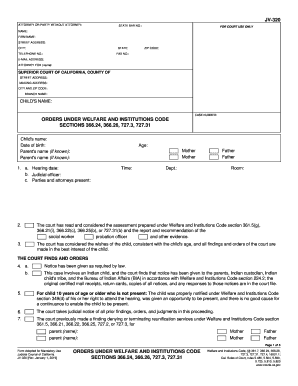
The CA JV-320 is a critical form used in California's juvenile court system to facilitate various orders under the Welfare and Institutions Code. This guide provides straightforward, step-by-step instructions to help users complete the form online effectively.
Follow the steps to fill out the CA JV-320 accurately.
- Press the ‘Get Form’ button to access the CA JV-320 online. This will allow you to open the necessary form in your preferred editor.
- Begin by filling out the section titled 'Attorney or party without attorney.' Enter your state bar number, your name, and the firm name if applicable. Provide the street address, city, state, telephone number, zip code, fax number, and email address, if relevant.
- For the 'For court use only' section, ensure to include specific details such as the child's name and the case number. It is important to fill this out correctly for proper case identification.
- In the orders section, carefully enter information concerning the child's name, date of birth, and the names of the parents if known. This information is necessary for the court’s understanding of the case.
- Proceed to the hearing details section. Here, include the hearing date, the name of the judicial officer, and list the parties and attorneys present at the hearing, along with the time, department, and room number.
- Fill in sections concerning the court’s assessments. This includes checking off boxes that apply to the case, such as whether the child is likely to be adopted and if parental rights are to be terminated. Carefully review the instructions accompanying each item.
- Continue filling out the sections relating to specific findings about the child’s welfare and the reasons for any orders being made. This includes any visitation arrangements and further special notes relevant to the case.
- Complete the form by checking any additional orders and remarks sections. Make sure all necessary points are addressed to support the court’s understanding of the case.
- After ensuring all sections are accurately filled out, save your changes. You may then download, print, or share the form as needed for submission.
Complete the CA JV-320 online to ensure a smooth filing process.
Get form
Related links form
Acquiring guardianship in California can vary significantly, generally taking anywhere from several weeks to a few months. The timeline depends on factors such as the complexity of the case and the court's schedule. Through the CA JV-320 form process and proper legal representation, you can navigate this timeline more efficiently. For assistance with documents and procedures, consider using US Legal Forms to streamline your journey.