Loading
Get Ca Jv-128 2007-2026
How it works
-

Open form follow the instructions
-

Easily sign the form with your finger
-

Send filled & signed form or save
How to fill out the CA JV-128 online
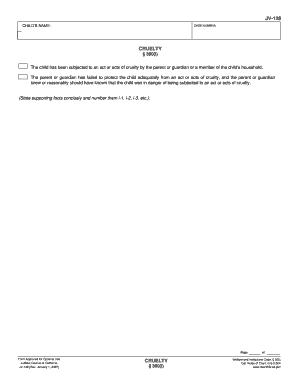
The CA JV-128 form is essential for reporting acts of cruelty against a child and ensuring their protection. This guide will provide you with clear, step-by-step instructions on completing this form online, making the process easier for users of all experience levels.
Follow the steps to complete the form successfully.
- Press the ‘Get Form’ button to access the CA JV-128 and open it in your preferred editing tool.
- Begin by entering the child's name in the designated field at the top of the form.
- Next, fill in the case number, ensuring it is accurate to avoid any processing delays.
- In the section labeled ‘Cruelty § 300(i),’ describe the acts of cruelty experienced by the child. Be specific and concise; number your supporting facts as i-1, i-2, i-3, and so on.
- Review all entered information for accuracy and completeness.
- Once you have completed the form, save your changes to retain the information entered.
- You can also download, print, or share the form as needed.
- For privacy reasons, after printing or saving, make sure to click the ‘Clear This Form’ button to ensure your information is not accessible to others.
Start completing your documents online today.
Related links form
To file a California corporate disclosure statement online, you must visit the California Secretary of State's website and locate the online filing section. Here, you will find the CA JV-128 form, which you can fill out electronically. After completing the form, simply follow the prompts to submit it online. UsLegalForms can further enhance your experience by offering resources and tips for successful online submission.