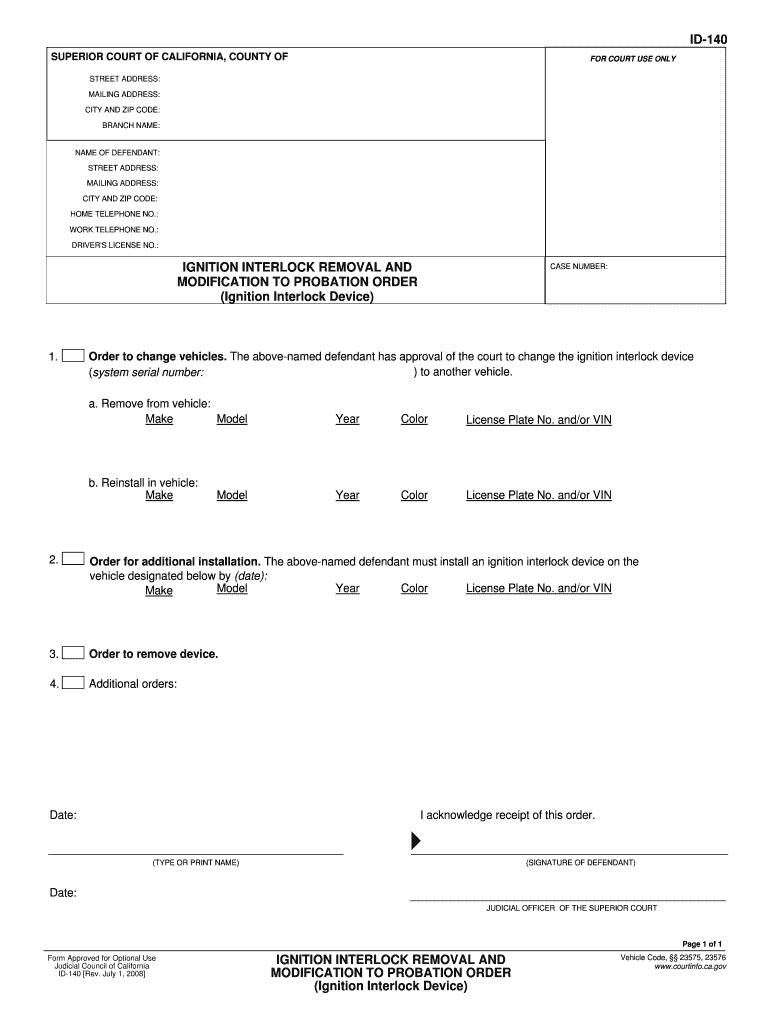
ADDRESS: MAILING ADDRESS: CITY AND ZIP CODE: BRANCH NAME: NAME OF DEFENDANT: STREET ADDRESS: MAILING ADDRESS: CITY AND ZIP CODE: HOME TELEPHONE NO.: WORK TELEPHONE NO.: DRIVER'S LICENSE NO.: IGNITION INTERLOCK REMOVAL AND MODIFICATION TO PROBATION ORDER (Ignition Interlock Device) CASE NUMBER: Order to change vehicles. The above-named defendant has approval of the court to change the ignition interlock device ) to another vehicle. (system serial number: 1. a. Remove from vehicle: Model Ma.
Loading

Open form follow the instructions

Easily sign the form with your finger

Send filled & signed form or save
How to fill out the CA ID-140 online
The CA ID-140 form is essential for individuals seeking to modify or remove an ignition interlock device as part of a probation order. This guide provides a step-by-step approach to help users complete the form online with confidence.
Follow the steps to successfully complete the form.
- Press the ‘Get Form’ button to access the CA ID-140 form and open it in your preferred editor.
- Begin by filling out the court information section. Include the street address, mailing address, city, zip code, and branch name of the Superior Court handling your case.
- Input the name of the defendant in the designated field, followed by their street address, mailing address, city, zip code, home telephone number, work telephone number, and driver's license number.
- Enter the case number associated with the ignition interlock device modification order accurately.
- Complete the section for the order to change vehicles, specifying the vehicle that currently has the ignition interlock device, including the model, make, year, color, and license plate number or VIN.
- Provide details for the vehicle where the ignition interlock device will be reinstalled, including the necessary information similar to the previous step.
- Fill out the order for additional installation, which requires entering the vehicle's model, make, year, color, and license plate number or VIN for the new installation location.
- If applicable, indicate any orders for removal of the device in the specified section.
- Add any additional orders or notes as required, including the date of acknowledgment.
- Finally, type or print your name in the acknowledgment section, sign where indicated, and date the form.
- After completing the form, make sure to review all entered information for accuracy. Save any changes, and choose to download, print, or share the form as needed.
Start filling out your CA ID-140 form online today for a smooth and efficient process.
Experience a faster way to fill out and sign forms on the web. Access the most extensive library of templates available.
Related content
The Language Access Complaint Form (ADM 140) allows individuals to complain if they were...
ID-140. Kentucky Beef Quality Assurance Program. Program and Manual Development...
AVISO DE SEGURANÇA. Apenas pessoal qualificado deve instalar e realizar a manutenção no...
Get answers to your most pressing questions about US Legal Forms API.
How to get a CA ID?
Getting a CA ID-140 is a straightforward process. Start by visiting the DMV website to complete your application form. Gather the required documents, and then schedule an appointment at your local DMV office. The US Legal Forms platform offers additional resources and forms to help you prepare for your visit, streamlining the overall process.
Can you do a California ID online?
Yes, you can apply for a California ID-140 online through the California Department of Motor Vehicles (DMV) website. The online application simplifies many steps, allowing you to gather your documents and fill out forms from home. However, you may still need to visit a DMV office to finalize your ID if you are a first-time applicant.
What do I need to get a CA ID?
To obtain a CA ID-140, you will need to provide specific documents. Generally, you must show proof of identity and residency in California. A valid birth certificate, social security card, or utility bill can serve this purpose. Make sure all documents are original or certified copies to ensure a smooth application process.
Can you get a California ID without SSN?
Yes, obtaining a California ID without a Social Security Number (SSN) is possible. The CA ID-140 allows individuals to apply without an SSN, making this identification accessible to many who may not have this number. This flexibility ensures that everyone, regardless of their circumstances, can secure valid identification. If you have questions, consider using US Legal Forms for guidance in the application process.
Can a non-US citizen get an identification card?
Yes, non-US citizens can apply for a California ID. The CA ID-140 is designed to assist non-citizens in obtaining official identification that can help with various tasks, such as opening a bank account or driving. This ID is an essential tool that recognizes the diverse backgrounds of California's residents. Utilizing the CA ID-140 streamlines the process for non-citizens.
Can I get an ID in California if I am undocumented?
Yes, you can obtain a California ID even if you are undocumented. The California ID-140 provides a way for individuals without legal status to access crucial identification. This process emphasizes inclusivity and ensures that everyone has access to identification for daily activities. By applying for the CA ID-140, you can fulfill this important requirement.
What is the format for California ID numbers?
California ID numbers are formatted as follows: a letter followed by seven digits. This specific format allows state authorities and businesses to easily retrieve information about the cardholder. If you're applying for a California ID or need to know more about the processing steps, the CA ID-140 form on the US Legal Forms platform can provide the assistance you require.
How does a California ID look like?
A California ID features a distinct design that includes a photo of the holder, personal information, and security features to prevent tampering. It has a colorful background that incorporates the state’s emblem, making it easily recognizable. Understanding what a California ID looks like can help you confirm its authenticity when dealing with official requests, including those involving the CA ID-140.
What is the format of a driver's number?
A California driver's number consists of one letter followed by seven digits, which helps to uniquely identify each driver in the state's system. This systematic approach ensures that each driver has a distinct record, reducing confusion or errors when accessing driving-related services. When completing forms such as the CA ID-140, ensure you have this number ready.
What is the issued date format for California ID?
The issued date on a California ID card follows a specific format: MM/DD/YYYY. This clear and consistent format allows individuals and agencies to quickly verify when the ID was issued. Keeping this in mind can help you accurately fill out forms like the CA ID-140 without confusion.
Use professional pre-built templates to fill in and sign documents online faster. Get access to thousands of forms.
If you believe that this page should be taken down, please follow our DMCA take down process here.