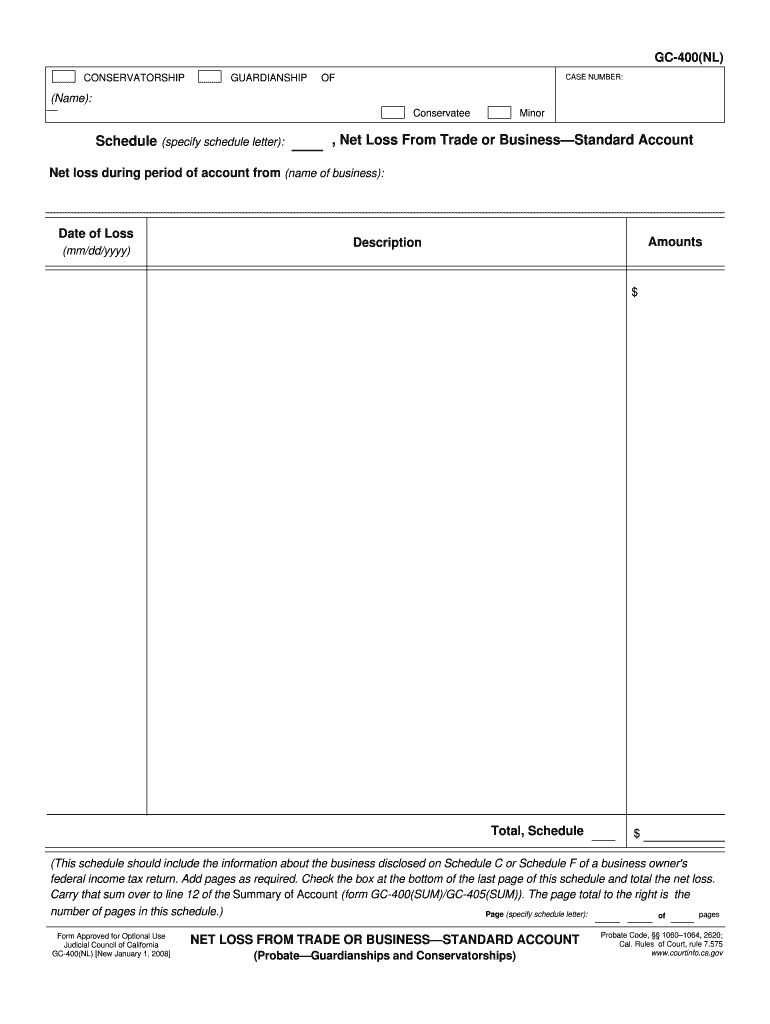
BER: (Name): Conservatee Schedule (specify schedule letter): Minor , Net Loss From Trade or Business Standard Account Net loss during period of account from (name of business): Date of Loss Amounts Description (mm/dd/yyyy) $ Total, Schedule $ (This schedule should include the information about the business disclosed on Schedule C or Schedule F of a business owner's federal income tax return. Add pages as required. Check the box at the bottom of the last page of this schedule and t.
Loading

Open form follow the instructions

Easily sign the form with your finger

Send filled & signed form or save
How to fill out the CA GC-400(NL) online
Filling out the CA GC-400(NL) form can seem daunting, but with a clear understanding of its components, you can navigate the process smoothly. This guide provides step-by-step instructions to assist you in completing the form accurately online.
Follow the steps to fill out the CA GC-400(NL) form effortlessly.
- Press the ‘Get Form’ button to access the form and open it in your preferred editor.
- Begin by entering the case number in the designated field. Make sure it accurately matches the case you are referencing.
- Fill in the name of the conservatee in the provided space. This is the individual whose conservatorship is being reported.
- Specify the schedule letter next to 'Schedule (specify schedule letter):'. This should reference the appropriate schedule for your accounting.
- Indicate whether the conservatee is a minor by checking the appropriate box.
- In the 'Net loss during period of account from (name of business):' field, enter the name of the business associated with the net loss.
- Fill in the date of loss using the format mm/dd/yyyy. Ensure the date is accurate and relevant to the accounting period.
- Enter the amounts related to the losses in the designated box. Provide detailed descriptions of the losses to give context.
- Calculate the total net loss and input this figure in the total section of the schedule. Ensure the calculations are correct.
- If necessary, add additional pages to provide more information about the business losses. Be sure to check the box at the bottom of the last page of this schedule and total the net loss.
- Make sure to carry the total net loss over to line 12 of the Summary of Account (form GC-400(SUM)/GC-405(SUM)).
- Once all fields and sections are completed, you may choose to save changes, download, print, or share the form as needed.
Complete your CA GC-400(NL) form online today for efficient document management.
Experience a faster way to fill out and sign forms on the web. Access the most extensive library of templates available.
Related content
(This schedule should include the information about the business disclosed on Schedule C...
A entrada de CA/CC de comutação automática, automaticamente reconhece a tensão da...
Get answers to your most pressing questions about US Legal Forms API.
How hard is it to terminate guardianship in California?
Terminating guardianship in California can be a challenging process that requires understanding legal standards. The involved parties need to prove that the guardianship is no longer necessary, and this often involves submitting a petition and a court hearing. While the process may seem daunting, utilizing the US Legal Forms platform can provide you with templates and resources, ensuring you correctly fulfill all requirements, including those for the CA GC-400(NL).
What is GC-210 CA?
The GC-210 CA form serves as a petition for the appointment of a guardian for a minor. It is used in California to provide the court with essential details about the minor and potential guardian, facilitating a formal review of the guardianship request. Completing this form requires specific information and adherence to legal standards. For a simplified approach, visit the US Legal Forms platform for resources on the CA GC-400(NL) to ensure proper submission.
What is the final accounting form for probate?
The final accounting form for probate is generally the Accounting and Petition for Distribution. This form details all financial transactions that took place during the probate process and outlines how the estate’s assets will be distributed to beneficiaries. Completing this form accurately is vital to ensure compliance with legal obligations. If you're looking for assistance, the US Legal Forms platform offers essential resources, including specific forms connected to CA GC-400(NL), to make your task easier.
What forms are needed for conservatorship in California?
Establishing conservatorship in California typically involves several forms, including the Petition for Appointment of Conservator. You'll also need to provide the Notice of Hearing and possibly the Confidential Conservator's Supplemental Information form. Each document plays a critical role in the process, which can be complex. Utilizing the US Legal Forms platform, you can access all the necessary forms, including those related to the CA GC-400(NL), simplifying your experience.
What form is needed to terminate parental rights in California?
To terminate parental rights in California, the most relevant form is the Petition to Terminate Parental Rights. This petition usually outlines the reasons for termination and the circumstances surrounding the child's welfare. It's crucial to follow the proper legal processes, as termination can have significant consequences. The US Legal Forms platform can guide you through the necessary paperwork, including the CA GC-400(NL) form, to ensure everything is completed correctly.
How to fill out GC 210 CA?
Filling out the GC 210 CA form requires careful attention to detail. Start by entering the necessary information about the guardianship, including the names and addresses of the minor and the guardian. Ensure you provide accurate details regarding your relationship with the minor and any relevant judicial information. For seamless navigation of this process, consider using the US Legal Forms platform, where you can find templates and guidance tailored specifically for handling the CA GC-400(NL) requirements.
Can you get an emergency conservatorship in California?
A temporary conservatorship may be set up when a person needs immediate help. A judge, upon finding of good cause, may appoint a temporary conservator of the person or of the estate, or both, for a specific period until a permanent conservator can be appointed.
What is required to get conservatorship in California?
Adults who cannot take care of themselves or their finances, usually elderly individuals, qualify for conservatorship in California. Adults with developmental disabilities who cannot fully care for themselves or their finances are also eligible for a conservatorship.
How do you get someone conserved in California?
How do I establish a probate conservatorship? Step 1 - Gather the information you will need to fill out your forms. Step 2 - Fill out your forms. Step 3 - File your forms. Step 4 - Get a hearing date and case number. Step 5 - Serve your forms. Step 6 - Attend the proposed conservator training class.
What is a conservatorship in California probate code?
Subject to Section 1800. 3: (a) A conservator of the person may be appointed for a person who is unable to provide properly for his or her personal needs for physical health, food, clothing, or shelter, except as provided for the person as described in subdivision (b) or (c) of Section 1828.5.
Use professional pre-built templates to fill in and sign documents online faster. Get access to thousands of forms.
If you believe that this page should be taken down, please follow our DMCA take down process here.