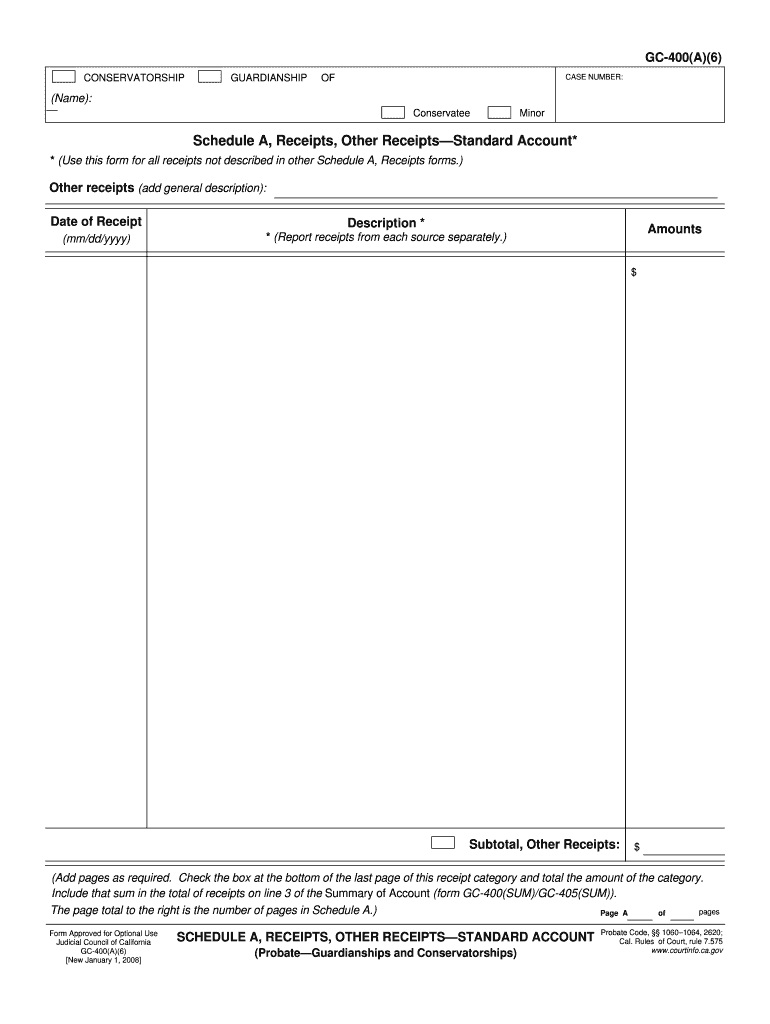
BER: (Name): Conservatee Minor Schedule A, Receipts, Other Receipts Standard Account* * (Use this form for all receipts not described in other Schedule A, Receipts forms.) Other receipts (add general description): Date of Receipt Description * (mm/dd/yyyy) * (Report receipts from each source separately.) Amounts $ Subtotal, Other Receipts: $ (Add pages as required. Check the box at the bottom of the last page of this receipt category and total the amount of the category. Include tha.
Loading

Open form follow the instructions

Easily sign the form with your finger

Send filled & signed form or save
How to fill out the CA GC-400(A)(6) online
Filling out the CA GC-400(A)(6) form online helps streamline the process for conservatorship or guardianship reporting. This guide provides clear instructions to ensure accurate completion of each section.
Follow the steps to fill out the CA GC-400(A)(6) efficiently.
- Click the 'Get Form' button to access the CA GC-400(A)(6) form and open it in your preferred editor.
- Begin by entering the case number at the top of the form, followed by the name of the conservatee or minor in the designated fields.
- In Schedule A, locate the section labeled 'Receipts, Other Receipts—Standard Account'. Here, you will need to provide a general description for each receipt that does not fit into other categories.
- For each receipt, fill out the 'Date of Receipt' field using the required format (mm/dd/yyyy) and enter the 'Description' of the receipt.
- Next, input the 'Amounts' for each receipt in the specified field, ensuring each source is reported separately.
- Calculate the subtotal for the other receipts and enter it in the 'Subtotal, Other Receipts' section.
- If necessary, add additional pages to accommodate all receipts. Make sure to check the box on the last page of this receipt category and total the amounts as instructed.
- Finally, include the sum of this category in line 3 of the Summary of Account section (form GC-400(SUM)/GC-405(SUM)).
- Review your entries for accuracy. Once completed, you can save changes, download, print, or share the filled-out form as needed.
Complete your CA GC-400(A)(6) form online today for a smoother submission process.
Experience a faster way to fill out and sign forms on the web. Access the most extensive library of templates available.
Related content
GC-400(A)(6) Schedule A is for other receipts, used for receipts not described in other...
The Principal Investigator has primary responsibility for financial management and control...
Pressione STOP ( 6 ) no Controle Remoto ou STOP/EJECT. ( 6 /m ) no painel frontal. Para...
Get answers to your most pressing questions about US Legal Forms API.
How do I file a California corporate disclosure statement?
Filing a California corporate disclosure statement involves completing the form and submitting it to the Secretary of State either online or via mail. You need to provide specific corporate information, like the entity's name and address, referencing the CA GC-400(A)(6) for related requirements. After filing, keep track of your submission to ensure timely processing. For streamlined filing, consider using US Legal Forms, which offers detailed guidance and the correct forms.
Can you file CA Statement of Information online?
Yes, you can file the CA Statement of Information online through the California Secretary of State’s website. The process is straightforward; you must complete the online form with details of your corporation, including the relevant information required by the CA GC-400(A)(6). Once you've filled everything out, submit it and retain your confirmation. Utilizing platforms like US Legal Forms can provide templates and instructions to ensure you meet all requirements.
How to file California corporate disclosure statement online?
Filing a California corporate disclosure statement online starts with visiting the California Secretary of State’s website. You will need to create an account or log in, and then complete the required fields in the online form, ensuring to reference the CA GC-400(A)(6) document if applicable. After submitting, be sure to download or save your confirmation for your records. US Legal Forms can help navigate this online filing process efficiently.
What form is needed to terminate parental rights in California?
To terminate parental rights in California, you must file a petition with the court, which typically includes specific forms that outline the grounds for termination. This process can be emotionally challenging but is essential for the welfare of the child involved. The CA GC-400(A)(6) form can provide additional insights, and USLegalForms can assist you in understanding what documentation is necessary to proceed.
What forms are needed for conservatorship in California?
To establish conservatorship in California, you typically need to complete several forms, including the conservatorship petition and notice of hearing. These forms ensure that the court is informed about your intentions and the needs of the individual. Utilizing the CA GC-400(A)(6) form can streamline your conservatorship case, guiding you through the required documentation with ease.
How hard is it to terminate guardianship in California?
Terminating guardianship in California can be a complex process, depending on the circumstances surrounding the case. It often requires filing specific forms and potentially attending a court hearing to evaluate the situation. With the correct understanding of the CA GC-400(A)(6) form and the right resources from USLegalForms, you can navigate this process more smoothly.
How to fill out GC 210 CA?
Filling out GC 210 CA involves providing specific information about the child, the proposed guardian, and the relationship between them. Ensure that you include all necessary signatures and dates to validate the form. By utilizing the resources available on USLegalForms, you can confidently complete the CA GC-400(A)(6) process and meet all legal requirements.
What is GC-210 CA?
GC-210 CA is a vital form used in California probate to obtain consent from interested parties in guardianship cases. It serves as a declaration of consent for guardianship, ensuring that all parties involved understand their rights and responsibilities. Using the CA GC-400(A)(6) process can simplify this legal requirement, making it easier for guardians to navigate their responsibilities.
What is GC 400?
GC400 is a comprehensive controller particularly suggested for managing different types of synchro/parallel applications, especially for MPM (Multiple Prime Mover) and MSB (Multiple Stand-by) power plants, where the synchronization of several gensets is required.
Use professional pre-built templates to fill in and sign documents online faster. Get access to thousands of forms.
If you believe that this page should be taken down, please follow our DMCA take down process here.