Get Ca Gc-400(a)(3) 2008-2026
How it works
-

Open form follow the instructions
-

Easily sign the form with your finger
-

Send filled & signed form or save
How to fill out the CA GC-400(A)(3) online
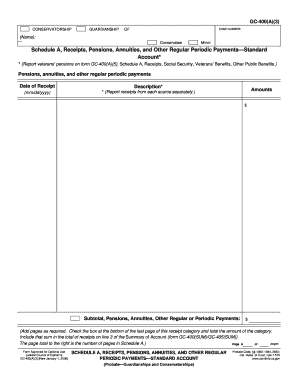
Filling out the CA GC-400(A)(3) form is essential for reporting receipts and other regular periodic payments in conservatorships and guardianships. This guide will provide you with clear and detailed steps to complete the form online effectively.
Follow the steps to fill out the CA GC-400(A)(3) online.
- Press the ‘Get Form’ button to access the CA GC-400(A)(3) form and open it in your preferred editor.
- Enter the case number at the top of the form to identify the specific conservatorship or guardianship case.
- Move to Schedule A, where you will report receipts, pensions, annuities, and other regular payments. Ensure you enter each receipt from different sources separately.
- In the amounts section, enter the corresponding dollar amount for each receipt you have documented.
- After you have completed all sections, save your changes, download the form, print it for your records, or share it as needed.
Complete your forms online with confidence and ensure all entries are accurate and up-to-date.
To put someone in a conservatorship in California, begin by gathering relevant information about their condition and needs. You will need to file the CA GC-400(A)(3) petition in the appropriate court, providing evidence of the person's inability to care for themselves. After the court hears your case and reviews the evidence, they may appoint a conservator to oversee their care. It's advisable to seek legal assistance to ensure that you comply with all legal requirements in this sensitive process.