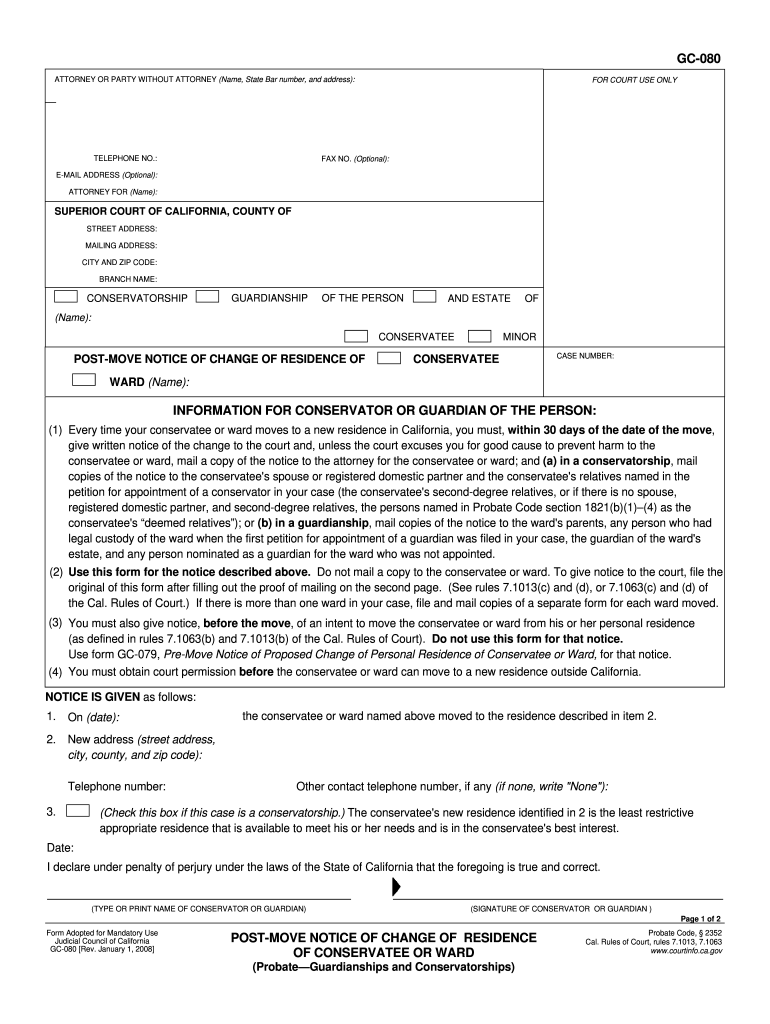
The laws of the State of California that the foregoing is true and correct. (TYPE OR PRINT NAME OF CONSERVATOR OR GUARDIAN) (SIGNATURE OF CONSERVATOR OR GUARDIAN ) Page 1 of 2 Form Adopted for Mandatory Use Judicial Council of California GC-080 Rev. January 1, 2008 POST-MOVE NOTICE OF CHANGE OF RESIDENCE OF CONSERVATEE OR WARD (Probate Guardianships and Conservatorships) Probate Code, 2352 Cal. Rules of Court, rules 7.1013, 7.1063 www.courtinfo.ca.gov GC-080 CONSERVATORSHIP GUARD.
Loading

Open form follow the instructions

Easily sign the form with your finger

Send filled & signed form or save
How to fill out the CA GC-080 online
The CA GC-080 form is essential for providing notification of a change of residence for a conservatee or ward. This guide will walk you through the process of filling out the form online, ensuring that you complete each section accurately and efficiently.
Follow the steps to complete the CA GC-080 form online.
- Click the ‘Get Form’ button to access the CA GC-080 document and open it within the online editing tool.
- Enter your name, State Bar number (if applicable), and address in the section labeled 'Attorney or party without attorney'. Include your phone number and email address, if available.
- Specify the purpose of the form by checking whether it pertains to conservatorship or guardianship.
- Provide the name of the conservatee or ward, along with any relevant case number in the designated areas.
- Fill in the new address of the conservatee or ward, including the street address, city, county, and zip code.
- In the section designated for notice details, fill in the date of the move and affirm that the new residence is the least restrictive appropriate option for the conservatee's needs.
- Complete the proof of mailing section on the second page, detailing the names and addresses of those to whom the notice was mailed.
- Once all fields are completed, review your entries for accuracy and clarity.
- Finally, save your changes, and choose whether to download, print, or share the completed form.
Complete your CA GC-080 form online today for a smoother filing process.
Experience a faster way to fill out and sign forms on the web. Access the most extensive library of templates available.
Related content
Use Petition to Fix Residence Outside the State of California (form GC-085) to ask the...
Feb 12, 2025 — Canada has the world's longest coastline. We research its offshore...
Cuidados com a bateria de lítio substituível. Se manuseada incorretamente, a bateria...
Get answers to your most pressing questions about US Legal Forms API.
What forms do I need for guardianship in California?
For guardianship in California, the primary form you will need is the CA GC-080, which is essential for initiating the process. Additionally, you may require other supporting forms such as the petition for guardianship and various informational documents. Using USLegalForms can provide you with access to all necessary forms and guidance, making it easier to navigate the requirements for your guardianship case.
How long does the guardianship process take in California?
The guardianship process duration in California varies based on several factors, including court schedules and the complexity of your case. Generally, it may take several months from the initial filing to the final hearing. Completing the CA GC-080 form accurately can streamline your application and minimize delays. USLegalForms offers resources to help you understand the timeline and prepare your documents effectively.
How do I file proof of service in California?
To file proof of service in California, you need to complete the relevant form, typically the CA GC-080 form for guardianship cases. After filling out the form, submit it to the court where your case is filed. Ensure you keep a copy for your records and serve it to all relevant parties involved in the guardianship case. Using USLegalForms can help simplify this process by providing the necessary forms and instructions to make your filing smooth.
How do I put someone in a conservatorship in California?
To put someone in a conservatorship in California, you will file a petition with the probate court, which includes the CA GC-080 form. You must provide information about the proposed conservatee's condition and demonstrate why conservatorship is necessary. After submitting your petition, a court hearing will take place to determine if the conservatorship is appropriate. Using uslegalforms can guide you through this process, ensuring you have the right forms and support.
What are the two types of conservatorships?
In California, the two main types of conservatorships are general conservatorship and limited conservatorship. A general conservatorship is appropriate for adults who cannot manage their personal and financial affairs. In contrast, a limited conservatorship serves individuals with developmental disabilities who may only require specific assistance. Understanding these differences is crucial, and using resources like CA GC-080 can help clarify what you need to file.
What forms do I need to file for conservatorship in California?
To initiate a conservatorship in California, you will typically need to complete specific forms, including the CA GC-080. This form is essential for the appointment of a conservator. Additionally, you may need to file the petition for conservatorship, along with medical certificates and other required documents to ensure a thorough process. You can find these forms on uslegalforms, simplifying your filing experience.
What is informal guardianship in California?
Informal guardianship in California refers to situations where a child lives with someone who is not their parent without formal legal proceedings. Although it may provide immediate care and stability, it lacks the legal protections offered by formal guardianship. For those considering a more secure arrangement, using forms like CA GC-080 can ease the transition into a formal guardianship arrangement.
What are the two types of guardianship in California?
California recognizes two types of guardianship: guardianship of the person and guardianship of the estate. Guardianship of the person focuses primarily on the care and custody of the child, while guardianship of the estate manages the child’s finances and assets. Understanding these distinctions through documents like CA GC-080 can help tailor your approach based on the needs of the minor.
What's the difference between guardianship and conservatorship in California?
Guardianship and conservatorship differ mainly in their focus. Guardianship is typically concerned with the care of minors or dependents who cannot act on their behalf. Meanwhile, conservatorship relates to adults who need assistance in managing their financial or personal interests. Understanding these distinctions can be crucial, and forms like CA GC-080 help clarify roles within these legal arrangements.
What does permanent guardianship mean in California?
Permanent guardianship in California refers to a long-term arrangement where a guardian takes full responsibility for a minor's care and welfare. This designation ensures that the minor is placed in a safe, stable environment, usually without a predetermined end date. Utilizing the legal framework of CA GC-080, guardians can solidify their role in providing for the child's needs.
Use professional pre-built templates to fill in and sign documents online faster. Get access to thousands of forms.
If you believe that this page should be taken down, please follow our DMCA take down process here.
This form is available in several versions. Select the version you need from the drop-down list below.