Loading
Get Ca Fl-281 S 2006
How it works
-

Open form follow the instructions
-

Easily sign the form with your finger
-

Send filled & signed form or save
How to fill out the CA FL-281 S online
This guide provides a step-by-step approach to filling out the CA FL-281 S form online, designed for individuals who may not have legal experience. By following these instructions, users can navigate the process with ease and confidence.
Follow the steps to complete the CA FL-281 S form online.
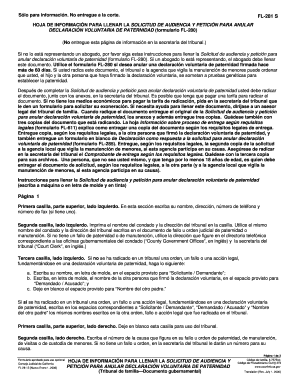
- Press the ‘Get Form’ button to access the CA FL-281 S form and open it in an online editor.
- In the top left box of the first page, enter your name, address, phone number, and fax number if applicable.
- In the second box on the left, print the name of the county and the address of the court. Use the same information as on the paternity or child support order if available.
- In the third box on the left, enter your name as ‘Requester/Petitioner’ and the other person's name who signed the declaration as ‘Respondent/Defendant’. Leave ‘Other Parent’s Name’ blank if there is no additional party.
- Leave the top right box blank for court use.
- In the second right box, input the case number as shown on your existing orders, or get a new number from the court clerk if none exists.
- In the first numbered paragraph, write the name of the person you are addressing and check the appropriate boxes indicating who you are requesting the hearing for. Contact the court clerk for a hearing date.
- In the second numbered paragraph, fill in the date, time, and location of the hearing.
- For numbered paragraphs 3 and 4, state if you request expedited hearing due to a specific reason. Seek assistance if needed.
- In numbered paragraph 5, enter the date when the voluntary declaration of paternity was signed and list the parties involved.
- In paragraph 6, check the box if the local agency providing child support services is involved.
- In paragraph 8, select the boxes that describe why you believe the voluntary declaration should be annulled.
- On page 2, restate the names from page 1, now as they appear in the court context, and add the case number.
- In paragraph 10, state if there is an existing order regarding paternity support. Fill in the date recorded.
- In paragraph 11, assert your details about existing legal actions regarding support.
- In paragraph 12, explain the reasons checked in previous sections. Ensure that the form is signed, dated, and printed clearly.
- After completing the form, save your changes and choose to download, print, or share the document as needed.
Start filling out your CA FL-281 S form online today to ensure your legal rights are protected.
Get form
Experience a faster way to fill out and sign forms on the web. Access the most extensive library of templates available.
Proof of service for eviction in California is documentation that verifies that all parties involved have been properly notified of eviction proceedings. This can include a signed declaration from the server or copies of the notices sent. It's essential to follow the legal requirements closely, and uslegalforms provides convenient templates and guidance that help comply with CA FL-281 S.
Get This Form Now!
Use professional pre-built templates to fill in and sign documents online faster. Get access to thousands of forms.