Loading
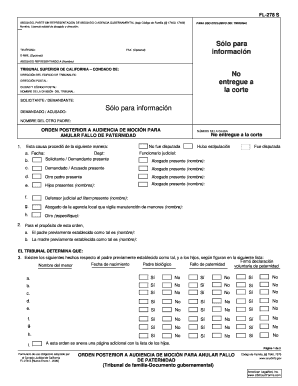
Get Ca Fl-278 S 2006
How it works
-

Open form follow the instructions
-

Easily sign the form with your finger
-

Send filled & signed form or save
How to fill out the CA FL-278 S online
Filling out the CA FL-278 S form online can simplify the process of modifying paternity orders. This guide provides clear, step-by-step instructions on how to complete each section of the form effectively.
Follow the steps to fill out the CA FL-278 S form online.
- Click ‘Get Form’ button to obtain the form and open it in the editor.
- Begin by entering the attorney's information, including their name, state bar number, and address. If you are representing yourself, ensure to indicate this appropriately.
- Fill in the court department information, including the specific county of the Superior Court of California. This information is located in the designated section of the form.
- Complete the case number and provide details regarding the other parent and parties involved in the case. This section should be filled accurately to avoid any processing issues.
- In section 1, specify how the case proceeded, selecting options based on whether it was contested or stipulated. Include all relevant details such as dates and participating parties.
- In section 2, identify the established father and mother names clearly. This information is vital for the court's understanding of the family structure.
- For section 3, provide accurate details about each child listed, including their names, birth dates, and paternity status. Be sure to check yes or no for each relevant statement.
- In section 4, any additional determinations should be specified clearly. This could include special instructions or clarifications that apply to the case.
- Proceed to sections 5 and 6 to detail the orders concerning paternity and custody issues. Check the appropriate boxes for the actions taking place regarding the established paternity.
- Fill in any other sections as needed, ensuring that you provide all required information as specified by the form.
- Once completed, review the form for accuracy. After ensuring that all fields are correctly filled, you can save changes, download, print, or share the form as needed.
Complete your CA FL-278 S form online today for a smoother process.
Get form
Experience a faster way to fill out and sign forms on the web. Access the most extensive library of templates available.
After a judgement is set aside, the case is reopened for further legal proceedings. This means both parties have another chance to present their side and any supporting evidence. It’s advisable to utilize resources like CA FL-278 S to understand the next steps in your case. Overall, setting aside a judgement can significantly change the direction of your legal situation and is a critical step in resolving disputes.
Get This Form Now!
Use professional pre-built templates to fill in and sign documents online faster. Get access to thousands of forms.