Loading
Form preview
  • US Legal Forms
  • Other Templates
  • Legal Forms
  • California Legal Forms
  • Ca Fam 031 2018

Get Ca Fam 031 2018-2026

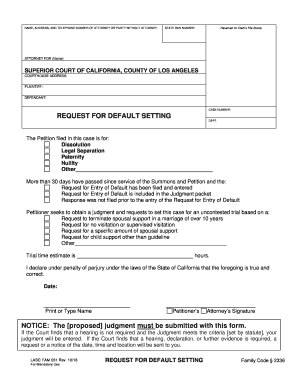
NAME, ADDRESS, AND TELEPHONE NUMBER OF ATTORNEY OR PARTY WITHOUT ATTORNEY:Reserved for Clerks File StampSTATE BAR NUMBERATTORNEY FOR (Name)SUPERIOR COURT OF CALIFORNIA, COUNTY OF LOS ANGELES COURTHOUSE.

How it works

  1. Open form

    Open form follow the instructions

  2. Easily sign form

    Easily sign the form with your finger

  3. Share form

    Send filled & signed form or save

How to fill out the CA FAM 031 online

Filling out the CA FAM 031 form is an important step in the California family law process for cases such as dissolution, legal separation, or paternity. This guide will provide you with clear, step-by-step instructions to help you complete the form online with confidence.

Follow the steps to complete the CA FAM 031 form online

  1. Press the ‘Get Form’ button to access the CA FAM 031 form and open it in your online editor.
  2. Enter the name, address, and telephone number of your attorney or leave this section blank if you are representing yourself.
  3. In the reserved space for the Clerk’s File Stamp, leave it blank as this will be completed by the court.
  4. Input your State Bar Number if you are an attorney. If you are a self-represented user, skip this step.
  5. Indicate who you are representing by filling in the field labeled ‘Attorney for (Name)’.
  6. Provide the courthouse address where your case is filed.
  7. List the names of the plaintiff and defendant as they appear in your case.
  8. Enter the case number assigned by the court.
  9. Select the nature of the petition filed by marking the appropriate box: dissolution, legal separation, paternity, nullity, or other, specifying if necessary.
  10. Confirm that more than 30 days have passed since the service of the Summons and Petition and check the relevant statements related to the Request for Entry of Default.
  11. In the section for the petitioner’s requests regarding judgment, indicate the specific requests you are making related to spousal support, visitation, child support, or any other relevant matters.
  12. Estimate the trial time in hours based on your expectations.
  13. Date the form using the online date entry function.
  14. Print or type your name as the petitioner clearly.
  15. If applicable, include your attorney’s signature where indicated.
  16. Remember to attach the proposed judgment with this form, as it is required.
  17. Finally, review all entries for accuracy. You can then save the changes, download, print, or share the completed form.

Complete your CA FAM 031 form online today to ensure your case progresses smoothly.

Get form

Experience a faster way to fill out and sign forms on the web. Access the most extensive library of templates available.
Get form

Related content

MC-031 Attached Declaration
MC-031 is an attached declaration form that must be attached to another form before...
Learn more
Rule 31. Depositions by Written Questions...
A party may, by written questions, depose any person, including a party, without leave of...
Learn more
MC-031 Attached Declaration
I declare under penalty of perjury under the laws of the State of California that the...
Learn more

Related links form

IN EDWE Sample Agape Letter 2014 KS Board Of Technical Professions Application For Reinstatement Of License 2017 KS Board Of Technical Professions Application For Reinstatement Of License 2020 CA Community Event Organizer Application - County Of Ventura 2017

Questions & Answers

Get answers to your most pressing questions about US Legal Forms API.

Contact support

A default divorce in California can take anywhere from a few months to over six months, depending on the court’s schedule and how quickly you file the necessary paperwork. Once you file your forms, including CA FAM 031, the court will set a hearing date, and delays may occur if documentation is incomplete. Being organized and following court guidelines can help expedite the process.

For an uncontested divorce in California, you typically need to fill out several key forms, including the Petition for Divorce and the Response forms. Additionally, CA FAM 031 is often required to finalize the divorce process. It’s beneficial to use resources from platforms like uslegalforms to ensure you have all necessary documents and that they are filled out correctly.

Filling out MC 031 involves providing necessary information about you and your case. Begin by carefully reading the instructions on the form. Make sure to include details such as your case number and be diligent about filling out each section accurately—this is crucial for a smooth process and meets California court requirements.

To enforce a family judgment in California, you must file a request with the court that issued the judgment. This includes providing proper documentation and forms, such as CA FAM 031, to demonstrate that the judgment has not been complied with. It is advisable to consult with legal resources or platforms like uslegalforms for assistance in ensuring all steps are correctly followed.

Yes, you can divorce without the other person signing in California. If your spouse does not respond to the divorce papers, you can proceed with a default divorce. This method requires you to file the correct forms, including CA FAM 031, showing the court that your spouse has been served and did not contest the divorce.

Filling out a declaration statement involves clearly stating your personal information, the purpose of the declaration, and the facts you wish to present. Make sure to organize your thoughts logically, using headings if necessary, to enhance clarity. Conclude with a statement affirming the truth of the information provided. For intuitive templates and assistance, consider leveraging services from USLegalForms.

The timeline to obtain a default divorce judgment in California varies based on several factors, including court workloads and any potential complications in your case. Generally, after filing the necessary forms, including CA FAM 031, it can take anywhere from a few weeks to several months to finalize the judgment. Staying proactive and organized can help expedite the process.

To file a motion to vacate a judgment in California, you begin by preparing a legal motion that outlines the reasons for your request. This typically includes a clear statement of facts and supporting evidence that justify why the judgment should be reconsidered. Don't forget to follow specific procedural rules set by the court. Using USLegalForms can ensure that your motion complies with essential legal standards.

Filing a default judgment in California involves first ensuring that the opposing party is properly notified. After filing the necessary documents, including form CA FAM 031, you must wait for a certain period to confirm that no response has been received. Then, you can submit your request for judgment along with any supporting documentation to the appropriate court. For clear guidance through this process, consider using USLegalForms.

To complete a Declaration of Mailing, you need to list the parties involved, specify the date of mailing, and confirm that you mailed the documents properly. Include the addresses for all parties and check the required boxes to affirm compliance with court rules. This declaration helps establish a record of proper communication in legal matters. For exceptional clarity, resources like USLegalForms can assist you with the format.

Get This Form Now!

Use professional pre-built templates to fill in and sign documents online faster. Get access to thousands of forms.
Get form
If you believe that this page should be taken down, please follow our DMCA take down processhere.
Get CA FAM 031
Get form
  • Adoption
  • Bankruptcy
  • Contractors
  • Divorce
  • Home Sales
  • Employment
  • Identity Theft
  • Incorporation
  • Landlord Tenant
  • Living Trust
  • Name Change
  • Personal Planning
  • Small Business
  • Wills & Estates
  • Packages A-Z
  • Affidavits
  • Bankruptcy
  • Bill of Sale
  • Corporate - LLC
  • Divorce
  • Employment
  • Identity Theft
  • Internet Technology
  • Landlord Tenant
  • Living Wills
  • Name Change
  • Power of Attorney
  • Real Estate
  • Small Estates
  • Wills
  • All Forms
  • Forms A-Z
  • Other Templates
  • Legal Hub
  • About Us
  • Help Portal
  • Legal Resources
  • Blog
  • Affiliates
  • Contact Us
  • Delete My Account
  • Site Map
  • Industries
  • Forms in Spanish
  • Localized Forms
  • State-specific Forms
  • Forms Kit
  • Real Estate Handbook
  • All Guides
  • Notarize
  • Incorporation services
  • For Consumers
  • For Small Business
  • For Attorneys
  • USLegal
  • FormsPass
  • pdfFiller
  • signNow
  • altaFlow
  • DocHub
  • Instapage
Form Packages
  • Adoption
  • Bankruptcy
  • Contractors
  • Divorce
  • Home Sales
  • Employment
  • Identity Theft
  • Incorporation
  • Landlord Tenant
  • Living Trust
  • Name Change
  • Personal Planning
  • Small Business
  • Wills & Estates
  • Packages A-Z
Form Categories
  • Affidavits
  • Bankruptcy
  • Bill of Sale
  • Corporate - LLC
  • Divorce
  • Employment
  • Identity Theft
  • Internet Technology
  • Landlord Tenant
  • Living Wills
  • Name Change
  • Power of Attorney
  • Real Estate
  • Small Estates
  • Wills
  • All Forms
  • Forms A-Z
  • Other Templates
Customer Service
  • Legal Hub
  • About Us
  • Help Portal
  • Legal Resources
  • Blog
  • Affiliates
  • Contact Us
  • Delete My Account
  • Site Map
  • Industries
  • Forms in Spanish
  • Localized Forms
  • State-specific Forms
  • Forms Kit
Legal Guides
  • Real Estate Handbook
  • All Guides
Prepared for you
  • Notarize
  • Incorporation services
Our Customers
  • For Consumers
  • For Small Business
  • For Attorneys
Our Sites
  • USLegal
  • FormsPass
  • pdfFiller
  • signNow
  • altaFlow
  • DocHub
  • Instapage
Social Media
Call us now toll free:
+1 833 426 79 33
As seen in:
© Copyright 1999-2026 airSlate Legal Forms, Inc. 17 Station Street, Ste. 203, Brookline, MA 02445
  • Your Privacy Choices
  • Terms of Service
  • Privacy Notice
  • Content Takedown Policy
  • Bug Bounty Program