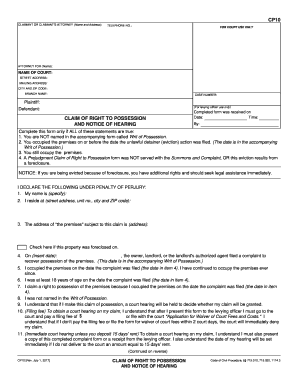
Intiff: (For levying officer use only) Defendant: CLAIM OF RIGHT TO POSSESSION AND NOTICE OF HEARING Completed form was received on Date: Time: By: Complete this form only if ALL of these statements are true: 1. You are NOT named in the accompanying form called Writ of Possession. 2. You occupied the premises on or before the date the unlawful detainer (eviction) action was filed. (The date is in the accompanying Writ of Possession.) 3. You still occupy the premises. 4. A Prejudgment Claim o.
Open form follow the instructions
Easily sign the form with your finger
Send filled & signed form or save
How to fill out the CA CP10 online
The CA CP10 form is essential for individuals claiming their right to possession of a rental property during an unlawful detainer action. This guide provides clear, step-by-step instructions to assist users in filling out the form online accurately and effectively.
Follow the steps to complete your CA CP10 form online.
- Click the ‘Get Form’ button to access the CA CP10 form and open it in the editing interface.
- In the 'Claimant or claimant's attorney' section, enter the name and address of the claimant or their legal representative. If applicable, include the telephone number.
- Fill out the 'For court use only' section, providing details such as the attorney's name (if applicable), the name of the court, street address, mailing address, city, zip code, and branch name.
- Enter the case number related to the unlawful detainer action.
- In the 'Claim of Right to Possession' section, ensure that all conditions are true as stated before proceeding. You must specify your name, residence address, and the address of the premises in question.
- Indicate whether the property was foreclosed on by checking the appropriate box.
- Provide the date on which the owner or landlord filed a complaint regarding the possession of the premises. This date is found on the accompanying Writ of Possession.
- Confirm that you occupied the premises on the date the complaint was filed and have continued to do so ever since.
- State that you were at least 18 years old on the aforementioned date.
- Acknowledge your understanding of the requirement to pay a filing fee or submit a form for waiver of court fees.
- Select how you are filing your claim by checking the appropriate box and ensuring you meet all necessary conditions for delivery to the court.
- Complete the rental agreement section, specifying whether you have a verbal or written agreement with the landlord or another party.
- Finally, declare under penalty of perjury that the information provided is true and accurate. Type or print your name, and affix your signature and date.
- After ensuring all information is complete, save your changes and download the form. You can also print or share the completed document as needed.
Complete your CA CP10 form online to assert your claim and take necessary actions to protect your rights.
Experience a faster way to fill out and sign forms on the web. Access the most extensive library of templates available.
Related content
Complete this form only if ALL of these statements are true: 1. You are NOT named in the...
Apostila CPA10 Edgar Abreu. Profile image of Daniel Henrique dos Santos Daniel Henrique...
To control USB camera during Zoom Rooms meeting, choose Room Controller. The computer will...
Get answers to your most pressing questions about US Legal Forms API.
How do I give notice to a tenant to vacate in California?
To give notice to a tenant to vacate in California, you must provide a written notice stating your intention and the reason for eviction. Ensure that the notice complies with the timeline required by California law, such as a 30-day or 60-day notice, depending on the situation. Resources on uslegalforms related to CA CP10 can provide templates and guidance for proper notice delivery.
How do you serve a prejudgment claim of right to possession?
Serving a prejudgment claim of right to possession involves delivering specific forms to the tenant, notifying them of your intent to evict. Ensure you follow the legal requirements for service, which can include personal delivery or sending via certified mail. Understanding these requirements through CA CP10 will help you succeed, and using uslegalforms can simplify the process.
How do I send an eviction notice in California?
To send an eviction notice in California, you must serve the tenant with the appropriate notice type based on your grounds for eviction. You can deliver the notice personally, or send it via certified mail, ensuring you retain proof of delivery. For guidance on the correct procedures and templates, explore the resources available on the uslegalforms platform regarding CA CP10.
How to respond to an unlawful detainer in California?
If you receive an unlawful detainer notice, act quickly to respond within the specified time. You may contest the eviction by filing your response with the court and providing evidence to support your case. Utilizing resources from uslegalforms can help you navigate this process effectively, ensuring your response aligns with CA CP10 requirements.
How to win an eviction lawsuit?
Winning an eviction lawsuit requires you to follow the proper legal procedures outlined by California law. Ensure that you provide clear evidence for your case, such as lease agreements and payment records. Additionally, familiarize yourself with CA CP10 guidelines, and consider using uslegalforms for legal documentation and support to strengthen your case.
What is required to evict a tenant in California?
To evict a tenant in California, you must have a valid reason supported by state law. Common reasons include nonpayment of rent, lease violations, or the end of the rental term. After establishing your grounds, you must provide proper notice to the tenant before filing an eviction lawsuit, ensuring compliance with CA CP10 regulations.
How long does it take to evict a tenant in California?
The eviction process in California can vary, generally taking 30 to 60 days, depending on the circumstances under CA CP10. After filing the eviction notice, the tenant typically has five days to respond. If they do not, you may proceed with a court trial, which can extend the timeline. Utilizing the US Legal Forms platform can provide you with essential resources and forms to ensure your eviction process goes smoothly.
How do I file proof of Service in California?
Filing proof of Service in California involves a straightforward process under CA CP10. Start by completing the proof of service form after delivering legal documents to the required parties. Then, file the completed form with the court where your case is pending. The US Legal Forms platform offers templates and resources that can help streamline your filing process.
How to file an adverse possession claim in California?
To file an adverse possession claim in California, you need to meet specific requirements under CA CP10. Begin by occupying the property continuously for a minimum of five years, paying property taxes, and using the land as your own. You must then file a legal claim in the appropriate court to establish ownership. Consider using the US Legal Forms platform to access the necessary forms and guidance to facilitate your claim.
Do I have 30 days to move after an eviction in California?
In California, the time frame to move out after receiving an eviction notice, such as the CA CP10, generally allows for 30 days. This gives tenants the opportunity to prepare and find new housing if needed. However, always check the details of your specific notice, as some situations may provide different time frames.
Use professional pre-built templates to fill in and sign documents online faster. Get access to thousands of forms.
If you believe that this page should be taken down, please follow our DMCA take down process here.