Get Ca Civ-100 2018-2026
How it works
-

Open form follow the instructions
-

Easily sign the form with your finger
-

Send filled & signed form or save
How to fill out the CA CIV-100 online
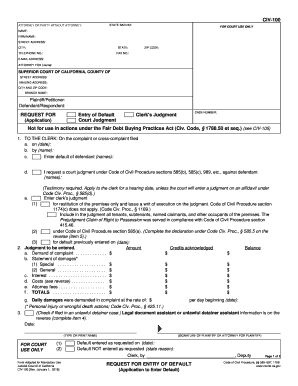
The CA CIV-100 form is a request for entry of default in California civil court cases. This guide will provide you with step-by-step instructions on how to accurately fill out the form online, ensuring that you understand each component and can complete it correctly.
Follow the steps to fill out the CA CIV-100 form online.
- Click ‘Get Form’ button to obtain the form and open it in the editor.
- Begin with the section labeled ‘Attorney or Party Without Attorney’. Here, input your name, firm name (if applicable), street address, city, state, telephone number, and additional contact details. Ensure that all information is accurate and up to date.
- Provide the case number at the top of the form. This should be the case number assigned by the court.
- Fill in the details for the plaintiff/petitioner and defendant/respondent. This includes their names and any relevant information related to the case.
- In the ‘Request for’ section, specify whether you are requesting an entry of default or a court judgment. Provide additional information as needed, including specific details relating to the defendant and dates.
- Complete the section detailing the amount you are requesting. Include any claim amounts, costs, and the total amount sought in the judgment.
- If applicable, indicate whether legal document assistant or unlawful detainer assistant support was utilized in preparing this form. Provide their name and registration details.
- Fill out the declaration under Code of Civil Procedure and mailing declaration accordingly. Make sure to follow the instructions for each subsection carefully.
- Once all fields are completed, save your progress. You can then choose to download, print, or share the form as required.
Complete your CA CIV-100 form online today to ensure a smooth filing process.
Related links form
After a notice of default is issued in California, the property owner typically has a grace period to rectify the situation to avoid foreclosure. If the default is not cured within this timeframe, the lender may proceed with foreclosure proceedings. The CA CIV-100 can help you navigate the subsequent legal steps and understand the rights and obligations you have during this process. It's crucial to remain informed of your options.