Loading
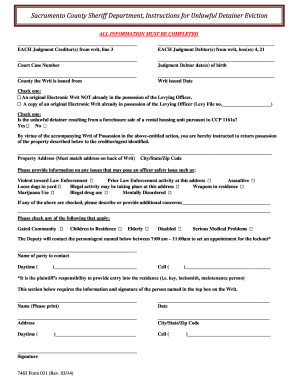
Get Ca 7483 Form 031 2014
How it works
-

Open form follow the instructions
-

Easily sign the form with your finger
-

Send filled & signed form or save
How to fill out the CA 7483 Form 031 online
Filling out the CA 7483 Form 031 online is a straightforward process that ensures all pertinent information is correctly submitted for unlawful detainer eviction actions. This guide provides clear steps to assist users in completing the form efficiently and accurately.
Follow the steps to fill out the CA 7483 Form 031 online
- Click ‘Get Form’ button to access the CA 7483 Form 031 and open it in your preferred editing interface.
- Complete the fields for each Judgment Creditor(s) listed on line 3 of the form, ensuring that all required information is accurate.
- Fill in the details for each Judgment Debtor(s) in the boxes provided at section 4 and 21, making sure to include their full names.
- Input the Court Case Number accurately, as it is essential for referencing the specific case related to the eviction.
- Enter the Judgment Debtor's date(s) of birth to verify their identity and ensure the correct parties are involved.
- Specify the county from which the Writ is issued by selecting it from a dropdown list, if available, or typing it directly.
- Record the date the Writ was issued to establish the timeline of the eviction process.
- Check the relevant box to indicate whether you are submitting an original Electronic Writ or a copy already in possession of the Levying Officer.
- Indicate if the unlawful detainer is a result of a foreclosure sale by selecting 'Yes' or 'No'.
- Provide the property address exactly as it appears on the back of the Writ to ensure accuracy.
- List any issues that may pose a safety risk to officers when executing the writ by checking the appropriate boxes and adding any additional relevant concerns.
- Check any conditions that apply to the property or residents, such as gated community, children, elderly, disabled individuals, or medical issues.
- Fill in the contact information for the party the Deputy will reach out to set an appointment for the lockout, including a name and phone numbers.
- In the designated section, the person named in the top box of the Writ must print their name, date, address, and provide a signature to validate the form.
- Once all sections are completed, review the form for accuracy and completeness, then save changes, download, print, or share the form as necessary.
Complete your CA 7483 Form 031 online today for a smoother filing experience.
Get form
Experience a faster way to fill out and sign forms on the web. Access the most extensive library of templates available.
Get This Form Now!
Use professional pre-built templates to fill in and sign documents online faster. Get access to thousands of forms.