Loading
Get Ak Tr-420 2016-2026
How it works
-

Open form follow the instructions
-

Easily sign the form with your finger
-

Send filled & signed form or save
How to fill out the AK TR-420 online
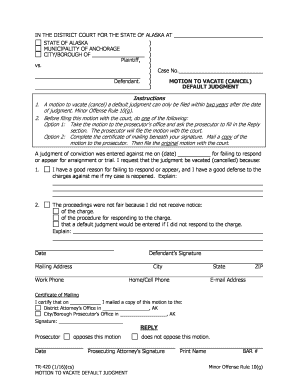
The AK TR-420 is a motion to vacate a default judgment that allows individuals to request the court to cancel a judgment entered against them. This guide will walk you through the process of completing the form online, ensuring clarity and ease for all users.
Follow the steps to fill out the AK TR-420 online effectively.
- Press the 'Get Form' button to access the AK TR-420 document and open it in the editor.
- Fill in the case number at the top of the form where indicated.
- In the section detailing the judgment date, clearly state the date of the conviction that you wish to vacate.
- Provide a detailed explanation in the first reason box for why you failed to respond or appear. Make sure to include any relevant defenses you may have against the charges.
- In the second reason box, explain the fairness of the proceedings. Specify if you did not receive notification about the charges, the response procedure, or any other relevant information.
- Enter the date of filling out the form as indicated.
- Provide your mailing address, including city, state, ZIP code, work phone, home/cell phone, and email address.
- Complete the Certificate of Mailing section, certifying the date you mailed a copy of this motion to the prosecutor.
- Select whether the prosecutor opposes or does not oppose this motion and include the prosecuting attorney's signature.
- Once all fields are completed, save your changes, and consider downloading, printing, or sharing the form as needed.
Start filling out your AK TR-420 motion online today.